Access and Use Dolphin3.0 Mistral 24B via OpenRouter using API Key
 Ann Ng
Access and Use dolphin3.0-mistral-24b via OpenRouter
Dolphin 3.0 is the next generation of the Dolphin series of instruct-tuned models. Designed to be the ultimate general purpose local model, enabling coding, math, agentic, function calling, and general use cases.
Dolphin aims to be a general purpose instruct model, similar to the models behind ChatGPT, Claude, Gemini.
Part of the Dolphin 3.0 Collection Curated and trained by Eric Hartford, Ben Gitter, BlouseJury and Cognitive Computations
Dolphin3.0 Mistral 24B Overview
| Full Name | Dolphin3.0 Mistral 24B |
| Provider | Dolphin3.0 Mistral 24B |
| Model ID | cognitivecomputations/dolphin3.0-mistral-24b |
| Release Date | Feb 13, 2025 |
| Context Window | 32,768 tokens |
| Pricing /1M tokens | $0 for input $0 for output |
| Supported Input Types | text |
| Supported Parameters | frequency_penaltylogit_biaslogprobsmax_tokensmin_ppresence_penaltyrepetition_penaltyseedstoptemperaturetop_ktop_logprobstop_p |
Complete Setup Guide
Create OpenRouter Account
- Visit openrouter.ai
- Click "Sign In" and create an account (free)
- Verify your email address
- You'll receive $1 in free credits to test models
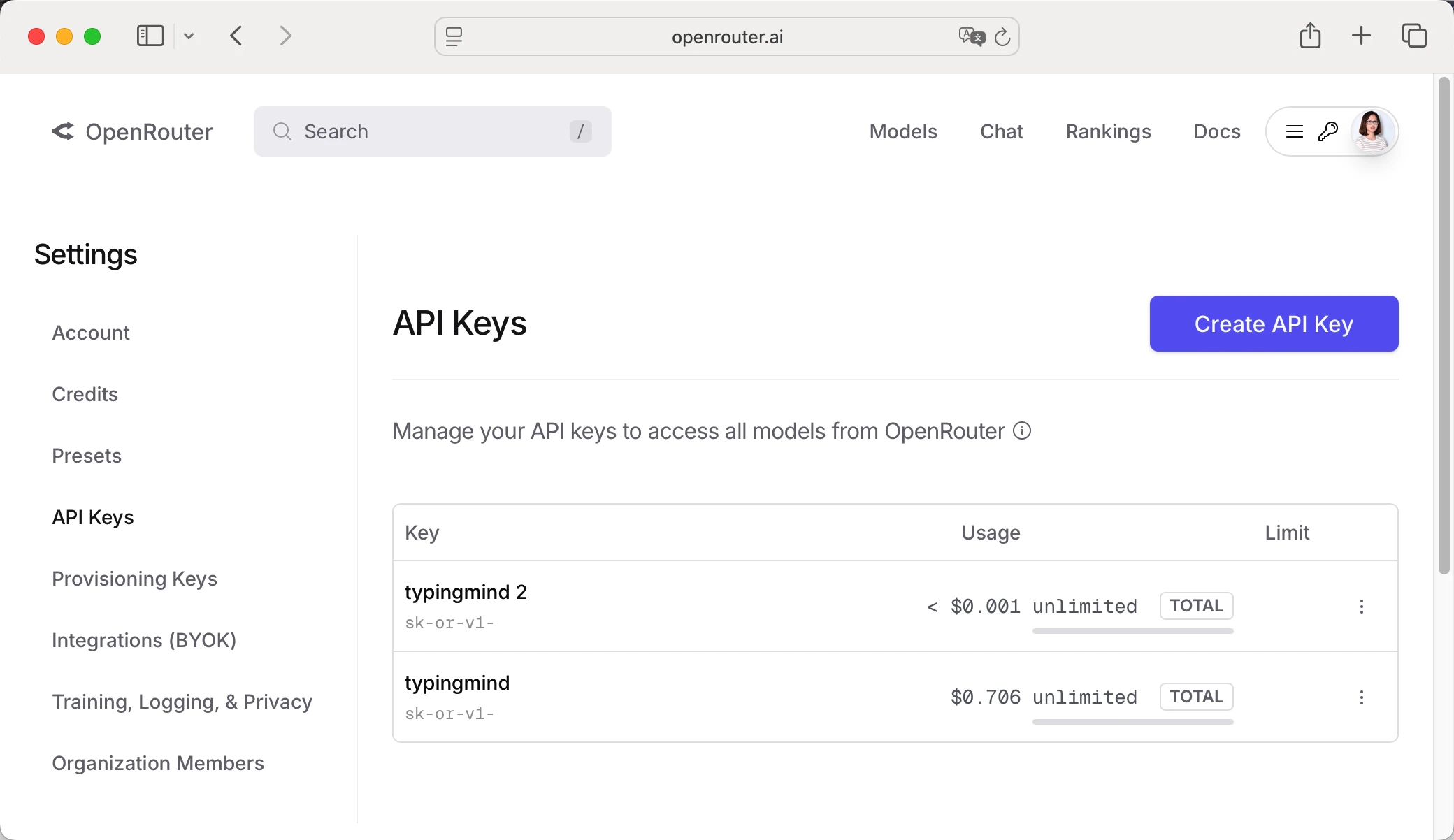
Get Your OpenRouter API Key
- Log in to OpenRouter dashboard
- Go to "API Keys" section in the menu
- Click "Create API Key"
- Give it a name (e.g., "TypingMind")
- Copy your API key (starts with "sk-or-v1-...")
Add Credits to OpenRouter (Optional)
- Go to "Credits" in OpenRouter dashboard
- Click "Add Credits"
- Choose amount ($5 minimum, $20 recommended for testing)
- Complete payment (credit card or crypto)
- Credits never expire!
Configure TypingMind with OpenRouter API Key
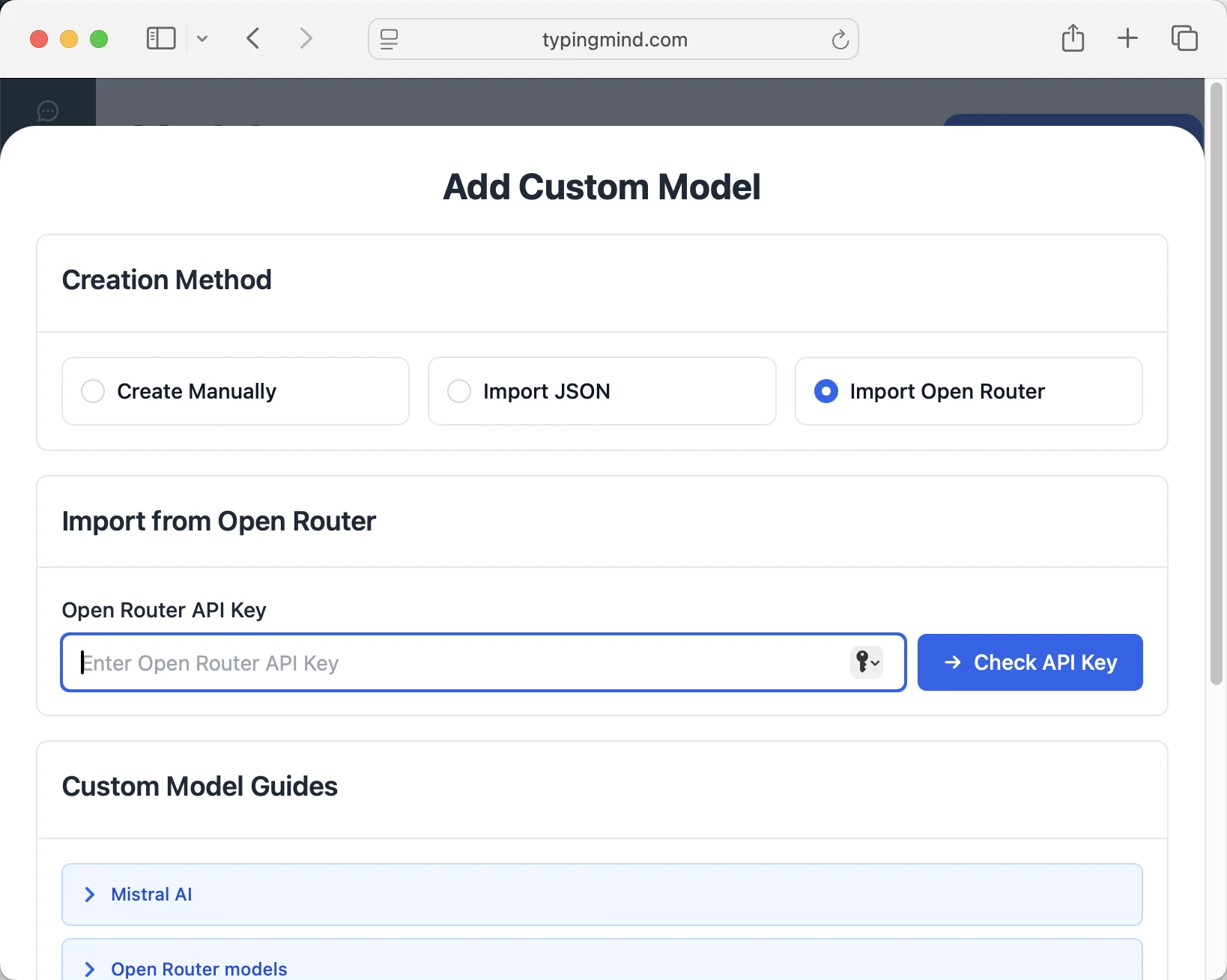
Method 1: Direct Import (Recommended)
- Open TypingMind in your browser
- Click the "Settings" icon (gear symbol)
- Navigate to "Manage Models" section
- Click "Add Custom Model"
- Select "Import OpenRouter" from the options
- Enter your OpenRouter API key from Step 1
- Click "Check API Key" to verify the connection
- Choose which models you want to add from the list (you can add multiple at once)
- Click "Import Models" to complete the setup
Method 2: Manual Custom Model Setup
- Open TypingMind in your browser
- Click the "Settings" icon (gear symbol)
- Navigate to "Models" section
- Click "Add Custom Model"
- Fill in the model information:Name:
cognitivecomputations/dolphin3.0-mistral-24b via OpenRouter(or your preferred name)Endpoint:https://openrouter.ai/api/v1/chat/completionsModel ID:cognitivecomputations/dolphin3.0-mistral-24bContext Length: Enter the model's context window (e.g., 32768 for cognitivecomputations/dolphin3.0-mistral-24b)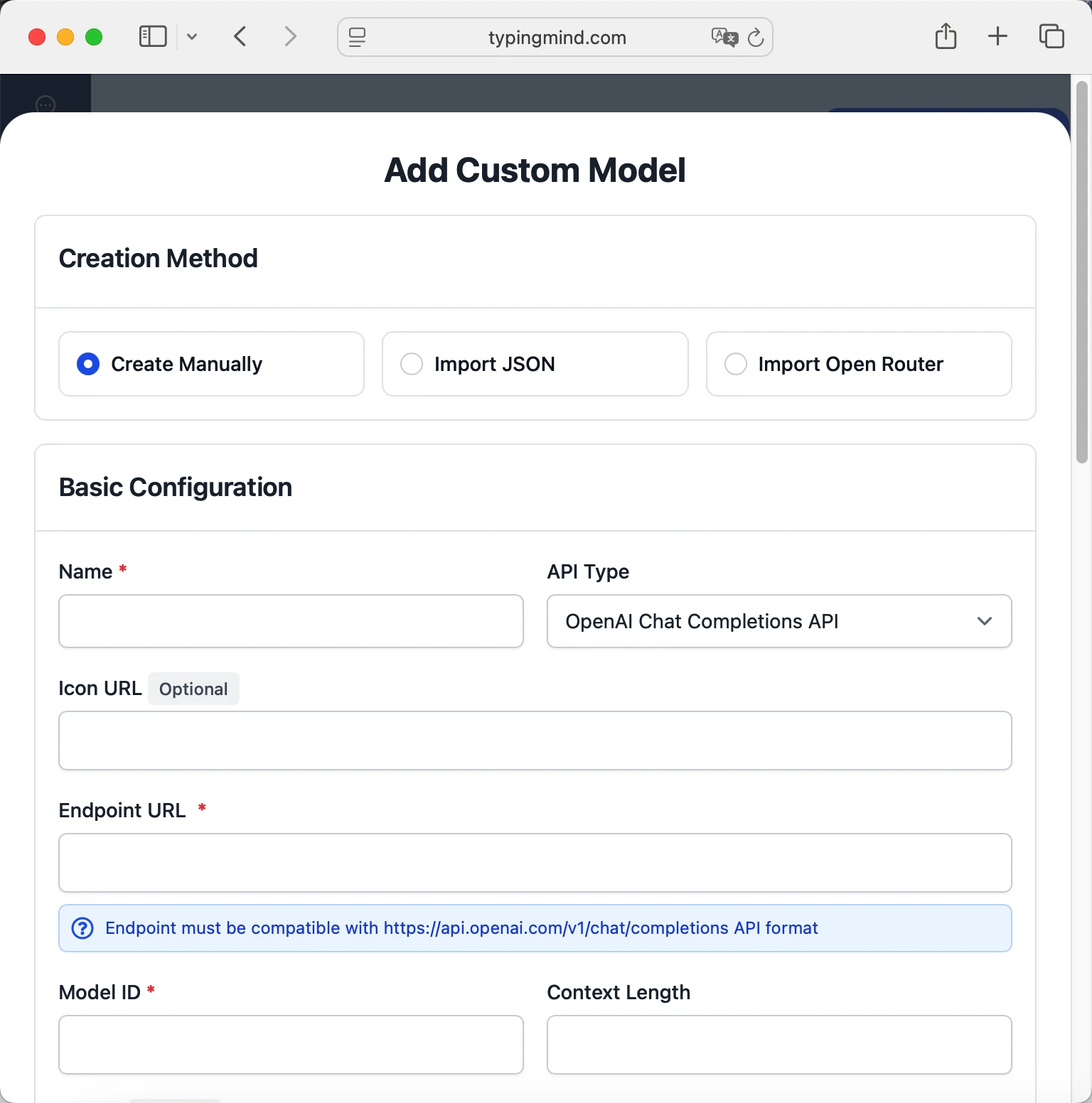 cognitivecomputations/dolphin3.0-mistral-24bhttps://openrouter.ai/api/v1/chat/completionscognitivecomputations/dolphin3.0-mistral-24b via OpenRouterhttps://www.typingmind.com/model-logo.webp32768
 - Add custom headers by clicking "Add Custom Headers" in the Advanced Settings section:Authorization:
Bearer <OPENROUTER_API_KEY>:X-Title:typingmind.comHTTP-Referer:https://www.typingmind.com - Enable "Support Plugins (via OpenAI Functions)" if the model supports the "functions" or "tool_calls" parameter, or enable "Support OpenAI Vision" if the model supports vision.
- Click "Test" to verify the configuration
- If you see "Nice, the endpoint is working!", click "Add Model"
Start chatting with cognitivecomputations/dolphin3.0-mistral-24b
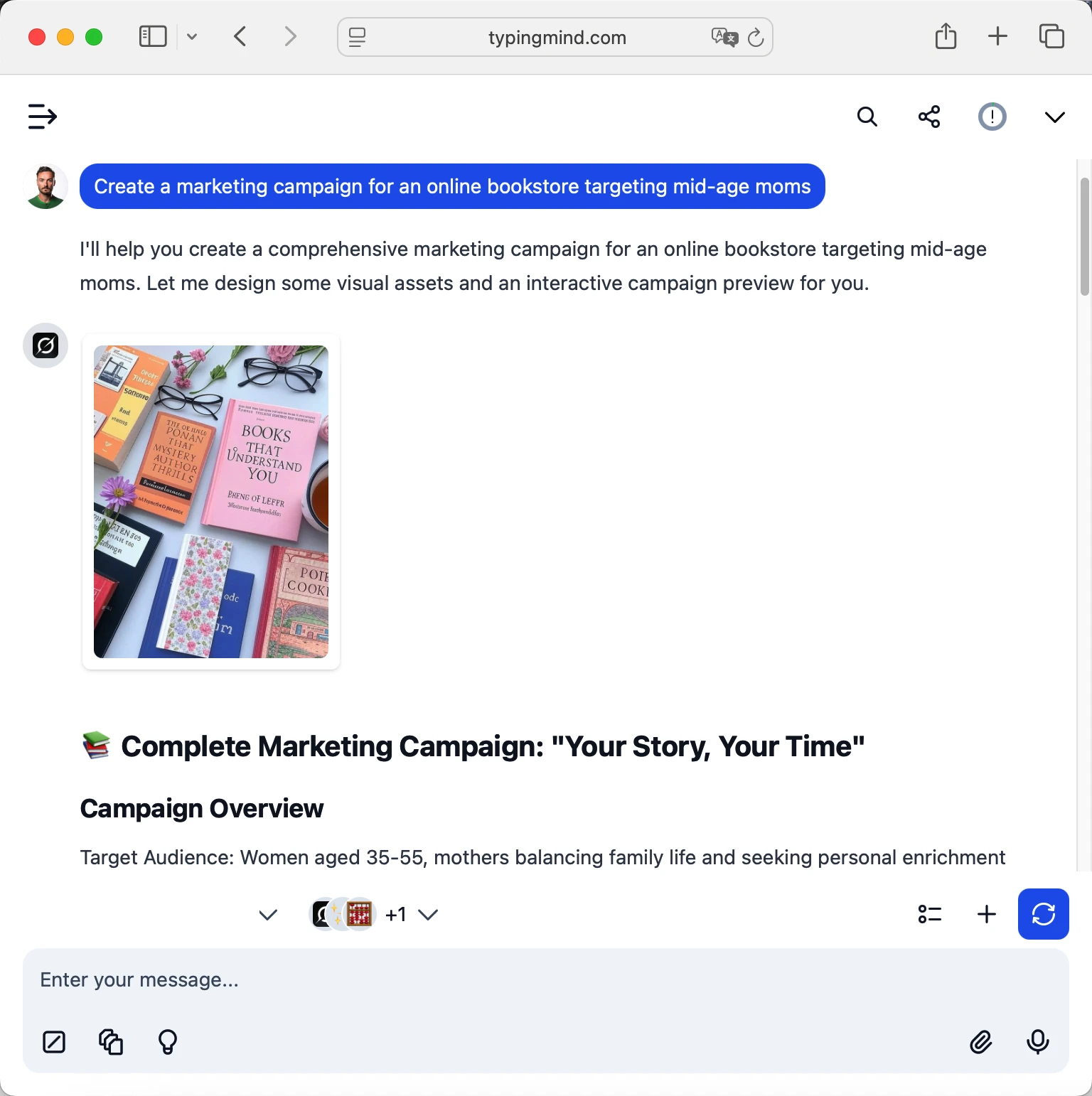
Now you can start chatting with the cognitivecomputations/dolphin3.0-mistral-24b model via OpenRouter on TypingMind:
- Select your preferred cognitivecomputations/dolphin3.0-mistral-24b model from the model dropdown menu
- Start typing your message in the chat input
- Enjoy faster responses and better features than the official interface
- Switch between different AI models as needed
 cognitivecomputations/dolphin3.0-mistral-24b
Pro tips for better results:
- Use specific, detailed prompts for better responses (How to use Prompt Library)
- Create AI agents with custom instructions for repeated tasks (How to create AI Agents)
- Use plugins to extend cognitivecomputations/dolphin3.0-mistral-24b capabilities (How to use plugins)
- Upload documents and images directly to chat for AI analysis and discussion (Chat with documents)
Why TypingMind + OpenRouter?
- Best-in-class UI: TypingMind's interface is far superior to standard chat UIs
- Model flexibility: Switch between Dolphin3.0 Mistral 24B and 200+ models instantly
- Cost control: Pay only for what you use through OpenRouter
- One-time purchase: Buy TypingMind once, use forever with any OpenRouter model
- Data privacy: Your conversations stored locally, not on external servers
Frequently Asked Questions
Do I need a subscription to use Dolphin3.0 Mistral 24B?
No! Through OpenRouter, you pay only for what you use with no monthly subscription. Add credits to your OpenRouter account and they never expire. TypingMind is also a one-time purchase, not a subscription.
How much will it cost to use Dolphin3.0 Mistral 24B?
It costs 0.00004 for input and 0.00016999999999999999 for output via OpenRouter. A typical conversation might cost $0.01-0.10 depending on length. Start with $5-10 in credits to test.
Can I use other models besides Dolphin3.0 Mistral 24B?
Yes! With OpenRouter + TypingMind, you get access to 200+ models including GPT-4, Claude, Gemini, Llama, Mistral, and many more. Switch between them instantly in TypingMind.
Is my data private and secure?
Yes! TypingMind stores conversations locally (web version in browser, desktop version on your device). OpenRouter handles API calls securely and doesn't train on your data. Check each provider's data policy for specifics.
Can I use Dolphin3.0 Mistral 24B for commercial projects?
Yes! Check Dolphin3.0 Mistral 24B's terms of service for specific commercial use policies. OpenRouter and TypingMind both support commercial use.
What if Dolphin3.0 Mistral 24B is unavailable?
OpenRouter allows you to configure fallback models. If Dolphin3.0 Mistral 24B is down, it can automatically route to your backup choice. You can also manually switch models in TypingMind anytime.
How do I cancel or get a refund?
OpenRouter: No subscriptions to cancel. Unused credits remain in your account forever.
 OpenAI: GPT-5 Image Mini
Access OpenAI: GPT-5 Image Mini via OpenRouter
GPT-5 Image Mini combines OpenAI's GPT-5 Mini with state-of-the-art image generation capabilities. It provides the same instruction-following and safety-tuning benefits as GPT-5, but with reduced latency and cost. This natively multimodal model incorporates GPT Image 1 Mini's superior instruction following, text rendering, and detailed image editing, making it ideal for applications that require both efficient text processing and high-quality visual creation at scale.
 Anthropic: Claude Haiku 4.5
Access Anthropic: Claude Haiku 4.5 via OpenRouter
Claude Haiku 4.5 is Anthropic’s fastest and most efficient model, delivering near-frontier intelligence at a fraction of the cost and latency of larger Claude models. Matching Claude Sonnet 4’s performance across reasoning, coding, and computer-use tasks, Haiku 4.5 brings frontier-level capability to real-time and high-volume applications. It introduces extended thinking to the Haiku line; enabling controllable reasoning depth, summarized or interleaved thought output, and tool-assisted workflows with full support for coding, bash, web search, and computer-use tools. Scoring >73% on SWE-bench Verified, Haiku 4.5 ranks among the world’s best coding models while maintaining exceptional responsiveness for sub-agents, parallelized execution, and scaled deployment.
 Qwen: Qwen3 VL 8B Thinking
Access Qwen: Qwen3 VL 8B Thinking via OpenRouter
Qwen3-VL-8B-Thinking is the reasoning-optimized variant of the Qwen3-VL-8B multimodal model, designed for advanced visual and textual reasoning across complex scenes, documents, and temporal sequences. It integrates enhanced multimodal alignment and long-context processing (native 256K, expandable to 1M tokens) for tasks such as scientific visual analysis, causal inference, and mathematical reasoning over image or video inputs. Compared to the Instruct edition, the Thinking version introduces deeper visual-language fusion and deliberate reasoning pathways that improve performance on long-chain logic tasks, STEM problem-solving, and multi-step video understanding. It achieves stronger temporal grounding via Interleaved-MRoPE and timestamp-aware embeddings, while maintaining robust OCR, multilingual comprehension, and text generation on par with large text-only LLMs.
 Qwen: Qwen3 VL 8B Instruct
Access Qwen: Qwen3 VL 8B Instruct via OpenRouter
Qwen3-VL-8B-Instruct is a multimodal vision-language model from the Qwen3-VL series, built for high-fidelity understanding and reasoning across text, images, and video. It features improved multimodal fusion with Interleaved-MRoPE for long-horizon temporal reasoning, DeepStack for fine-grained visual-text alignment, and text-timestamp alignment for precise event localization. The model supports a native 256K-token context window, extensible to 1M tokens, and handles both static and dynamic media inputs for tasks like document parsing, visual question answering, spatial reasoning, and GUI control. It achieves text understanding comparable to leading LLMs while expanding OCR coverage to 32 languages and enhancing robustness under varied visual conditions.
 OpenAI: GPT-5 Image
Access OpenAI: GPT-5 Image via OpenRouter
[GPT-5](https://openrouter.ai/openai/gpt-5) Image combines OpenAI's most advanced language model with state-of-the-art image generation capabilities. It offers major improvements in reasoning, code quality, and user experience while incorporating GPT Image 1's superior instruction following, text rendering, and detailed image editing.
 inclusionAI: Ling-1T
Access inclusionAI: Ling-1T via OpenRouter
Ling-1T is a trillion-parameter open-weight large language model developed by inclusionAI and released under the MIT license. It represents the first flagship non-thinking model in the Ling 2.0 series, built around a sparse-activation architecture with roughly 50 billion active parameters per token. The model supports up to 128 K tokens of context and emphasizes efficient reasoning through an “Evolutionary Chain-of-Thought (Evo-CoT)” training strategy. Pre-trained on more than 20 trillion reasoning-dense tokens, Ling-1T achieves strong results across code generation, mathematics, and logical reasoning benchmarks while maintaining high inference efficiency. It employs FP8 mixed-precision training, MoE routing with QK normalization, and MTP layers for compositional reasoning stability. The model also introduces LPO (Linguistics-unit Policy Optimization) for post-training alignment, enhancing sentence-level semantic control. Ling-1T can perform complex text generation, multilingual reasoning, and front-end code synthesis with a focus on both functionality and aesthetics.
 OpenAI: o3 Deep Research
Access OpenAI: o3 Deep Research via OpenRouter
o3-deep-research is OpenAI's advanced model for deep research, designed to tackle complex, multi-step research tasks. Note: This model always uses the 'web_search' tool which adds additional cost.
 OpenAI: o4 Mini Deep Research
Access OpenAI: o4 Mini Deep Research via OpenRouter
o4-mini-deep-research is OpenAI's faster, more affordable deep research model—ideal for tackling complex, multi-step research tasks. Note: This model always uses the 'web_search' tool which adds additional cost.
 NVIDIA: Llama 3.3 Nemotron Super 49B V1.5
Access NVIDIA: Llama 3.3 Nemotron Super 49B V1.5 via OpenRouter
Llama-3.3-Nemotron-Super-49B-v1.5 is a 49B-parameter, English-centric reasoning/chat model derived from Meta’s Llama-3.3-70B-Instruct with a 128K context. It’s post-trained for agentic workflows (RAG, tool calling) via SFT across math, code, science, and multi-turn chat, followed by multiple RL stages; Reward-aware Preference Optimization (RPO) for alignment, RL with Verifiable Rewards (RLVR) for step-wise reasoning, and iterative DPO to refine tool-use behavior. A distillation-driven Neural Architecture Search (“Puzzle”) replaces some attention blocks and varies FFN widths to shrink memory footprint and improve throughput, enabling single-GPU (H100/H200) deployment while preserving instruction following and CoT quality. In internal evaluations (NeMo-Skills, up to 16 runs, temp = 0.6, top_p = 0.95), the model reports strong reasoning/coding results, e.g., MATH500 pass@1 = 97.4, AIME-2024 = 87.5, AIME-2025 = 82.71, GPQA = 71.97, LiveCodeBench (24.10–25.02) = 73.58, and MMLU-Pro (CoT) = 79.53. The model targets practical inference efficiency (high tokens/s, reduced VRAM) with Transformers/vLLM support and explicit “reasoning on/off” modes (chat-first defaults, greedy recommended when disabled). Suitable for building agents, assistants, and long-context retrieval systems where balanced accuracy-to-cost and reliable tool use matter.
 Baidu: ERNIE 4.5 21B A3B Thinking
Access Baidu: ERNIE 4.5 21B A3B Thinking via OpenRouter
ERNIE-4.5-21B-A3B-Thinking is Baidu's upgraded lightweight MoE model, refined to boost reasoning depth and quality for top-tier performance in logical puzzles, math, science, coding, text generation, and expert-level academic benchmarks.
 Google: Gemini 2.5 Flash Image (Nano Banana)
Access Google: Gemini 2.5 Flash Image (Nano Banana) via OpenRouter
Gemini 2.5 Flash Image, a.k.a. "Nano Banana," is now generally available. It is a state of the art image generation model with contextual understanding. It is capable of image generation, edits, and multi-turn conversations. Aspect ratios can be controlled with the [image_config API Parameter](https://openrouter.ai/docs/features/multimodal/image-generation#image-aspect-ratio-configuration)
 Qwen: Qwen3 VL 30B A3B Thinking
Access Qwen: Qwen3 VL 30B A3B Thinking via OpenRouter
Qwen3-VL-30B-A3B-Thinking is a multimodal model that unifies strong text generation with visual understanding for images and videos. Its Thinking variant enhances reasoning in STEM, math, and complex tasks. It excels in perception of real-world/synthetic categories, 2D/3D spatial grounding, and long-form visual comprehension, achieving competitive multimodal benchmark results. For agentic use, it handles multi-image multi-turn instructions, video timeline alignments, GUI automation, and visual coding from sketches to debugged UI. Text performance matches flagship Qwen3 models, suiting document AI, OCR, UI assistance, spatial tasks, and agent research.
