appproxy logo

appproxy

Community
ys1231

基于flutter的Android vpn代理工具支持mcp调用, Android VPN Proxy Tool Based on Flutter

Publisherys1231
Repositoryappproxy
LanguageDart
Forks
100
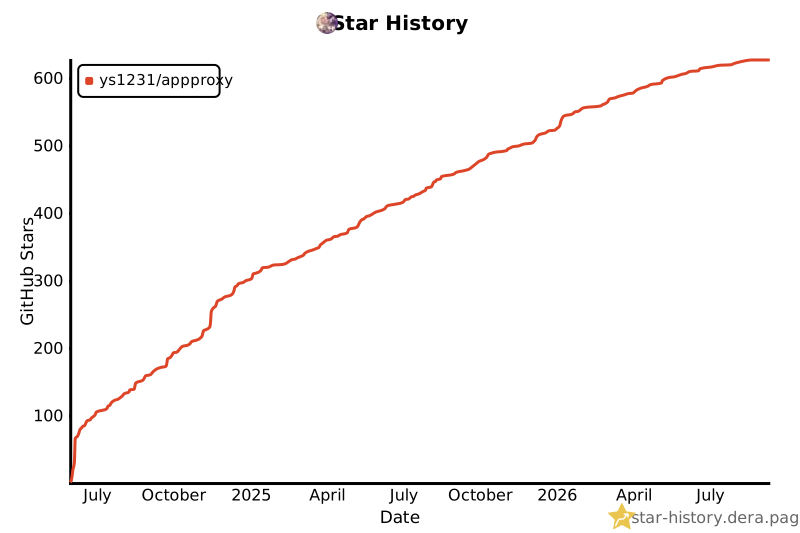
Stars
626
Available tools
0
Transport typestreamable-http
Categories
LicenseGPL-3.0
Links
  • Connect tools to AI workflows

    appproxy exposes MCP capabilities that can be used by compatible AI clients and agents.

  • 0 available tools

    Browse the callable actions below, including names and descriptions when provided by the server.

  • Ready-to-copy setup

    Use the installation snippets to configure this server in your preferred MCP client.

  • Open source signals

    626 stars and 100 forks from the linked repository.

appproxy

项目背景

  • 在分析app的时候,偶尔需要抓包,尝试了目前比较常见的代理工具
  • Drony Postern ProxyDroid 发现都有一个相同的问题,对于较新的Android系统不太友好,要么app列表显示不正常,或者界面过于复杂,往往设置之后经常会失效,偶然在play上发现一个比较新的代理工具,界面很不错清晰不过对国内用户不友好有些功能需要会员,即使花钱由于不维护或者网络原因,完整的功能无法使用于是在业余时间开发了这个.

项目简介

  1. 基于 flutter 和tun2socks开发,更多详细信息zread
  2. appproxy 是一个轻量级的VPN代理工具,支持HTTP, SOCKS5协议.
  3. 功能单只做代理,可分app代理, 双击修改配置 逻辑比较简单, 主打一个能用就行.
  4. 出于学习熟悉flutter的目的去做的,分享给大家,顺便帮我测试一下.
  5. 加上MoveCertificate 上下游都有了哈哈.
  6. 支持 Android 9 及以上版本, 低于 android 9 推荐使用 postern
  7. 支持 MCP 远程调用, ip 地址为手机 ip, 默认端口为 12345, 默认auth为 appproxy
json
{
  "mcpServers": {
    "appproxy-mcp": {
      "type": "http",
      "url": "http://192.168.0.10:12345/mcp",
      "headers": {
        "Authorization": "Bearer appproxy"
      }
    }
  }
}
MCP 工具描述
start_proxy使用指定的主机、端口、类型、鉴权信息及按应用代理包列表启动代理
stop_proxy停止正在运行的代理服务
get_proxy_status检查代理当前是否处于活跃状态
get_proxy_config获取当前的代理配置
update_proxy_config修改运行中的代理参数(如有需要会触发重启)

重要的事情说三遍

  • 双击修改配置
  • 双击修改配置
  • 双击修改配置

附上截图

Screenshot_20240604-205220

Screenshot_20240604-205910

Screenshot_20240604-205229

Screenshot_20240604-205148

screenshot-20260327-205536

screenshot-20260327-205655

screenshot-20260328-185607

img.png

依赖项目

开发

build tun2socks

shell
./btun2socks.sh
shell
# 如果发现Android Studio 调试flutter 自动跳到一个只读的文件,调试的时候无法修改代码,可以恢复上一个版本,是的坑.
# 推荐 "Android Studio Iguana | 2023.2.1 Patch 2" -> "Android Studio Meerkat | 2024.3.1 Patch 1"
# line 设置为 100
flutter --no-color pub global run intl_utils:generate
flutter build apk --release --split-per-abi --build-name=$VERSION --dart-define=BUILD_DATE=$(date +%Y-%m-%d) --obfuscate --split-debug-info ./build/

flutter shorebird 热更新

  • appproxy 已经绑定可强制更新 app_id
shell
# linux && mac
curl --proto '=https' --tlsv1.2 https://raw.githubusercontent.com/shorebirdtech/install/main/install.sh -sSf | bash
# windows
# Set-ExecutionPolicy RemoteSigned -scope CurrentUser
# iwr -UseBasicParsing 'https://raw.githubusercontent.com/shorebirdtech/install/main/install.ps1'|iex

# 官网注册
https://console.shorebird.dev/login
# shell 登录
shorebird login
# 初始化项目 在 flutter 项目下执行即可
shorebird init
# 编译
shorebird release -p android --artifact apk 
# 打补丁
shorebird patch --platforms=android

Star History
Star History Chart

免责声明

  • 本程序仅用于学习交流, 请勿用于非法用途.

Use appproxy MCP with multiple AI models

TypingMind connects MCP tools at the workspace level, so once appproxy is connected, you can use it with different AI models in TypingMind instead of setting it up separately for each model. This MCP connects through a hosted MCP server URL in TypingMind.

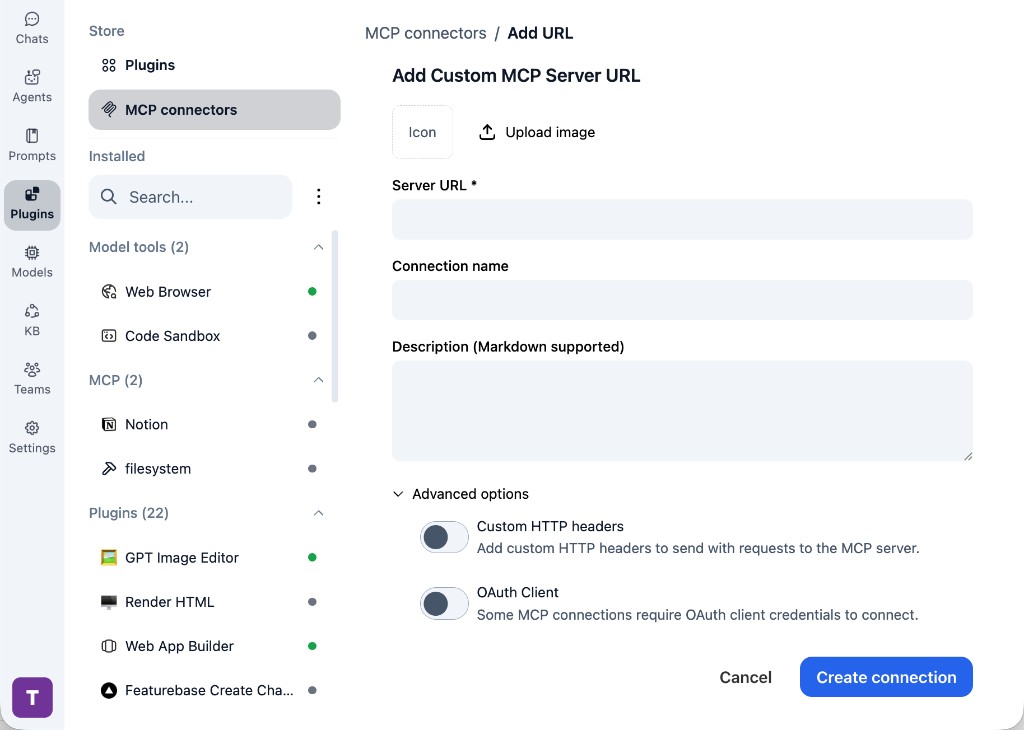
Add an MCP server URL

Use this when appproxy is already hosted remotely or your team wants one shared connector that multiple users can access.

1

Open MCP connectors

In TypingMind, go to Plugins, open MCP connectors, then choose Add URL.

  1. Open TypingMind in your browser.
  2. Go to Plugins.
  3. Open MCP connectors.
  4. Click Add URL.
TypingMind Add Custom MCP Server URL form
2

Paste the server URL

Enter the MCP server URL from the provider in the Server URL field. Add a connection name, description, icon, custom HTTP headers, or OAuth client settings if the server requires them.

  1. Paste the MCP server URL from the provider into the Server URL field.
  2. Enter a connection name for appproxy.
  3. Add a description and icon if you want it to be easier to identify.
  4. Add custom HTTP headers or OAuth client details if the server requires authentication.
3

Create the connection

Click Create connection, then return to the Plugins list and confirm the new MCP connection is active.

  1. Click Create connection.
  2. Return to the MCP connectors list.
  3. Confirm the appproxy connection appears as active.
  4. Refresh the plugin list if the connection does not appear immediately.
4

Switch models without reconnecting

Start a chat with your preferred model, enable the appproxy tools from Plugins, and switch to another model whenever needed. The MCP connection stays available to the TypingMind workspace.

  1. Start a new chat in TypingMind.
  2. Select the AI model you want to use.
  3. Enable the appproxy tools from Plugins.
  4. Ask the model to use the tool when needed.
  5. Switch to another AI model and reuse the same MCP connection.
TypingMind chat using enabled MCP tools with a selected AI model
Can you use appproxy to help me with this task?
appproxy
Sure. I read it.
Here is what I found using appproxy.

Frequently asked questions

What is the appproxy MCP server used for?

appproxy is an MCP server that lets compatible AI clients connect to external tools and context. In TypingMind, you can add this MCP server once and make its tools available in your AI workspace.

Can I use appproxy MCP with multiple AI models in TypingMind?

Yes. TypingMind connects MCP tools at the workspace level, so you can use appproxy with different AI models such as Claude, ChatGPT, Gemini, or other models you have configured in TypingMind without setting up the MCP server separately for each model.

Why use appproxy MCP with TypingMind?

TypingMind is one of the best frontends for LLM chat because it brings multiple AI models, prompts, plugins, AI agents, API keys, and MCP tools into one workspace. With appproxy connected, you can use its MCP tools across your preferred models while keeping your chat workflow organized in TypingMind.

How do I connect appproxy MCP to TypingMind?

appproxy can be connected in TypingMind by adding its hosted MCP server URL. This is useful when you want a remote MCP connection that is available from your TypingMind workspace.

What tools does appproxy MCP provide in TypingMind?

appproxy exposes MCP capabilities that can be enabled from the TypingMind Plugins page and used in chat or assigned to AI agents.

Do I need to share my API keys with TypingMind to use appproxy MCP?

No. TypingMind is local-first and lets you keep your model providers, API keys, prompts, and MCP configuration under your control. If appproxy requires authentication, add the required headers, OAuth settings, or local configuration for that MCP server when you create the connection.

Related MCP Servers

View all

Set up your own AI workspace now

Get notified about new features and future giveaways by subscribing to our newsletter 👇