Chinese Trends Hub logo

Chinese Trends Hub

Community
baranwang

基于 Model Context Protocol (MCP) 协议的全网热点趋势一站式聚合服务

Publisherbaranwang
Repositorymcp-trends-hub
LanguageTypeScript
Forks
38
Stars
246
Available tools
21
Transport typestdio, streamable-http
Categories
LicenseMIT
Links
  • Connect tools to AI workflows

    Chinese Trends Hub exposes MCP capabilities that can be used by compatible AI clients and agents.

  • 21 available tools

    Browse the callable actions below, including names and descriptions when provided by the server.

  • Ready-to-copy setup

    Use the installation snippets to configure this server in your preferred MCP client.

  • Open source signals

    246 stars and 38 forks from the linked repository.

🔥 Trends Hub

smithery badge NPM Version NPM License

基于 Model Context Protocol (MCP) 协议的全网热点趋势一站式聚合服务

示例效果

✨ 特性

  • 📊 一站式聚合 - 聚合全网热点资讯,20+ 优质数据源
  • 🔄 实时更新 - 保持与源站同步的最新热点数据
  • 🧩 MCP 协议支持 - 完全兼容 Model Context Protocol,轻松集成到 AI 应用
  • 🔌 易于扩展 - 简单配置即可添加自定义 RSS 源
  • 🎨 灵活定制 - 通过环境变量轻松调整返回字段

📋 环境要求

  • Node.js 22 或更新版本
  • VS Code、Cursor、Windsurf、Claude Desktop 或其他 MCP 客户端

🚀 快速开始

首先,在你的 MCP 客户端中安装 Trends Hub MCP 服务。

标准配置适用于大部分客户端:

json
{
  "mcpServers": {
    "trends-hub": {
      "command": "npx",
      "args": [
        "-y",
        "mcp-trends-hub"
      ]
    }
  }
}

参考 MCP 安装指南,使用上述标准配置。

配置文件位置:

  • macOS: ~/Library/Application Support/Claude/claude_desktop_config.json
  • Windows: %APPDATA%\Claude\claude_desktop_config.json

前往 Cursor Settings -> MCP -> Add new MCP Server。自定义名称,类型选择 command,命令填写 npx -y mcp-trends-hub

参考 MCP 安装指南,使用上述标准配置。

你也可以使用 VS Code CLI 安装:

bash
code --add-mcp '{"name":"trends-hub","command":"npx","args":["-y","mcp-trends-hub"]}'

参考 Windsurf MCP 文档,使用上述标准配置。

参考 Configuring MCP Servers 文档。

cline_mcp_settings.json 中添加:

json
{
  "mcpServers": {
    "trends-hub": {
      "type": "stdio",
      "command": "npx",
      "args": ["-y", "mcp-trends-hub"],
      "disabled": false
    }
  }
}

通过 Smithery 一键安装(仅支持 Claude Desktop):

bash
npx -y @smithery/cli install @baranwang/mcp-trends-hub --client claude

MCPorter 是一个强大的 MCP 工具包,可通过 TypeScript 或 CLI 调用 MCP,适合 OpenClaw(Clawdbot/Moltbot) 等场景使用。

使用 CLI 添加:

bash
npx mcporter add mcp-trends-hub -- npx -y mcp-trends-hub

或在配置文件中添加:

json
{
  "mcps": {
    "trends-hub": {
      "command": "npx",
      "args": ["-y", "mcp-trends-hub"]
    }
  }
}

⚙️ 配置选项

Trends Hub 支持以下环境变量配置,可在 JSON 配置的 "env" 对象中设置:

选项说明
TRENDS_HUB_HIDDEN_FIELDS隐藏返回数据中的指定字段。作用于所有工具:{field-name}(如 cover作用于特定工具:{tool-name}:{field-name}(如 get_toutiao_trending:cover多个配置用逗号分隔
TRENDS_HUB_CUSTOM_RSS_URL添加自定义 RSS 订阅源,支持多个 URL(逗号分隔)工具名根据 hostname 自动生成(如 news_yahoo_com相同域名会添加数字后缀避免冲突

示例配置:

json
{
  "mcpServers": {
    "trends-hub": {
      "command": "npx",
      "args": ["-y", "mcp-trends-hub"],
      "env": {
        "TRENDS_HUB_HIDDEN_FIELDS": "cover,get_nytimes_news:description",
        "TRENDS_HUB_CUSTOM_RSS_URL": "https://news.yahoo.com/rss,https://sspai.com/feed"
      }
    }
  }
}

🛠️ 支持的工具

工具名称描述
get_36kr_trending获取 36 氪热榜,提供创业、商业、科技领域的热门资讯,包含投融资动态、新兴产业分析和商业模式创新信息
get_9to5mac_news获取 9to5Mac 苹果相关新闻,包含苹果产品发布、iOS 更新、Mac 硬件、应用推荐及苹果公司动态的英文资讯
get_bbc_news获取 BBC 新闻,提供全球新闻、英国新闻、商业、政治、健康、教育、科技、娱乐等资讯
get_bilibili_rank获取哔哩哔哩视频排行榜,包含全站、动画、音乐、游戏等多个分区的热门视频,反映当下年轻人的内容消费趋势
get_douban_rank获取豆瓣实时热门榜单,提供当前热门的图书、电影、电视剧、综艺等作品信息,包含评分和热度数据
get_douyin_trending获取抖音热搜榜单,展示当下最热门的社会话题、娱乐事件、网络热点和流行趋势
get_gcores_new获取机核网游戏相关资讯,包含电子游戏评测、玩家文化、游戏开发和游戏周边产品的深度内容
get_ifanr_news获取爱范儿科技快讯,包含最新的科技产品、数码设备、互联网动态等前沿科技资讯
get_infoq_news获取 InfoQ 技术资讯,包含软件开发、架构设计、云计算、AI等企业级技术内容和前沿开发者动态
get_juejin_article_rank获取掘金文章榜,包含前端开发、后端技术、人工智能、移动开发及技术架构等领域的高质量中文技术文章和教程
get_netease_news_trending获取网易新闻热点榜,包含时政要闻、社会事件、财经资讯、科技动态及娱乐体育的全方位中文新闻资讯
get_nytimes_news获取纽约时报新闻,包含国际政治、经济金融、社会文化、科学技术及艺术评论的高质量英文或中文国际新闻资讯
get_smzdm_rank获取什么值得买热门,包含商品推荐、优惠信息、购物攻略、产品评测及消费经验分享的实用中文消费类资讯
get_sspai_rank获取少数派热榜,包含数码产品评测、软件应用推荐、生活方式指南及效率工作技巧的优质中文科技生活类内容
get_tencent_news_trending获取腾讯新闻热点榜,包含国内外时事、社会热点、财经资讯、娱乐动态及体育赛事的综合性中文新闻资讯
get_thepaper_trending获取澎湃新闻热榜,包含时政要闻、财经动态、社会事件、文化教育及深度报道的高质量中文新闻资讯
get_theverge_news获取 The Verge 新闻,包含科技创新、数码产品评测、互联网趋势及科技公司动态的英文科技资讯
get_toutiao_trending获取今日头条热榜,包含时政要闻、社会事件、国际新闻、科技发展及娱乐八卦等多领域的热门中文资讯
get_weibo_trending获取微博热搜榜,包含时事热点、社会现象、娱乐新闻、明星动态及网络热议话题的实时热门中文资讯
get_weread_rank获取微信读书排行榜,包含热门小说、畅销书籍、新书推荐及各类文学作品的阅读数据和排名信息
get_zhihu_trending获取知乎热榜,包含时事热点、社会话题、科技动态、娱乐八卦等多领域的热门问答和讨论的中文资讯

更多数据源正在持续增加中

鸣谢

Installation

TypingMind
Prerequisites:

Node.js 18+

{
  "mcpServers": {
    "trends-hub": {
      "command": "npx",
      "args": [
        "-y",
        "mcp-trends-hub@1.6.2"
      ]
    }
  }
}

Available Tools

  • get-36kr-trending

    获取 36 氪热榜,提供创业、商业、科技领域的热门资讯,包含投融资动态、新兴产业分析和商业模式创新信息

  • get-9to5mac-news

    获取 9to5Mac 苹果相关新闻,包含苹果产品发布、iOS 更新、Mac 硬件、应用推荐及苹果公司动态的英文资讯

  • get-bbc-news

    获取 BBC 新闻,提供全球新闻、英国新闻、商业、政治、健康、教育、科技、娱乐等资讯

  • get-bilibili-rank

    获取哔哩哔哩视频排行榜,包含全站、动画、音乐、游戏等多个分区的热门视频,反映当下年轻人的内容消费趋势

  • get-douban-rank

    获取豆瓣实时热门榜单,提供当前热门的图书、电影、电视剧、综艺等作品信息,包含评分和热度数据

  • get-douyin-trending

    获取抖音热搜榜单,展示当下最热门的社会话题、娱乐事件、网络热点和流行趋势

  • get-gcores-new

    获取机核网游戏相关资讯,包含电子游戏评测、玩家文化、游戏开发和游戏周边产品的深度内容

  • get-ifanr-news

    获取爱范儿科技快讯,包含最新的科技产品、数码设备、互联网动态等前沿科技资讯

  • get-infoq-news

    获取 InfoQ 技术资讯,包含软件开发、架构设计、云计算、AI等企业级技术内容和前沿开发者动态

  • get-juejin-article-rank

    获取掘金文章榜,包含前端开发、后端技术、人工智能、移动开发及技术架构等领域的高质量中文技术文章和教程

  • get-netease-news-trending

    获取网易新闻热点榜,包含时政要闻、社会事件、财经资讯、科技动态及娱乐体育的全方位中文新闻资讯

  • get-nytimes-news

    获取纽约时报新闻,包含国际政治、经济金融、社会文化、科学技术及艺术评论的高质量英文或中文国际新闻资讯

  • get-smzdm-rank

    获取什么值得买热门,包含商品推荐、优惠信息、购物攻略、产品评测及消费经验分享的实用中文消费类资讯

  • get-sspai-rank

    获取少数派热榜,包含数码产品评测、软件应用推荐、生活方式指南及效率工作技巧的优质中文科技生活类内容

  • get-tencent-news-trending

    获取腾讯新闻热点榜,包含国内外时事、社会热点、财经资讯、娱乐动态及体育赛事的综合性中文新闻资讯

  • get-thepaper-trending

    获取澎湃新闻热榜,包含时政要闻、财经动态、社会事件、文化教育及深度报道的高质量中文新闻资讯

  • get-theverge-news

    获取 The Verge 新闻,包含科技创新、数码产品评测、互联网趋势及科技公司动态的英文科技资讯

  • get-toutiao-trending

    获取今日头条热榜,包含时政要闻、社会事件、国际新闻、科技发展及娱乐八卦等多领域的热门中文资讯

  • get-weibo-trending

    获取微博热搜榜,包含时事热点、社会现象、娱乐新闻、明星动态及网络热议话题的实时热门中文资讯

  • get-weread-rank

    获取微信读书排行榜,包含热门小说、畅销书籍、新书推荐及各类文学作品的阅读数据和排名信息

  • get-zhihu-trending

    获取知乎热榜,包含时事热点、社会话题、科技动态、娱乐八卦等多领域的热门问答和讨论的中文资讯

Use Chinese Trends Hub MCP with multiple AI models

TypingMind connects MCP tools at the workspace level, so once Chinese Trends Hub is connected, you can use it with different AI models in TypingMind instead of setting it up separately for each model. You can run MCP locally on your device or connect to a remote MCP server URL.

Option 1: Use the local connector

Use this when the MCP server needs access to local files, apps, or private resources on your computer.

1

Open the MCP settings

In TypingMind, go to Settings, Advanced Settings, then Model Context Protocol and choose Setup Connector.

  1. Open TypingMind in your browser.
  2. Click the Settings icon.
  3. Go to Advanced Settings.
  4. Open the Model Context Protocol section.
  5. Click Setup Connector and choose This Device.
TypingMind MCP connector setup screen with This Device selected
2

Run the connector command

Choose This Device, copy the command from TypingMind, and run it in Terminal. Keep the process running while you use MCP.

  1. Copy the setup command shown by TypingMind.
  2. Open Terminal on macOS or Windows Terminal on Windows.
  3. Paste and run the command.
  4. Approve the package install if Terminal asks you to proceed.
  5. Keep the Terminal window running while using MCP tools.
3

Add Chinese Trends Hub as a server

When the connector status is Ready, click Edit Servers and paste the MCP server configuration.

  1. Wait until the connector status shows Ready.
  2. Click Edit Servers.
  3. Paste the Chinese Trends Hub MCP server configuration.
  4. Save the server list.
  5. Refresh if you want to confirm the connector is still ready.
TypingMind MCP settings showing active server and Edit Servers button
{
  "mcpServers": {
    "chinese-trends-hub": {
      "command": "npx",
      "args": [
        "-y",
        "mcp-trends-hub"
      ]
    }
  }
}
4

Use it across models

Save the server list, open Plugins, enable the Chinese Trends Hub MCP tools, then select any supported AI model in TypingMind and use the tools in chat or assign them to an AI agent.

  1. Open the Plugins page in TypingMind.
  2. Enable the Chinese Trends Hub MCP tools.
  3. Start a chat and choose the AI model you want to use.
  4. Use the MCP tools in chat or assign them to an AI agent.
  5. Switch to another AI model whenever needed without reconnecting MCP.
TypingMind chat using enabled MCP tools with a selected AI model
Can you use Chinese Trends Hub to help me with this task?
Chinese Trends Hub
Sure. I read it.
Here is what I found using Chinese Trends Hub.

Option 2: Add an MCP server URL

Use this when Chinese Trends Hub is already hosted remotely or your team wants one shared connector that multiple users can access.

1

Open MCP connectors

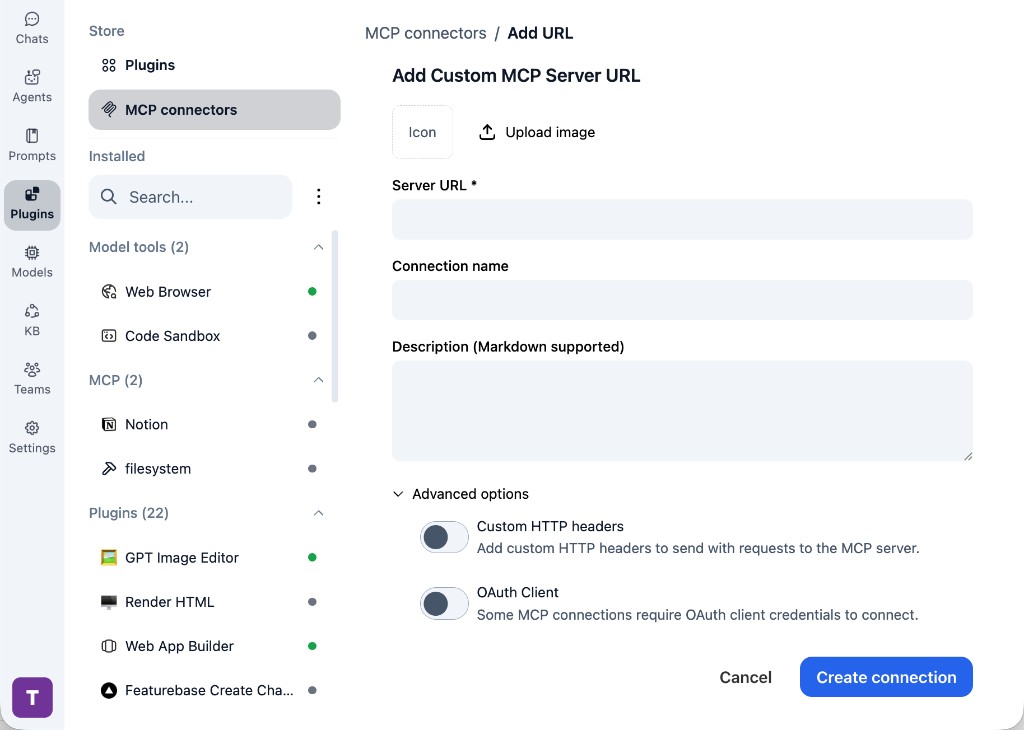
In TypingMind, go to Plugins, open MCP connectors, then choose Add URL.

  1. Open TypingMind in your browser.
  2. Go to Plugins.
  3. Open MCP connectors.
  4. Click Add URL.
TypingMind Add Custom MCP Server URL form
2

Paste the server URL

Enter your server URL in the Server URL field. Add a connection name, description, icon, custom HTTP headers, or OAuth client settings if the server requires them.

  1. Paste your server URL into the Server URL field.
  2. Enter a connection name for Chinese Trends Hub.
  3. Add a description and icon if you want it to be easier to identify.
  4. Add custom HTTP headers or OAuth client details if the server requires authentication.
3

Create the connection

Click Create connection, then return to the Plugins list and confirm the new MCP connection is active.

  1. Click Create connection.
  2. Return to the MCP connectors list.
  3. Confirm the Chinese Trends Hub connection appears as active.
  4. Refresh the plugin list if the connection does not appear immediately.
4

Switch models without reconnecting

Start a chat with your preferred model, enable the Chinese Trends Hub tools from Plugins, and switch to another model whenever needed. The MCP connection stays available to the TypingMind workspace.

  1. Start a new chat in TypingMind.
  2. Select the AI model you want to use.
  3. Enable the Chinese Trends Hub tools from Plugins.
  4. Ask the model to use the tool when needed.
  5. Switch to another AI model and reuse the same MCP connection.
TypingMind chat using enabled MCP tools with a selected AI model
Can you use Chinese Trends Hub to help me with this task?
Chinese Trends Hub
Sure. I read it.
Here is what I found using Chinese Trends Hub.

Frequently asked questions

What is the Chinese Trends Hub MCP server used for?

Chinese Trends Hub is an MCP server that lets compatible AI clients connect to external tools and context. In TypingMind, you can add this MCP server once and make its tools available in your AI workspace.

Can I use Chinese Trends Hub MCP with multiple AI models in TypingMind?

Yes. TypingMind connects MCP tools at the workspace level, so you can use Chinese Trends Hub with different AI models such as Claude, ChatGPT, Gemini, or other models you have configured in TypingMind without setting up the MCP server separately for each model.

Why use Chinese Trends Hub MCP with TypingMind?

TypingMind is one of the best frontends for LLM chat because it brings multiple AI models, prompts, plugins, AI agents, API keys, and MCP tools into one workspace. With Chinese Trends Hub connected, you can use its MCP tools across your preferred models while keeping your chat workflow organized in TypingMind.

How do I connect Chinese Trends Hub MCP to TypingMind?

Chinese Trends Hub can be connected in TypingMind with the local MCP connector or by adding a remote MCP server URL. Use the local connector when the server needs access to files, apps, or private resources on your device, and use a server URL when the MCP server is hosted remotely.

What tools does Chinese Trends Hub MCP provide in TypingMind?

Chinese Trends Hub exposes 21 MCP tools that can be enabled from the TypingMind Plugins page and used in chat or assigned to AI agents.

Do I need to share my API keys with TypingMind to use Chinese Trends Hub MCP?

No. TypingMind is local-first and lets you keep your model providers, API keys, prompts, and MCP configuration under your control. If Chinese Trends Hub requires authentication, add the required headers, OAuth settings, or local configuration for that MCP server when you create the connection.

Related MCP Servers

View all

Set up your own AI workspace now

Get notified about new features and future giveaways by subscribing to our newsletter 👇