DBHub (Universal Database Gateway) logo

DBHub (Universal Database Gateway)

OrganizationPopular
bytebase

Zero-dependency, token-efficient database MCP server for Postgres, MySQL, SQL Server, MariaDB, SQLite.

Publisherbytebase
Repositorydbhub
LanguageTypeScript
Forks
235
Stars
2.8K
Available tools
2
Transport typestdio
Categories
LicenseMIT
Links
  • Connect tools to AI workflows

    DBHub (Universal Database Gateway) exposes MCP capabilities that can be used by compatible AI clients and agents.

  • 2 available tools

    Browse the callable actions below, including names and descriptions when provided by the server.

  • Ready-to-copy setup

    Use the installation snippets to configure this server in your preferred MCP client.

  • Open source signals

    2.8K stars and 235 forks from the linked repository.

[!NOTE]
Brought to you by Bytebase, open-source database DevSecOps platform.

bash
            +------------------+    +--------------+    +------------------+
            |                  |    |              |    |                  |
            |                  |    |              |    |                  |
            |  Claude Desktop  +--->+              +--->+    PostgreSQL    |
            |                  |    |              |    |                  |
            |  Claude Code     +--->+              +--->+    SQL Server    |
            |                  |    |              |    |                  |
            |  Cursor          +--->+    DBHub     +--->+    SQLite        |
            |                  |    |              |    |                  |
            |  VS Code         +--->+              +--->+    MySQL         |
            |                  |    |              |    |                  |
            |  Copilot CLI     +--->+              +--->+    MariaDB       |
            |                  |    |              |    |                  |
            |                  |    |              |    |                  |
            +------------------+    +--------------+    +------------------+
                 MCP Clients           MCP Server             Databases

DBHub is a zero-dependency, token efficient MCP server implementing the Model Context Protocol (MCP) server interface. This lightweight gateway allows MCP-compatible clients to connect to and explore different databases:

  • Local Development First: Zero dependency, token efficient with just two MCP tools to maximize context window
  • Multi-Database: PostgreSQL, MySQL, MariaDB, SQL Server, and SQLite through a single interface
  • Multi-Connection: Connect to multiple databases simultaneously with TOML configuration
  • Guardrails: Read-only mode, row limiting, and query timeout to prevent runaway operations
  • Secure Access: SSH tunneling and SSL/TLS encryption

Supported Databases

PostgreSQL, MySQL, SQL Server, MariaDB, and SQLite.

MCP Tools

DBHub implements MCP tools for database operations:

  • execute_sql: Execute SQL queries with transaction support and safety controls
  • search_objects: Search and explore database schemas, tables, columns, indexes, and procedures with progressive disclosure
  • Custom Tools: Define reusable, parameterized SQL operations in your dbhub.toml configuration file

Workbench

DBHub includes a built-in web interface for interacting with your database tools. It provides a visual way to execute queries, run custom tools, and view request traces without requiring an MCP client.
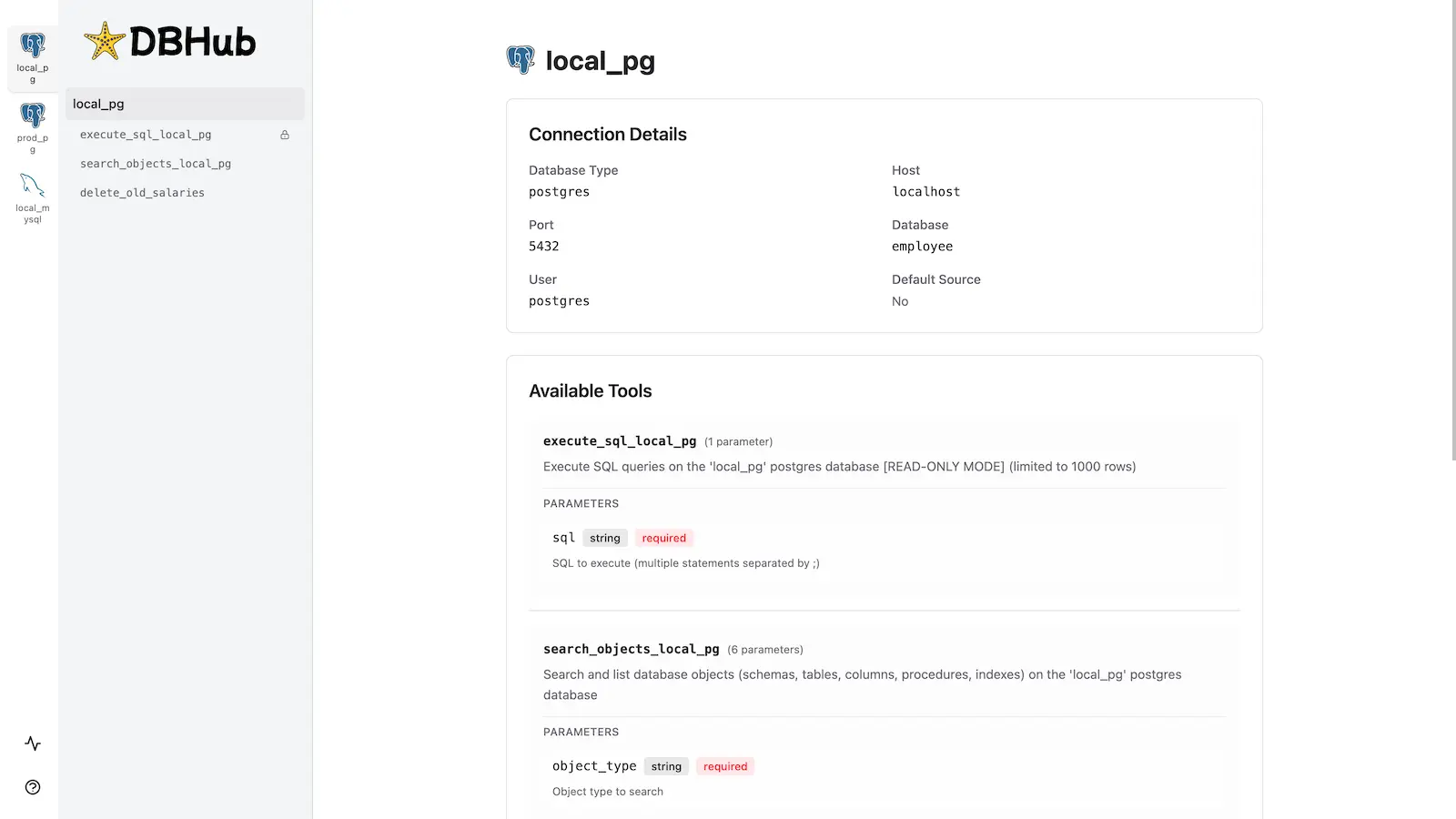
workbench

Installation

See the full Installation Guide for detailed instructions.

Quick Start

Docker:

bash
docker run --rm --init \
   --name dbhub \
   --publish 8080:8080 \
   bytebase/dbhub \
   --transport http \
   --port 8080 \
   --dsn "postgres://user:password@localhost:5432/dbname?sslmode=disable"

NPM:

bash
npx @bytebase/dbhub@latest --transport http --port 8080 --dsn "postgres://user:password@localhost:5432/dbname?sslmode=disable"

Demo Mode:

bash
npx @bytebase/dbhub@latest --transport http --port 8080 --demo

See Command-Line Options for all available parameters.

Multi-Database Setup

Connect to multiple databases simultaneously using TOML configuration files. Perfect for managing production, staging, and development databases from a single DBHub instance.

See Multi-Database Configuration for complete setup instructions.

Development

bash
# Install dependencies
pnpm install

# Run in development mode
pnpm dev

# Build and run for production
pnpm build && pnpm start --transport stdio --dsn "postgres://user:password@localhost:5432/dbname"

See Testing and Debug.

Contributors

Star History

Installation

TypingMind
Prerequisites:

Node.js 18+

{
  "mcpServers": {
    "dbhub-demo": {
      "command": "npx",
      "args": [
        "-y",
        "@bytebase/dbhub",
        "--transport",
        "stdio",
        "--demo"
      ]
    }
  }
}

Available Tools

  • execute_sql

    Execute SQL queries on the sqlite database

  • search_objects

    Search and list database objects (schemas, tables, columns, procedures, indexes) on the sqlite database

Use DBHub (Universal Database Gateway) MCP with multiple AI models

TypingMind connects MCP tools at the workspace level, so once DBHub (Universal Database Gateway) is connected, you can use it with different AI models in TypingMind instead of setting it up separately for each model. This MCP runs locally through the TypingMind MCP connector on your device.

Setup guide to use the local connector

Use this when the MCP server needs access to local files, apps, or private resources on your computer.

1

Open the MCP settings

In TypingMind, go to Settings, Advanced Settings, then Model Context Protocol and choose Setup Connector.

  1. Open TypingMind in your browser.
  2. Click the Settings icon.
  3. Go to Advanced Settings.
  4. Open the Model Context Protocol section.
  5. Click Setup Connector and choose This Device.
TypingMind MCP connector setup screen with This Device selected
2

Run the connector command

Choose This Device, copy the command from TypingMind, and run it in Terminal. Keep the process running while you use MCP.

  1. Copy the setup command shown by TypingMind.
  2. Open Terminal on macOS or Windows Terminal on Windows.
  3. Paste and run the command.
  4. Approve the package install if Terminal asks you to proceed.
  5. Keep the Terminal window running while using MCP tools.
3

Add DBHub (Universal Database Gateway) as a server

When the connector status is Ready, click Edit Servers and paste the MCP server configuration.

  1. Wait until the connector status shows Ready.
  2. Click Edit Servers.
  3. Paste the DBHub (Universal Database Gateway) MCP server configuration.
  4. Save the server list.
  5. Refresh if you want to confirm the connector is still ready.
TypingMind MCP settings showing active server and Edit Servers button
{
  "mcpServers": {
    "dbhub-universal-database-gateway": {
      "command": "npx",
      "args": [
        "-y",
        "@bytebase/dbhub"
      ]
    }
  }
}
4

Use it across models

Save the server list, open Plugins, enable the DBHub (Universal Database Gateway) MCP tools, then select any supported AI model in TypingMind and use the tools in chat or assign them to an AI agent.

  1. Open the Plugins page in TypingMind.
  2. Enable the DBHub (Universal Database Gateway) MCP tools.
  3. Start a chat and choose the AI model you want to use.
  4. Use the MCP tools in chat or assign them to an AI agent.
  5. Switch to another AI model whenever needed without reconnecting MCP.
TypingMind chat using enabled MCP tools with a selected AI model
Can you use DBHub (Universal Database Gateway) to help me with this task?
DBHub (Universal Database Gateway)
Sure. I read it.
Here is what I found using DBHub (Universal Database Gateway).

Frequently asked questions

What is the DBHub (Universal Database Gateway) MCP server used for?

DBHub (Universal Database Gateway) is an MCP server that lets compatible AI clients connect to external tools and context. In TypingMind, you can add this MCP server once and make its tools available in your AI workspace.

Can I use DBHub (Universal Database Gateway) MCP with multiple AI models in TypingMind?

Yes. TypingMind connects MCP tools at the workspace level, so you can use DBHub (Universal Database Gateway) with different AI models such as Claude, ChatGPT, Gemini, or other models you have configured in TypingMind without setting up the MCP server separately for each model.

Why use DBHub (Universal Database Gateway) MCP with TypingMind?

TypingMind is one of the best frontends for LLM chat because it brings multiple AI models, prompts, plugins, AI agents, API keys, and MCP tools into one workspace. With DBHub (Universal Database Gateway) connected, you can use its MCP tools across your preferred models while keeping your chat workflow organized in TypingMind.

How do I connect DBHub (Universal Database Gateway) MCP to TypingMind?

DBHub (Universal Database Gateway) runs through the TypingMind local MCP connector. This is best when the MCP server needs access to local files, desktop apps, command-line tools, or private resources on your computer.

What tools does DBHub (Universal Database Gateway) MCP provide in TypingMind?

DBHub (Universal Database Gateway) exposes 2 MCP tools that can be enabled from the TypingMind Plugins page and used in chat or assigned to AI agents.

Do I need to share my API keys with TypingMind to use DBHub (Universal Database Gateway) MCP?

No. TypingMind is local-first and lets you keep your model providers, API keys, prompts, and MCP configuration under your control. If DBHub (Universal Database Gateway) requires authentication, add the required headers, OAuth settings, or local configuration for that MCP server when you create the connection.

Related MCP Servers

View all

Set up your own AI workspace now

Get notified about new features and future giveaways by subscribing to our newsletter 👇


