Devopness logo

Devopness

Organization
devopness

DevOps Happiness: 1-click or 1-prompt MCP. Deploy apps + infra + CI/CD on your cloud. Happy humans + reliable agents. 🚀

Publisherdevopness
Repositorydevopness
LanguagePython
Forks
149
Stars
391
Available tools
0
Transport typestreamable-http
Categories
LicenseMIT
Links
  • Connect tools to AI workflows

    Devopness exposes MCP capabilities that can be used by compatible AI clients and agents.

  • 0 available tools

    Browse the callable actions below, including names and descriptions when provided by the server.

  • Ready-to-copy setup

    Use the installation snippets to configure this server in your preferred MCP client.

  • Open source signals

    391 stars and 149 forks from the linked repository.

Devopness: DevOps Happiness :-) for AI Agents & humans

MIT License

Installation

Install the Devopness MCP Server in your favorite IDE:

Install Devopness MCP Server in Cursor

Install Devopness MCP Server in VS Code

⚠️ When you start the MCP Server in your IDE, it will require you to log in with your Devopness Account in order to authenticate and operate properly.

Community

Discord Badge

About Devopness

Devopness drastically simplifies the way we manage cloud applications and multi cloud infrastructure in a secure and productive way.

Devopness allows AI Agents and humans to provision and manage cloud infrastructure and deploy applications to AWS, Azure, DigitalOcean, GCP, ..., and any other major cloud provider.

  • Simplified role based access control and permission management
  • No surprise on your cloud provider bills, as we only deploy the infra that each team of humans or agents have permissions to
  • Full control on what AI Agents can do on your DevOps and CI/CD workflows
  • Full visibility, auditing and traceability on what has been done by each person or agent in your teams

We're making first-class software deployment and cloud infrastructure management tools accessible and affordable to everyone who is involved in software projects.

📚 Documentation

Product documentation is maintained in the docs folder.

🙋 Issues

See the issue backlog for a list of active or proposed tasks. Feel free to create new issues, report bugs, and send feature requests.

✍️ Contributing

Improvements and contributions are highly encouraged! 🙏👊

See the contributing guide for details on how to participate.

All communication and contributions to Devopness projects are subject to the Devopness Code of Conduct.

Not yet ready to contribute but do like the project? Support Devopness with a ⭐!

💼 Changelog

Detailed changes for each release are documented in the release notes.

📂 Repo Structure

This repository has the following packages/sub-projects:

Packages

SubpathPackageDescriptionStatus
/docs📚 DocumentationEnd user product documentation-
/packages/sdks/javascriptAPI SDK JavaScriptAPI SDK to interact with Devopness using JavaScript and TypeScriptSDK JavaScript - CISDK JavaScript - Version
/packages/sdks/pythonAPI SDK PythonAPI SDK to interact with Devopness using PythonSDK Python - CISDK Python - Version
/packages/ui/reactUI React ComponentsDevopness Design System UI components for ReactUI React - CIUI React - Version

📜 License

All repository contents are licensed under the terms of the MIT License unless otherwise specified in the LICENSE file at each package's root.

Installation

TypingMind
{
  "mcpServers": {
    "devopness": {
      "url": "https://mcp.devopness.com/mcp",
      "env": null
    }
  }
}

Use Devopness MCP with multiple AI models

TypingMind connects MCP tools at the workspace level, so once Devopness is connected, you can use it with different AI models in TypingMind instead of setting it up separately for each model. This MCP connects through a hosted MCP server URL in TypingMind.

Add an MCP server URL

Use this when Devopness is already hosted remotely or your team wants one shared connector that multiple users can access.

1

Open MCP connectors

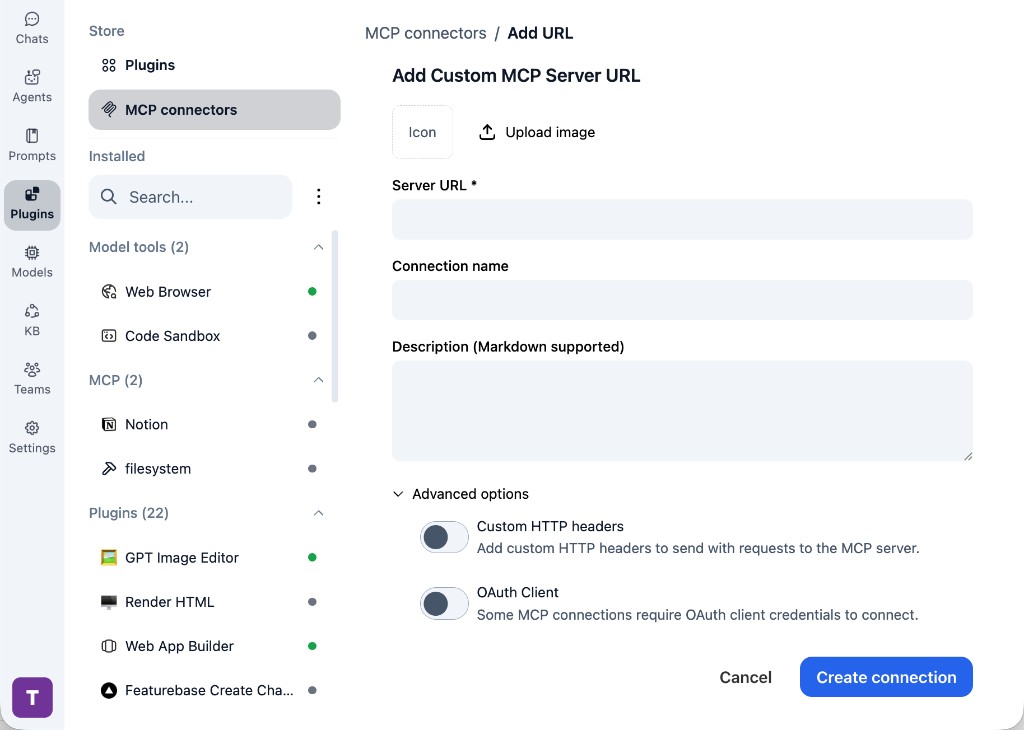
In TypingMind, go to Plugins, open MCP connectors, then choose Add URL.

  1. Open TypingMind in your browser.
  2. Go to Plugins.
  3. Open MCP connectors.
  4. Click Add URL.
TypingMind Add Custom MCP Server URL form
2

Paste the server URL

Enter https://mcp.devopness.com/mcp in the Server URL field. Add a connection name, description, icon, custom HTTP headers, or OAuth client settings if the server requires them.

  1. Paste https://mcp.devopness.com/mcp into the Server URL field.
  2. Enter a connection name for Devopness.
  3. Add a description and icon if you want it to be easier to identify.
  4. Add custom HTTP headers or OAuth client details if the server requires authentication.
3

Create the connection

Click Create connection, then return to the Plugins list and confirm the new MCP connection is active.

  1. Click Create connection.
  2. Return to the MCP connectors list.
  3. Confirm the Devopness connection appears as active.
  4. Refresh the plugin list if the connection does not appear immediately.
4

Switch models without reconnecting

Start a chat with your preferred model, enable the Devopness tools from Plugins, and switch to another model whenever needed. The MCP connection stays available to the TypingMind workspace.

  1. Start a new chat in TypingMind.
  2. Select the AI model you want to use.
  3. Enable the Devopness tools from Plugins.
  4. Ask the model to use the tool when needed.
  5. Switch to another AI model and reuse the same MCP connection.
TypingMind chat using enabled MCP tools with a selected AI model
Can you use Devopness to help me with this task?
Devopness
Sure. I read it.
Here is what I found using Devopness.

Frequently asked questions

What is the Devopness MCP server used for?

Devopness is an MCP server that lets compatible AI clients connect to external tools and context. In TypingMind, you can add this MCP server once and make its tools available in your AI workspace.

Can I use Devopness MCP with multiple AI models in TypingMind?

Yes. TypingMind connects MCP tools at the workspace level, so you can use Devopness with different AI models such as Claude, ChatGPT, Gemini, or other models you have configured in TypingMind without setting up the MCP server separately for each model.

Why use Devopness MCP with TypingMind?

TypingMind is one of the best frontends for LLM chat because it brings multiple AI models, prompts, plugins, AI agents, API keys, and MCP tools into one workspace. With Devopness connected, you can use its MCP tools across your preferred models while keeping your chat workflow organized in TypingMind.

How do I connect Devopness MCP to TypingMind?

Devopness can be connected in TypingMind by adding its hosted MCP server URL. This is useful when you want a remote MCP connection that is available from your TypingMind workspace.

What tools does Devopness MCP provide in TypingMind?

Devopness exposes MCP capabilities that can be enabled from the TypingMind Plugins page and used in chat or assigned to AI agents.

Do I need to share my API keys with TypingMind to use Devopness MCP?

No. TypingMind is local-first and lets you keep your model providers, API keys, prompts, and MCP configuration under your control. If Devopness requires authentication, add the required headers, OAuth settings, or local configuration for that MCP server when you create the connection.

Related MCP Servers

View all

Set up your own AI workspace now

Get notified about new features and future giveaways by subscribing to our newsletter 👇