MingAI - AI命理 logo

MingAI - AI命理

Community
hhszzzz

🔮 高精度AI算命工具,涵盖八字、紫微斗数、六爻、梅花易数、奇门遁甲、大六壬、小六壬、占星术、太乙神数、塔罗、MBTI、面相手相、合盘配对、每日/每月运势、周公解梦等。支持MCP服务和Skills

Publisherhhszzzz
RepositoryMingAI
LanguageTypeScript
Forks
54
Stars
174
Available tools
11
Transport typestdio, streamable-http
Categories
LicenseNOASSERTION
Links
  • Connect tools to AI workflows

    MingAI - AI命理 exposes MCP capabilities that can be used by compatible AI clients and agents.

  • 11 available tools

    Browse the callable actions below, including names and descriptions when provided by the server.

  • Ready-to-copy setup

    Use the installation snippets to configure this server in your preferred MCP client.

  • Open source signals

    174 stars and 54 forks from the linked repository.

太卜

将传统命理文化与AI深度融合

Next.js TypeScript Tailwind CSS Supabase Vercel

Language: 中文 | English

在线体验 · 报告问题


产品亮点

  • 多命理体系 - 八字、六爻、紫微斗数、奇门遁甲、大六壬、梅花易数、塔罗、MBTI、面相、手相、合盘、周公解梦
  • AI智能分析 - 支持导出命理体系文本进行AI分析,多模型支持,深度推理,视觉识别
  • MCP Server - 支持 Model Context Protocol(MCP),可在支持MCP的客户端中直接调用命理工具
  • 历史记录、知识库与@提及 - 支持存储所有命理体系的记录,可将命理体系纳入个人知识库,显式引用命理体系数据源
  • AI个性化 - 表达风格/用户画像/自定义指令 + 上下文、提示词预算可视化
  • 多端体验 - Web + iOS/Android 客户端
  • 社区与激励 - 命理记录、匿名讨论、签到激励

命理功能预览

功能模块核心特性
八字排盘· 真太阳时、阳历农历排盘、即时排盘、四柱排盘· 五行天干地支、十神、藏干、星运、纳音、神煞(51种)、十二长生、刑害合冲· 天干五合、地支半合、地支三会· 大运、流年、流月、流日· 传统分析、盲派分析
紫微斗数· 十二宫位、三方四正· 主星、辅星、杂曜、四化(含自化)· 命主星/身主星、小限、博士十二星· 旺衰落陷、大限/流年/流月/流日/流时运限分析· 飞星分析(飞化落宫、三方四正)
奇门遁甲· 九宫、天地盘、八门、九星、八神· 值符值使、遁甲类型、局数· 格局判定(吉/凶)、空亡、驿马、入墓、旺衰· 转盘排盘,拆补/茅山局法· 显式时区支持
大六壬· 天地盘、四课、三传· 天将(十二神将)、遁干· 49种神煞、课体分类· 十二长生、五行旺衰、建除十二神· 显式时区,支持本命/行年
六爻占卜· 硬币起卦、快速起卦、选卦起卦、时间起卦、数字起卦· 爻变明动、暗动· 卦辞、爻辞、象辞· 用神、原神、伏神、仇神· 空亡 · 世应、旺衰状态、刑冲合害· 互卦、错卦、综卦· 应期推测
梅花易数· 年月日時起卦、物数/声数、字占、丈尺尺寸、方位类象· 两数/三数报数扩展法· 本卦、互卦、变卦、错卦、综卦、动爻· 体卦/用卦、体用生克、月令旺衰、克应层次· 应期线索、定性吉凶判断
塔罗占卜· 9种牌阵:单牌、三牌阵、爱情牌阵、凯尔特十字、马蹄、抉择、身心灵、情境、是/否· 逆位判定、78张完整牌面解读、精美卡牌· 星座/元素对应、数字命理(人格牌/灵魂牌/年份牌)· 每日运势指引
关系合盘· 情侣、商业、亲子· 未来运势走线· 沟通建议
面相、手相· 天庭、鼻相、眼相、口相· 生命线、智慧线、事业线、感情线
运势中心· 基于命盘的每日、每月运势分析· 每日黄历(含方位系统、12时辰吉凶、二十八星宿)· 未来运势走线
MBTI性格测试· 90+道性格测试题· 综合AI分析性格
高度AI集成· 根据过往占卜综合分析· 命理体系全分析· 知识库、附件、搜索· 支持AI对话时提及所有命理体系· 年度命理报告

MCP

太卜提供 MCP,可在支持 MCP 的客户端中直接调用命理工具。

快速配置

配置中添加以下内容即可使用

json
{
  "mcpServers": {
    "taibu": {
      "command": "npx",
      "args": ["-y", "taibu-mcp"]
    }
  }
}

支持的工具

工具功能提问例子
bazi八字排盘(支持阳历/农历,51种神煞,天干五合,地支半合/三会,胎元/命宫)"我是1990年5月15日15点生,请帮我排盘"
bazi_pillars_resolve八字反查(四柱 → 出生时间候选,1900-2100)"我的八字是丙午庚寅丙辰癸巳,请帮我分析"
bazi_dayun八字大运计算(十年大运周期,流年详情,太岁标注,小运)AI会自动分析你的八字调用计算
ziwei紫微斗数排盘(含命主星/身主星,小限,博士12星,三方四正)"我是农历1990年4月初八生,请排紫微盘"
ziwei_horoscope紫微运限(大限/小限/流年/流月/流日/流时,流年星曜)"帮我看看2026年的紫微运限"
ziwei_flying_star紫微飞星分析(飞化/自化/四化落宫/三方四正)"分析一下我命宫的飞星"
liuyao六爻占卜(支持起卦/自主选卦/时间起卦/数字起卦,含互卦/错卦/综卦)"我想占卜今年的事业运,请帮我起卦分析"
meihua梅花易数(支持年月日時、物数/声数、字占、丈尺尺寸、方位类象、两数/三数报数)"现在起一卦,用梅花易数看这次合作能不能成"
tarot塔罗抽牌(9种牌阵,78张完整牌面,独立逆位关键词,星座/元素对应)"请为我抽一张塔罗牌,关于近期的爱情运势"
almanac黄历查询(含方位系统,12时辰吉凶,二十八星宿)"今天的黄历怎么样?适合求婚吗?"
astrology西方占星命盘与流运(命盘三巨头、本命主星、重大流运触发)"帮我看一下这段时间的占星流运重点"
qimen奇门遁甲排盘(九宫、八门、九星、八神、值符值使、显式时区)"用奇门看一下今天谈合作是否顺利"
taiyi太乙九星观测(外部时空环境、九星阵列、能量交互)"用太乙九星看一下这个项目推进情况"
daliuren大六壬排盘(四课三传、天地盘、神将、显式时区)"用大六壬看一下这件事的结果"
xiaoliuren小六壬占测(起课结果、宫位落点、核心断事线索)"用小六壬看一下今天出行顺不顺"

SDK

如果你想在自己的 Node.js 项目中直接调用计算引擎(无需 MCP 协议),可以使用核心库:

bash
npm install taibu-core

详见 taibu-core npm 页面


快速开始

Docker 部署

支持三种方式:

bash
# 准备环境变量(首次)
cp .env.example .env

# 1) 一键部署:同时启动 Web + MCP
docker compose up -d --build

# 2) 仅部署 Web
docker compose -f docker-compose.web.yml up -d --build

# 3) 仅部署 MCP Server
docker compose -f docker-compose.mcp.yml up -d --build

默认端口:

开发环境部署

环境要求:

  • Node.js 18+
  • pnpm (推荐) / npm / yarn
bash
# 克隆项目
git clone git@github.com:hhszzzz/taibu.git
cd taibu

# 安装依赖
pnpm install

# 配置环境变量
cp .env.example .env
# 编辑 .env 填入必要的 API Keys

# 启动开发服务器
pnpm dev

访问 http://localhost:3000 查看应用。


贡献

欢迎提交 Issue 和 Pull Request!


许可证

本仓库采用混合许可证:

  • packages/core
  • packages/mcp
  • packages/mcp-server

以上三个包采用 MIT 许可证,详见各自目录下的 LICENSE 文件。

除上述三个包外,仓库其余 Web、服务端、部署与运行时代码采用 AGPL-3.0-only,详见仓库根目录 LICENSE

提示:

  • AGPL-3.0-only 不禁止商用,但要求修改后的网络服务在对外提供时履行相应源码开放义务
  • MIT 包允许商用、再分发与二次开发,但需保留版权与许可声明

太卜 - 用AI解读命运,用科技传承文化

Made with ❤️ by hhszzzz

Installation

TypingMind
Prerequisites:

Node.js 18+

{
  "mcpServers": {
    "hhszzzz-mingai": {
      "command": "npx",
      "args": [
        "-y",
        "taibu-app"
      ]
    }
  }
}

Use MingAI - AI命理 MCP with multiple AI models

TypingMind connects MCP tools at the workspace level, so once MingAI - AI命理 is connected, you can use it with different AI models in TypingMind instead of setting it up separately for each model. You can run MCP locally on your device or connect to a remote MCP server URL.

Option 1: Use the local connector

Use this when the MCP server needs access to local files, apps, or private resources on your computer.

1

Open the MCP settings

In TypingMind, go to Settings, Advanced Settings, then Model Context Protocol and choose Setup Connector.

  1. Open TypingMind in your browser.
  2. Click the Settings icon.
  3. Go to Advanced Settings.
  4. Open the Model Context Protocol section.
  5. Click Setup Connector and choose This Device.
TypingMind MCP connector setup screen with This Device selected
2

Run the connector command

Choose This Device, copy the command from TypingMind, and run it in Terminal. Keep the process running while you use MCP.

  1. Copy the setup command shown by TypingMind.
  2. Open Terminal on macOS or Windows Terminal on Windows.
  3. Paste and run the command.
  4. Approve the package install if Terminal asks you to proceed.
  5. Keep the Terminal window running while using MCP tools.
3

Add MingAI - AI命理 as a server

When the connector status is Ready, click Edit Servers and paste the MCP server configuration.

  1. Wait until the connector status shows Ready.
  2. Click Edit Servers.
  3. Paste the MingAI - AI命理 MCP server configuration.
  4. Save the server list.
  5. Refresh if you want to confirm the connector is still ready.
TypingMind MCP settings showing active server and Edit Servers button
{
  "mcpServers": {
    "hhszzzz-mingai": {
      "command": "npx",
      "args": [
        "-y",
        "taibu-app"
      ]
    }
  }
}
4

Use it across models

Save the server list, open Plugins, enable the MingAI - AI命理 MCP tools, then select any supported AI model in TypingMind and use the tools in chat or assign them to an AI agent.

  1. Open the Plugins page in TypingMind.
  2. Enable the MingAI - AI命理 MCP tools.
  3. Start a chat and choose the AI model you want to use.
  4. Use the MCP tools in chat or assign them to an AI agent.
  5. Switch to another AI model whenever needed without reconnecting MCP.
TypingMind chat using enabled MCP tools with a selected AI model
Can you use MingAI - AI命理 to help me with this task?
MingAI - AI命理
Sure. I read it.
Here is what I found using MingAI - AI命理.

Option 2: Add an MCP server URL

Use this when MingAI - AI命理 is already hosted remotely or your team wants one shared connector that multiple users can access.

1

Open MCP connectors

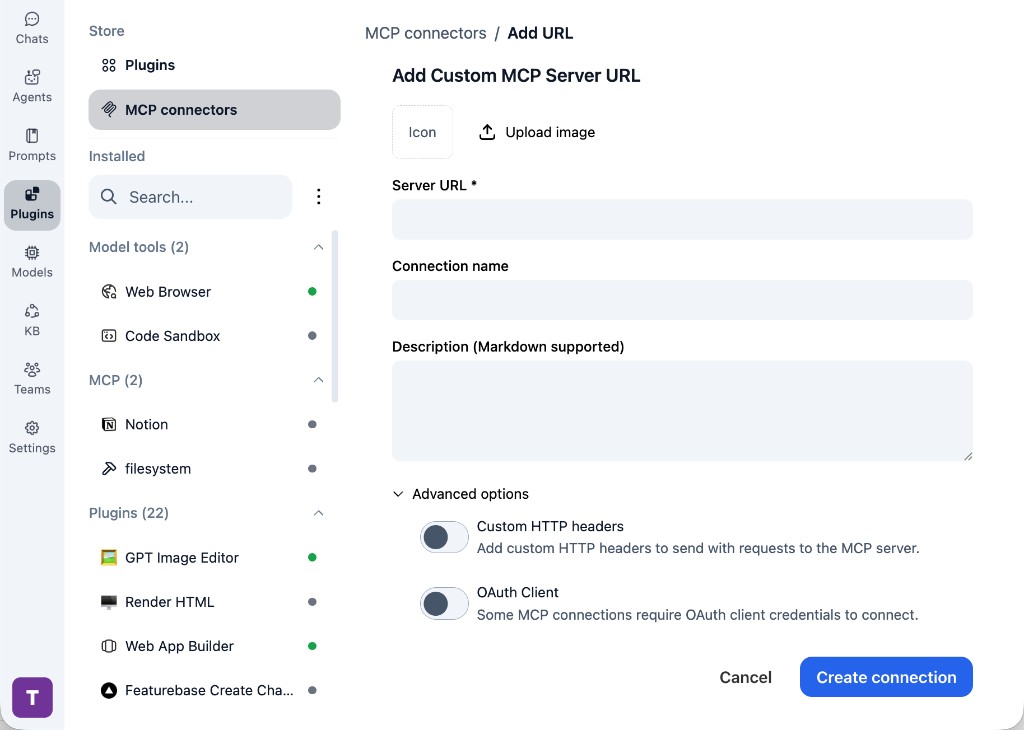
In TypingMind, go to Plugins, open MCP connectors, then choose Add URL.

  1. Open TypingMind in your browser.
  2. Go to Plugins.
  3. Open MCP connectors.
  4. Click Add URL.
TypingMind Add Custom MCP Server URL form
2

Paste the server URL

Enter your server URL in the Server URL field. Add a connection name, description, icon, custom HTTP headers, or OAuth client settings if the server requires them.

  1. Paste your server URL into the Server URL field.
  2. Enter a connection name for MingAI - AI命理.
  3. Add a description and icon if you want it to be easier to identify.
  4. Add custom HTTP headers or OAuth client details if the server requires authentication.
3

Create the connection

Click Create connection, then return to the Plugins list and confirm the new MCP connection is active.

  1. Click Create connection.
  2. Return to the MCP connectors list.
  3. Confirm the MingAI - AI命理 connection appears as active.
  4. Refresh the plugin list if the connection does not appear immediately.
4

Switch models without reconnecting

Start a chat with your preferred model, enable the MingAI - AI命理 tools from Plugins, and switch to another model whenever needed. The MCP connection stays available to the TypingMind workspace.

  1. Start a new chat in TypingMind.
  2. Select the AI model you want to use.
  3. Enable the MingAI - AI命理 tools from Plugins.
  4. Ask the model to use the tool when needed.
  5. Switch to another AI model and reuse the same MCP connection.
TypingMind chat using enabled MCP tools with a selected AI model
Can you use MingAI - AI命理 to help me with this task?
MingAI - AI命理
Sure. I read it.
Here is what I found using MingAI - AI命理.

Frequently asked questions

What is the MingAI - AI命理 MCP server used for?

MingAI - AI命理 is an MCP server that lets compatible AI clients connect to external tools and context. In TypingMind, you can add this MCP server once and make its tools available in your AI workspace.

Can I use MingAI - AI命理 MCP with multiple AI models in TypingMind?

Yes. TypingMind connects MCP tools at the workspace level, so you can use MingAI - AI命理 with different AI models such as Claude, ChatGPT, Gemini, or other models you have configured in TypingMind without setting up the MCP server separately for each model.

Why use MingAI - AI命理 MCP with TypingMind?

TypingMind is one of the best frontends for LLM chat because it brings multiple AI models, prompts, plugins, AI agents, API keys, and MCP tools into one workspace. With MingAI - AI命理 connected, you can use its MCP tools across your preferred models while keeping your chat workflow organized in TypingMind.

How do I connect MingAI - AI命理 MCP to TypingMind?

MingAI - AI命理 can be connected in TypingMind with the local MCP connector or by adding a remote MCP server URL. Use the local connector when the server needs access to files, apps, or private resources on your device, and use a server URL when the MCP server is hosted remotely.

What tools does MingAI - AI命理 MCP provide in TypingMind?

MingAI - AI命理 exposes 11 MCP tools that can be enabled from the TypingMind Plugins page and used in chat or assigned to AI agents.

Do I need to share my API keys with TypingMind to use MingAI - AI命理 MCP?

No. TypingMind is local-first and lets you keep your model providers, API keys, prompts, and MCP configuration under your control. If MingAI - AI命理 requires authentication, add the required headers, OAuth settings, or local configuration for that MCP server when you create the connection.

Related MCP Servers

View all

Set up your own AI workspace now

Get notified about new features and future giveaways by subscribing to our newsletter 👇