OWL (Web Ontology Language) logo

OWL (Web Ontology Language)

Organization
ai4curation

MCP server for OWL applications

Publisherai4curation
Repositoryowl-mcp
LanguagePython
Forks
7
Stars
15
Available tools
19
Transport typestdio
Categories
LicenseMIT
Links
  • Connect tools to AI workflows

    OWL (Web Ontology Language) exposes MCP capabilities that can be used by compatible AI clients and agents.

  • 19 available tools

    Browse the callable actions below, including names and descriptions when provided by the server.

  • Ready-to-copy setup

    Use the installation snippets to configure this server in your preferred MCP client.

  • Open source signals

    15 stars and 7 forks from the linked repository.

OWL-MCP

OWL-MCP is a Model-Context-Protocol (MCP) server for working with Web Ontology Language (OWL) ontologies.

img img

Quick Start

This walks you through using owl-mcp with Goose, but any MCP-enabled AI host will work.

Install Goose

You can use either the Desktop or CLI version of Goose from here:

Follow the instructions for setting up an LLM provider (Anthropic recommended)

Install OWL-MCP extension

You can either install directly from this link:

Or to do this manually, in the Extension section of Goose, add a new entry for owlmcp:

uvx owl-mcp

This video shows how to do this manually:
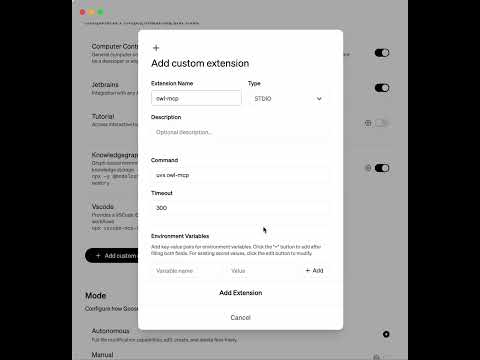
configuration

Try it out

You can ask to create an ontology, and add axioms to an ontology:

editing

How this works

The MCP server provides function calls for finding, adding, or removing OWL axioms, using OWL functional syntax. Each function call is accompanied by the file path of the OWL file on your disk. Any format supported by py-horned-owl is accepted (we following OBO guidelines and recommend functional syntax for source).

The server takes care of keeping an instance of the ontology in memory and syncing it with disk. Any CRUD operation simultaneously updates the in-memory model and syncs this with disk. If you have Protege running, Protege will also sync with local disk, and show updates.

The server is well adapted for working with OBO-style ontologies - when OWL strings are sent back to the client, labels for opaque IDs are included after #s comments, as is common for obo-format.

Key Features

  • MCP Server Integration: Connect AI assistants directly to OWL ontologies using the standardized Model-Context-Protocol
  • Thread-safe operations: All ontology operations are thread-safe, making it suitable for multi-user environments
  • File synchronization: Changes to the ontology file on disk are automatically detected and synchronized
  • Event-based notifications: Register observers to be notified of changes to the ontology
  • Simple string-based API: Work with OWL axioms as strings in functional syntax without dealing with complex object models
  • Configuration system: Store and manage settings for frequently-used ontologies
  • Label support: Access human-readable labels for entities with configurable annotation properties

Installation

TypingMind
Prerequisites:

Node.js 18+

{
  "mcpServers": {
    "owl-mcp": {
      "command": "uvx",
      "args": [
        "owl-mcp"
      ]
    }
  }
}

Available Tools

  • add_axiom
    Add an axiom to the ontology using OWL functional syntax.
    
    Args:
        owl_file_path: Absolute path to the OWL file
        axiom_str: String representation of the axiom in OWL functional syntax
                 e.g., "SubClassOf(:Dog :Animal)"
    
    Returns:
        str: Success message or error
    
  • add_axioms
    Adds a list of axioms to the ontology, using OWL functional syntax.
    
    Args:
        owl_file_path: Absolute path to the OWL file
        axiom_strs: List of string representation of the axiom in OWL functional syntax
                 e.g., ["SubClassOf(:Dog :Animal)", ...]
    
    Returns:
        str: Success message or error
    
  • remove_axiom
    Remove an axiom from the ontology using OWL functional syntax.
    
    Args:
        owl_file_path: Absolute path to the OWL file
        axiom_str: String representation of the axiom in OWL functional syntax
    
    Returns:
        str: Success message or error
    
  • find_axioms
    Find axioms matching a pattern in the ontology.
    
    Args:
        owl_file_path: Absolute path to the OWL file
        pattern: A string pattern to match against axiom strings
                (simple substring matching)
        limit: (int) Maximum number of axioms to return (default: 100)
        include_labels: If True, include human-readable labels after ## in the output
        annotation_property: Optional annotation property IRI to use for labels 
                            (defaults to rdfs:label)
    
    Returns:
        list[str]: List of matching axiom strings
    
  • get_all_axioms
    Get all axioms in the ontology as strings.
    
    Args:
        owl_file_path: Absolute path to the OWL file
        limit: Maximum number of axioms to return (default: 100)
        include_labels: If True, include human-readable labels after ## in the output
        annotation_property: Optional annotation property IRI to use for labels 
                            (defaults to rdfs:label)
    
    Returns:
        list[str]: List of all axiom strings
    
  • add_prefix
    Add a prefix mapping to the ontology.
    
    Args:
        owl_file_path: Absolute path to the OWL file
        prefix: The prefix string (e.g., "ex")
        uri: The URI the prefix maps to (e.g., "http://example.org/")
    
    Note that usually an ontology will contain standard prefixes for rdf, rdfs, owl, xsd
    
    Returns:
        str: Success message
    
  • ontology_metadata
    Get metadata about the ontology.
    
    Args:
        owl_file_path: Absolute path to the OWL file
    
    Returns:
        list[str]: List of metadata items
    
  • list_configured_ontologies
    List all ontologies defined in the configuration.
    
    Returns:
        List[OntologyConfigInfo]: List of configured ontologies
    
  • configure_ontology
    Add or update an ontology in the configuration.
    
    Args:
        name: A unique name for the ontology
        path: Absolute path to the ontology file
        metadata_axioms: List of metadata axioms as strings
        readonly: Whether the ontology is read-only (default: False)
        description: Optional description
        preferred_serialization: Optional preferred serialization format
        annotation_property: Optional annotation property IRI for labels (default: rdfs:label)
    
    Returns:
        str: Success or error message
    
  • remove_ontology_config
    Remove an ontology from the configuration.
    
    Args:
        name: Name of the ontology to remove
    
    Returns:
        str: Success or error message
    
  • get_ontology_config
    Get configuration for a specific ontology.
    
    Args:
        name: Name of the ontology
    
    Returns:
        Optional[OntologyConfigInfo]: The ontology configuration or None if not found
    
  • register_ontology_in_config
    Register an existing ontology in the configuration system.
    
    This allows you to save preferences and metadata for frequently used ontologies,
    making them accessible by name in future sessions.
    
    Args:
        owl_file_path: Absolute path to the ontology file
        name: Optional custom name for the ontology (defaults to filename without extension)
        readonly: Whether the ontology should be read-only (defaults to current setting if loaded)
        description: Optional description for the ontology
        preferred_serialization: Optional preferred serialization format
        annotation_property: Optional annotation property IRI for labels (defaults to current setting if loaded)
    
    Returns:
        str: Name of the registered ontology
    
  • load_and_register_ontology
    Load an ontology and register it in the configuration system in one step.
    
    Args:
        owl_file_path: Absolute path to the ontology file
        name: Optional name for the ontology (defaults to filename stem)
        readonly: Whether the ontology should be read-only (default: False)
        create_if_not_exists: If True, create the file if it doesn't exist (default: True)
        description: Optional description of the ontology
        preferred_serialization: Optional preferred serialization format
        metadata_axioms: Optional list of metadata axioms to add to the ontology
        annotation_property: Optional annotation property IRI for labels (default: rdfs:label)
        
    Returns:
        str: Success message
    
  • add_axiom_by_name
    Add an axiom to a configured ontology using its name.
    
    Args:
        ontology_name: Name of the ontology as defined in configuration
        axiom_str: String representation of the axiom in OWL functional syntax
    
    Returns:
        str: Success message or error
    
  • remove_axiom_by_name
    Remove an axiom from a configured ontology using its name.
    
    Args:
        ontology_name: Name of the ontology as defined in configuration
        axiom_str: String representation of the axiom in OWL functional syntax
    
    Returns:
        str: Success message or error
    
  • find_axioms_by_name
    Find axioms matching a pattern in a configured ontology using its name.
    
    Args:
        ontology_name: Name of the ontology as defined in configuration
        pattern: A string pattern to match against axiom strings
        limit: Maximum number of axioms to return (default: 100)
        include_labels: If True, include human-readable labels after ## in the output
        annotation_property: Optional annotation property IRI to use for labels 
                            (defaults to rdfs:label)
    
    Returns:
        list[str]: List of matching axiom strings or empty list if ontology not found
    
  • add_prefix_by_name
    Add a prefix mapping to a configured ontology using its name.
    
    Args:
        ontology_name: Name of the ontology as defined in configuration
        prefix: The prefix string (e.g., "ex:")
        uri: The URI the prefix maps to (e.g., "http://example.org/")
    
    Returns:
        str: Success message or error
    
  • get_labels_for_iri
    Get all labels for a given IRI.
    
    Args:
        owl_file_path: Absolute path to the OWL file
        iri: The IRI to get labels for (as a string)
        annotation_property: Optional annotation property IRI to use for labels
                            (defaults to rdfs:label if None)
    
    Returns:
        List[str]: List of label strings
    
  • get_labels_for_iri_by_name
    Get all labels for a given IRI in a configured ontology.
    
    Args:
        ontology_name: Name of the ontology as defined in configuration
        iri: The IRI to get labels for (as a string)
        annotation_property: Optional annotation property IRI to use for labels
                            (defaults to rdfs:label if None)
    
    Returns:
        List[str]: List of label strings or empty list if ontology not found
    

Use OWL (Web Ontology Language) MCP with multiple AI models

TypingMind connects MCP tools at the workspace level, so once OWL (Web Ontology Language) is connected, you can use it with different AI models in TypingMind instead of setting it up separately for each model. This MCP runs locally through the TypingMind MCP connector on your device.

Setup guide to use the local connector

Use this when the MCP server needs access to local files, apps, or private resources on your computer.

1

Open the MCP settings

In TypingMind, go to Settings, Advanced Settings, then Model Context Protocol and choose Setup Connector.

  1. Open TypingMind in your browser.
  2. Click the Settings icon.
  3. Go to Advanced Settings.
  4. Open the Model Context Protocol section.
  5. Click Setup Connector and choose This Device.
TypingMind MCP connector setup screen with This Device selected
2

Run the connector command

Choose This Device, copy the command from TypingMind, and run it in Terminal. Keep the process running while you use MCP.

  1. Copy the setup command shown by TypingMind.
  2. Open Terminal on macOS or Windows Terminal on Windows.
  3. Paste and run the command.
  4. Approve the package install if Terminal asks you to proceed.
  5. Keep the Terminal window running while using MCP tools.
3

Add OWL (Web Ontology Language) as a server

When the connector status is Ready, click Edit Servers and paste the MCP server configuration.

  1. Wait until the connector status shows Ready.
  2. Click Edit Servers.
  3. Paste the OWL (Web Ontology Language) MCP server configuration.
  4. Save the server list.
  5. Refresh if you want to confirm the connector is still ready.
TypingMind MCP settings showing active server and Edit Servers button
{
  "mcpServers": {
    "owl-web-ontology-language": {
      "command": "npx",
      "args": [
        "-y",
        "owl-mcp"
      ]
    }
  }
}
4

Use it across models

Save the server list, open Plugins, enable the OWL (Web Ontology Language) MCP tools, then select any supported AI model in TypingMind and use the tools in chat or assign them to an AI agent.

  1. Open the Plugins page in TypingMind.
  2. Enable the OWL (Web Ontology Language) MCP tools.
  3. Start a chat and choose the AI model you want to use.
  4. Use the MCP tools in chat or assign them to an AI agent.
  5. Switch to another AI model whenever needed without reconnecting MCP.
TypingMind chat using enabled MCP tools with a selected AI model
Can you use OWL (Web Ontology Language) to help me with this task?
OWL (Web Ontology Language)
Sure. I read it.
Here is what I found using OWL (Web Ontology Language).

Frequently asked questions

What is the OWL (Web Ontology Language) MCP server used for?

OWL (Web Ontology Language) is an MCP server that lets compatible AI clients connect to external tools and context. In TypingMind, you can add this MCP server once and make its tools available in your AI workspace.

Can I use OWL (Web Ontology Language) MCP with multiple AI models in TypingMind?

Yes. TypingMind connects MCP tools at the workspace level, so you can use OWL (Web Ontology Language) with different AI models such as Claude, ChatGPT, Gemini, or other models you have configured in TypingMind without setting up the MCP server separately for each model.

Why use OWL (Web Ontology Language) MCP with TypingMind?

TypingMind is one of the best frontends for LLM chat because it brings multiple AI models, prompts, plugins, AI agents, API keys, and MCP tools into one workspace. With OWL (Web Ontology Language) connected, you can use its MCP tools across your preferred models while keeping your chat workflow organized in TypingMind.

How do I connect OWL (Web Ontology Language) MCP to TypingMind?

OWL (Web Ontology Language) runs through the TypingMind local MCP connector. This is best when the MCP server needs access to local files, desktop apps, command-line tools, or private resources on your computer.

What tools does OWL (Web Ontology Language) MCP provide in TypingMind?

OWL (Web Ontology Language) exposes 19 MCP tools that can be enabled from the TypingMind Plugins page and used in chat or assigned to AI agents.

Do I need to share my API keys with TypingMind to use OWL (Web Ontology Language) MCP?

No. TypingMind is local-first and lets you keep your model providers, API keys, prompts, and MCP configuration under your control. If OWL (Web Ontology Language) requires authentication, add the required headers, OAuth settings, or local configuration for that MCP server when you create the connection.

Related MCP Servers

View all

Set up your own AI workspace now

Get notified about new features and future giveaways by subscribing to our newsletter 👇


