PageIndex logo

PageIndex

Organization
vectifyai

MCP server for PageIndex. PageIndex is a vectorless reasoning-based RAG system which uses multi-step reasoning and tree search to retrieve information like a human expert would.

Publishervectifyai
Repositorypageindex-mcp
LanguageTypeScript
Forks
39
Stars
335
Available tools
0
Transport typestreamable-http
Categories
LicenseMIT
Links
  • Connect tools to AI workflows

    PageIndex exposes MCP capabilities that can be used by compatible AI clients and agents.

  • 0 available tools

    Browse the callable actions below, including names and descriptions when provided by the server.

  • Ready-to-copy setup

    Use the installation snippets to configure this server in your preferred MCP client.

  • Open source signals

    335 stars and 39 forks from the linked repository.

PageIndex MCP

If you find this repo useful, please also star our main PageIndex repo

PageIndex GitHub  PageIndex MCP Home  PageIndex Home

📘 PageIndex is a vectorless, reasoning-based RAG system that represents documents as hierarchical tree structures. It enables LLMs to navigate and retrieve information through structure and reasoning, not vector similarity — much like a human would retrieve information using a book's index.

🔌 PageIndex MCP exposes this LLM-native, in-context tree index directly to LLMs via MCP, allowing platforms like Claude, Cursor, and other MCP-compatible agents or LLMs to reason over document structure and retrieve the right information — without vector databases.

Want to chat with long PDFs but hit context limit reached errors? Add your file to PageIndex to seamlessly chat with long PDFs on any agent/LLM platforms.

✨ Chat to long PDFs the human-like, reasoning-based way

  • Support local and online PDFs
  • Free 1000 pages
  • Unlimited conversations

For more information, visit the PageIndex MCP page.

💡 Looking for a fully hosted experience? Try PageIndex Chat 🤖: a human-like document analyst that lets you chat with long PDFs using the same agentic, reasoning-based workflow as PageIndex MCP.

What is PageIndex?

PageIndex is a vectorless, reasoning-based RAG system that generates hierarchical tree structures of documents and uses multi-step reasoning and tree search to retrieve information like a human expert would. It has the following key properties:

  • Higher Accuracy: Relevance beyond similarity
  • Better Transparency: Clear reasoning trajectory with traceable search paths
  • Like A Human: Retrieve information like a human expert navigates documents
  • No Vector DB: No extra infrastructure overhead
  • No Chunking: Preserve full document context and structure
  • No Top-K: Retrieve all relevant passages automatically

PageIndex MCP Setup

For Developers

Connect PageIndex to your agent framework or AI SDK via MCP. Works with Claude Agent SDK, Vercel AI SDK, OpenAI Agents SDK, LangChain, and any MCP-compatible client. Simple API Key authentication — no OAuth flow required.

  1. Go to PageIndex Dashboard to create an API Key
  2. Copy the generated key
  3. Add to your MCP configuration:
json
{
  "mcpServers": {
    "pageindex": {
      "type": "http",
      "url": "https://api.pageindex.ai/mcp",
      "headers": {
        "Authorization": "Bearer your_api_key"
      }
    }
  }
}

For more details, visit the PageIndex API Dashboard.

For PageIndex Chat Users

If you already have a PageIndex Chat account, you can connect your MCP client directly via OAuth.

Claude Desktop — One-Click Install:

Download the .mcpb file from Releases and double-click to install. OAuth authentication is handled automatically.

Other MCP Clients:

json
{
  "mcpServers": {
    "pageindex": {
      "type": "http",
      "url": "https://chat.pageindex.ai/mcp"
    }
  }
}

Local MCP Server (with local PDF upload):

If you need to upload local PDF files, you can run the local MCP server (requires Node.js ≥18.0.0):

json
{
  "mcpServers": {
    "pageindex": {
      "command": "npx",
      "args": ["-y", "@pageindex/mcp"]
    }
  }
}

For more details, visit PageIndex Chat.

Related Links

PageIndex Home   PageIndex GitHub

License

This project is licensed under the terms of the MIT open source license. Please refer to MIT for the full terms.

Installation

TypingMind
{
  "mcpServers": {
    "pageindex": {
      "url": "https://chat.pageindex.ai/mcp",
      "env": null
    }
  }
}

Use PageIndex MCP with multiple AI models

TypingMind connects MCP tools at the workspace level, so once PageIndex is connected, you can use it with different AI models in TypingMind instead of setting it up separately for each model. This MCP connects through a hosted MCP server URL in TypingMind.

Add an MCP server URL

Use this when PageIndex is already hosted remotely or your team wants one shared connector that multiple users can access.

1

Open MCP connectors

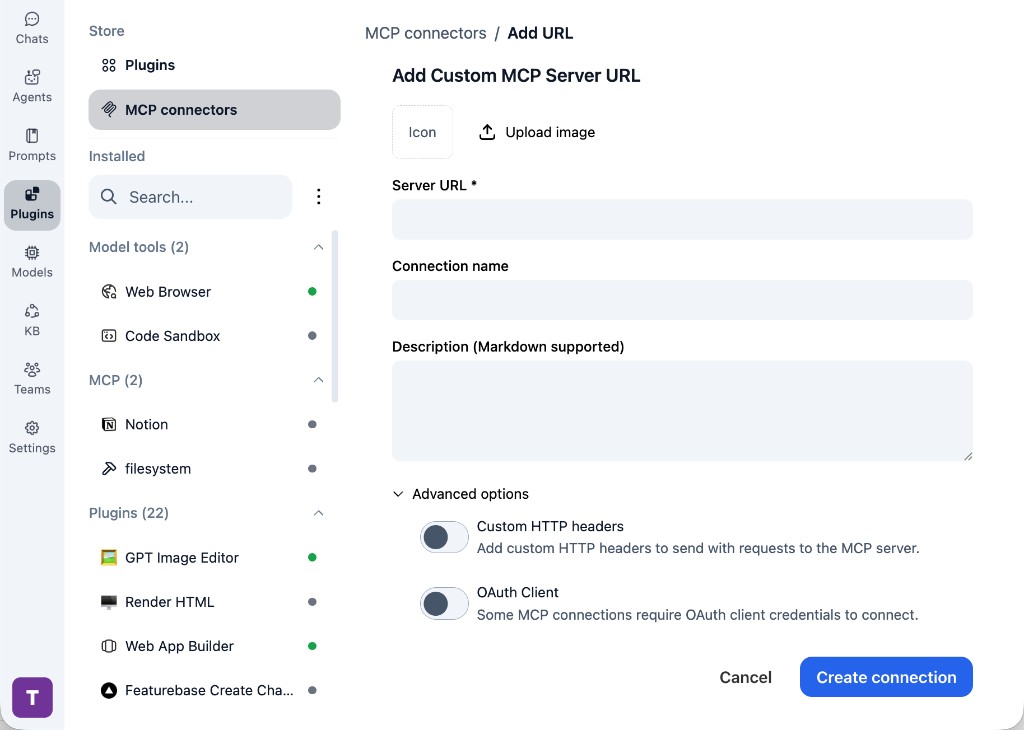
In TypingMind, go to Plugins, open MCP connectors, then choose Add URL.

  1. Open TypingMind in your browser.
  2. Go to Plugins.
  3. Open MCP connectors.
  4. Click Add URL.
TypingMind Add Custom MCP Server URL form
2

Paste the server URL

Enter https://chat.pageindex.ai/mcp in the Server URL field. Add a connection name, description, icon, custom HTTP headers, or OAuth client settings if the server requires them.

  1. Paste https://chat.pageindex.ai/mcp into the Server URL field.
  2. Enter a connection name for PageIndex.
  3. Add a description and icon if you want it to be easier to identify.
  4. Add custom HTTP headers or OAuth client details if the server requires authentication.
3

Create the connection

Click Create connection, then return to the Plugins list and confirm the new MCP connection is active.

  1. Click Create connection.
  2. Return to the MCP connectors list.
  3. Confirm the PageIndex connection appears as active.
  4. Refresh the plugin list if the connection does not appear immediately.
4

Switch models without reconnecting

Start a chat with your preferred model, enable the PageIndex tools from Plugins, and switch to another model whenever needed. The MCP connection stays available to the TypingMind workspace.

  1. Start a new chat in TypingMind.
  2. Select the AI model you want to use.
  3. Enable the PageIndex tools from Plugins.
  4. Ask the model to use the tool when needed.
  5. Switch to another AI model and reuse the same MCP connection.
TypingMind chat using enabled MCP tools with a selected AI model
Can you use PageIndex to help me with this task?
PageIndex
Sure. I read it.
Here is what I found using PageIndex.

Frequently asked questions

What is the PageIndex MCP server used for?

PageIndex is an MCP server that lets compatible AI clients connect to external tools and context. In TypingMind, you can add this MCP server once and make its tools available in your AI workspace.

Can I use PageIndex MCP with multiple AI models in TypingMind?

Yes. TypingMind connects MCP tools at the workspace level, so you can use PageIndex with different AI models such as Claude, ChatGPT, Gemini, or other models you have configured in TypingMind without setting up the MCP server separately for each model.

Why use PageIndex MCP with TypingMind?

TypingMind is one of the best frontends for LLM chat because it brings multiple AI models, prompts, plugins, AI agents, API keys, and MCP tools into one workspace. With PageIndex connected, you can use its MCP tools across your preferred models while keeping your chat workflow organized in TypingMind.

How do I connect PageIndex MCP to TypingMind?

PageIndex can be connected in TypingMind by adding its hosted MCP server URL. This is useful when you want a remote MCP connection that is available from your TypingMind workspace.

What tools does PageIndex MCP provide in TypingMind?

PageIndex exposes MCP capabilities that can be enabled from the TypingMind Plugins page and used in chat or assigned to AI agents.

Do I need to share my API keys with TypingMind to use PageIndex MCP?

No. TypingMind is local-first and lets you keep your model providers, API keys, prompts, and MCP configuration under your control. If PageIndex requires authentication, add the required headers, OAuth settings, or local configuration for that MCP server when you create the connection.

Related MCP Servers

View all

Set up your own AI workspace now

Get notified about new features and future giveaways by subscribing to our newsletter 👇