
🛫 Fli - Flight Search MCP Server and Library

A powerful Python library that provides programmatic access to Google Flights data with an elegant CLI interface. Search flights, find the best deals, and filter results with ease.
🚀 What makes
flispecial? Unlike other flight search libraries that rely on web scraping, Fli directly interacts with Google Flights' API through reverse engineering. This means:
- Fast: Direct API access means faster, more reliable results
- Zero Scraping: No HTML parsing, no browser automation, just pure API interaction
- Reliable: Less prone to breaking from UI changes
- Modular: Extensible architecture for easy customization and integration
MCP Server
bashpipx install flights # Run the MCP server on STDIO fli-mcp # Run the MCP server over HTTP (streamable) fli-mcp-http # serves at http://127.0.0.1:8000/mcp/
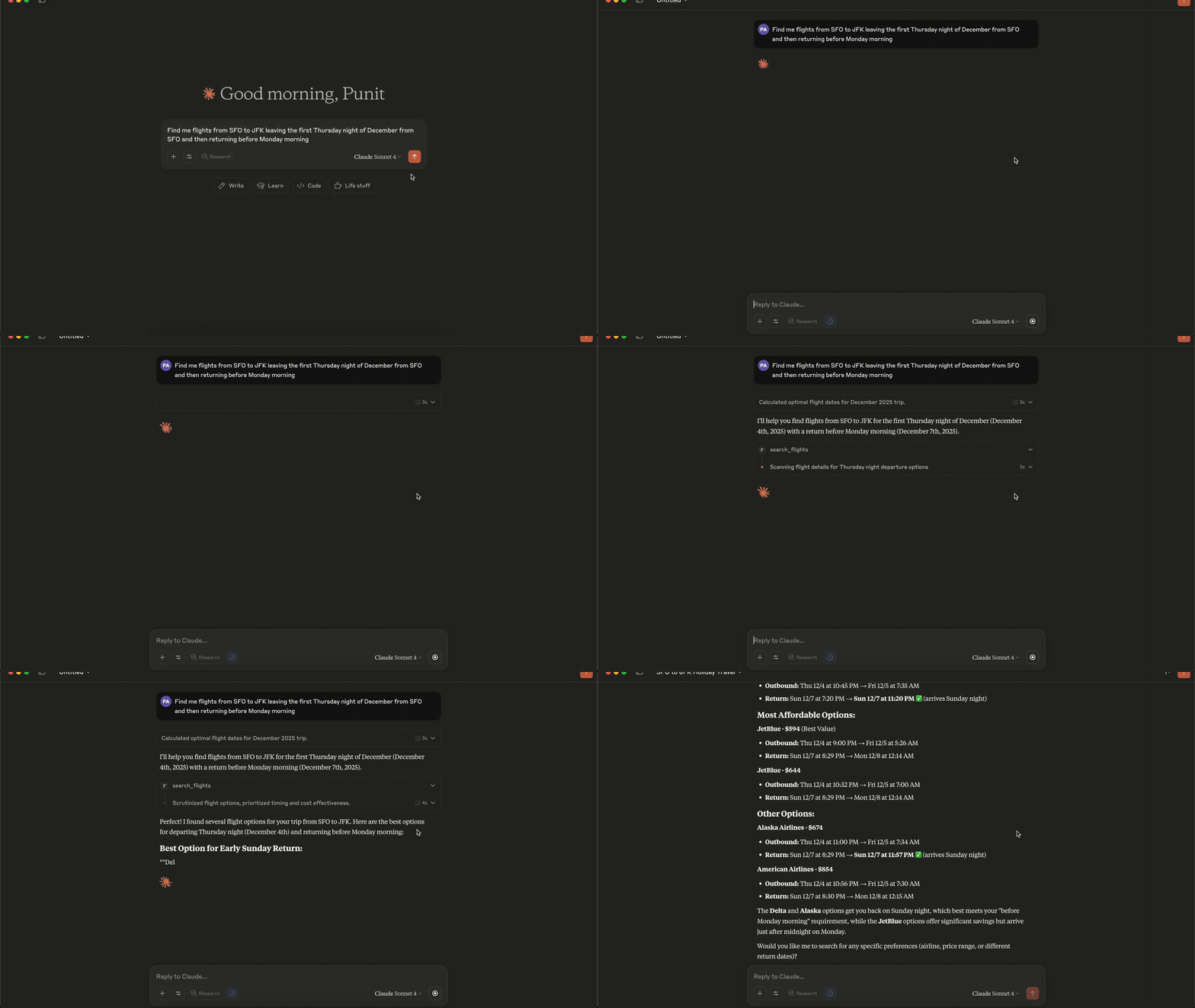
Connecting to Claude Desktop
json{ "mcpServers": { "fli": { "command": "/Users/<user>/.local/bin/fli-mcp" } } }
Note: Replace
<user>with your actual username. You can also find the path to the MCP server by runningwhich fli-mcpin your terminal.
MCP Tools Available
The MCP server provides two main tools:
| Tool | Description |
|---|---|
search_flights | Search for flights on a specific date with detailed filters |
search_dates | Find the cheapest travel dates across a flexible date range |
search_flights Parameters
| Parameter | Type | Description |
|---|---|---|
origin | string | Departure airport IATA code(s) — comma-separated for multi |
destination | string | Arrival airport IATA code(s) — comma-separated for multi |
departure_date | string | Travel date in YYYY-MM-DD format |
return_date | string | Return date for round trips (optional) |
cabin_class | string | ECONOMY, PREMIUM_ECONOMY, BUSINESS, or FIRST |
max_stops | string | ANY, NON_STOP, ONE_STOP, or TWO_PLUS_STOPS |
departure_window | string | Time window in 'HH-HH' format (e.g., '6-20') |
airlines | list | Filter by airline codes (e.g., ['BA', 'AA']) |
exclude_airlines | list | Airline IATA codes to exclude (e.g., ['DL', 'B6']) |
alliance | list | Restrict to alliances: ONEWORLD, SKYTEAM, STAR_ALLIANCE |
exclude_alliance | list | Alliance names to exclude from results |
min_layover | int | Minimum layover duration in minutes (multi-stop only) |
max_layover | int | Maximum layover duration in minutes (multi-stop only) |
top_n | int | Round-trip only: outbound options expanded into return flights (default 5, 1-10) |
currency | string | ISO 4217 code (e.g. 'EUR', 'JPY') — flows to curr= param |
language | string | BCP-47 language code (e.g. 'en-GB') — flows to hl= param |
country | string | ISO 3166-1 alpha-2 country code (e.g. 'GB') for gl= param |
sort_by | string | CHEAPEST, DURATION, DEPARTURE_TIME, or ARRIVAL_TIME |
passengers | int | Number of adult passengers |
children | int | Number of children (ages 2-11) |
infants_in_seat | int | Number of infants (under 2) occupying their own seat |
infants_on_lap | int | Number of lap infants (under 2, no seat) |
Total travelers (
passengers + children + infants_in_seat + infants_on_lap) must be between 1 and 9, andinfants_on_lapcannot exceedpassengers.A round trip costs
1 + top_npage fetches (one outbound search, plus one per outbound candidate expanded into return flights), sotop_nis capped at 10. Round-trip results all from one airline? Raisetop_n, or sort differently — the default sort only ever expands the cheapesttop_noutbounds, which are often the same carrier.
search_dates Parameters
| Parameter | Type | Description |
|---|---|---|
origin | string | Departure airport IATA code(s) — comma-separated for multi |
destination | string | Arrival airport IATA code(s) — comma-separated for multi |
start_date | string | Start of date range in YYYY-MM-DD format |
end_date | string | End of date range in YYYY-MM-DD format |
trip_duration | int | Trip duration in days (for round-trips) |
is_round_trip | bool | Whether to search for round-trip flights |
cabin_class | string | ECONOMY, PREMIUM_ECONOMY, BUSINESS, or FIRST |
max_stops | string | ANY, NON_STOP, ONE_STOP, or TWO_PLUS_STOPS |
departure_window | string | Time window in 'HH-HH' format (e.g., '6-20') |
airlines | list | Filter by airline codes (e.g., ['BA', 'AA']) |
exclude_airlines | list | Airline IATA codes to exclude |
alliance | list | Restrict to alliances: ONEWORLD, SKYTEAM, STAR_ALLIANCE |
exclude_alliance | list | Alliance names to exclude |
min_layover | int | Minimum layover duration in minutes |
max_layover | int | Maximum layover duration in minutes |
currency | string | ISO 4217 currency code (e.g. 'EUR', 'JPY') |
language | string | BCP-47 language code (e.g. 'en-GB') |
country | string | ISO 3166-1 alpha-2 country code (e.g. 'GB') |
sort_by_price | bool | Sort results by price (lowest first) |
passengers | int | Number of adult passengers |
children | int | Number of children (ages 2-11) |
infants_in_seat | int | Number of infants (under 2) occupying their own seat |
infants_on_lap | int | Number of lap infants (under 2, no seat) |
Same passenger limits as
search_flights: total 1-9,infants_on_lap≤passengers.
Quick Start
bashpip install flights
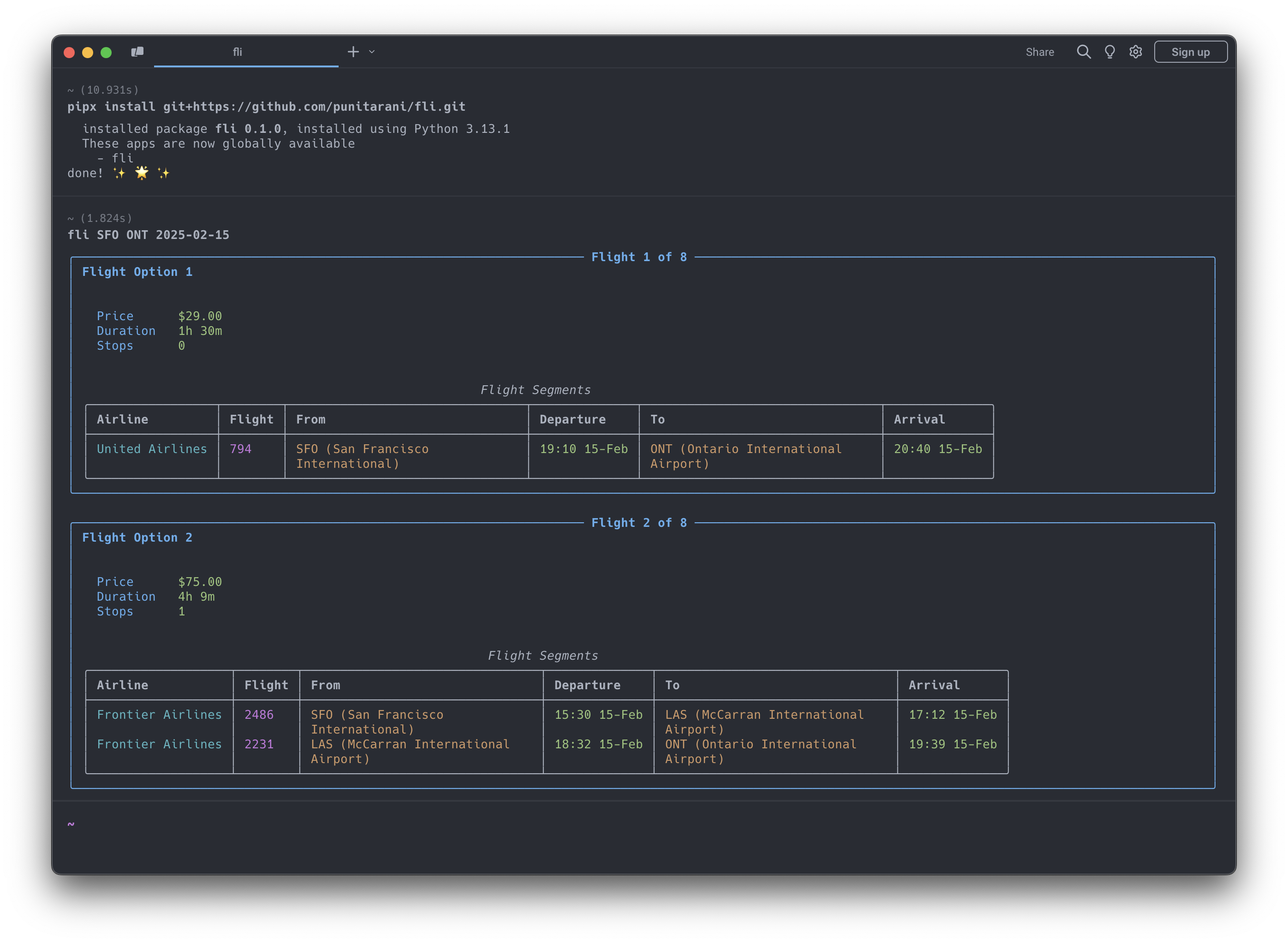
bash# Install using pipx (recommended for CLI) pipx install flights # Get started with CLI fli --help
Features
-
🔍 Powerful Search
- One-way flight searches
- Multi-city flight searches
- Flexible departure times
- Multi-airline support
- Cabin class selection
- Stop preferences
- Custom result sorting
-
💺 Cabin Classes
- Economy
- Premium Economy
- Business
- First
-
🎯 Smart Sorting
- Price
- Duration
- Departure Time
- Arrival Time
-
🛡️ Built-in Protection
- Rate limiting
- Automatic retries
- Comprehensive error handling
- Input validation
Search transport
Searches are served by Google's public search page rather than the
FlightsFrontendService RPC. Since 2026-08 GetShoppingResults and
GetCalendarGraph require an x-goog-batchexecute-bgr header that only the
page's own JavaScript can produce, so a plain HTTP client gets HTTP 200 with no
payload. Fli issues GET https://www.google.com/travel/flights?tfs=<protobuf>
instead and reads the results out of the page's inline AF_initDataCallback
blob keyed ds:1.
What that means in practice:
- Three filters are not supported.
emissions,bagsandexclude_basic_economyhave notfsfield and cannot be reconstructed from the decoded rows, so they are dropped with a warning. Stops, cabin, passengers, alliances and layover bounds ride in the request; airline include/exclude, price cap, max duration and departure windows are applied to the results after fetching. - Multi-city raises
SearchUnsupportedError. Google loads those results client-side through the gated RPC, so the page carries no rows to read. Search each leg separately. get_booking_optionsis unavailable. It callsGetBookingResults, which is gated the same way, and currently raisesSearchRejectedError. The per-flighttfsbooking deep links are built offline and still work.- Fewer rows per search. Expect roughly 20-45 itineraries, fewer than the old RPC returned — and a client-side filter cannot back-fill the list the way Google's server-side one did.
- Children and infants thin the results — sometimes to nothing. Google
prices those parties client-side, so the page inlines fewer itineraries for
them, and in premium cabins often none (measured 2026-09: JFK→LHR economy
23 rows for one adult, 16 with an infant; SFO→NRT business 9 rows for one
or two adults, 0 with a child). Extra adults cost nothing. An empty result
for such a search does not mean the route has no flights — and neither
does it mean this is why:
search()only warns when the fetched page itself came back with zero rows, not when the caller's own airline/price/ duration/window filter removed rows Google did return. An adults-only search shows the schedule. - Date searches cost one page fetch per date. The page has no calendar
grid, so a range is priced date by date; one
SearchDates.searchcovers at most 93 dates and a wider range raisesValueError. Budget for it: 93 dates across 10 workers is several hundred MB of pages and parsed JSON at peak. A sweep that never manages to load a single page — the shape a blocked or consent-gated client produces — gives up after a handful of dates rather than paying the retry budget on all of them. Only pages served without results count towards that: a timeout or a dropped connection says nothing about the dates not yet tried, so those never abandon a sweep. Measured with the real backoff: 42 page fetches (bounded at 45, so up to ~135 HTTP requests once the client's own retries multiply in) and about 4 seconds, the same whether the range is 30 days or 93. Unbroken, a 93-date range would have cost 279 fetches and up to 837 requests. The bound is(5 + worker count) x 3, so raisingconfigure_concurrencyraises it proportionally. That breaker disarms for good the moment any page loads, even an empty one, so it cannot catch a sweep that is mostly timeouts around one lucky date —SearchDates.searchraises that case too, whenever nothing priced and at least half the attempted dates never loaded. A minority of failures alongside real results, or alongside a confirmed-empty range (None), still returns normally but logs one warning naming the counts. - A page occasionally arrives without results. Roughly one request in sixty
returns HTTP 200 with no
ds:1blob; the client retries that case up to twice (0.5s then 1.5s) before raisingSearchParseError. A healthy search never pays for it. FLI_SOCS_COOKIE. EU/EEA IPs are redirected to Google's consent interstitial, which serves nods:1blob. The client sends a pre-acceptedSOCSconsent cookie by default; setFLI_SOCS_COOKIEto change the value, or to an empty string to send none.FLI_CA_BUNDLE/CURL_CA_BUNDLE/REQUESTS_CA_BUNDLE. Behind a TLS-intercepting corporate proxy, set one of these (checked in that order) to a PEM CA bundle path. A bad or missing path, or a certificate the bundle doesn't cover, raisesSearchCertificateErrornaming the variable — the client does not retry it, since a fixed bundle either verifies or it doesn't. Read once per worker thread on its first request; changing the value doesn't affect a thread's already-created session.
CLI Usage
Search for Flights
bash# Basic flight search fli flights JFK LHR 2026-10-25 # Advanced search with filters fli flights JFK LHR 2026-10-25 \ --time 6-20 \ # Departure time window (6 AM - 8 PM) --airlines BA,KL \ # Airlines (British Airways, KLM) --class BUSINESS \ # Cabin class --stops NON_STOP \ # Non-stop flights only --sort DURATION # Sort by duration # Alliance + exclude + locale (May-2026 filter additions) fli flights JFK LHR 2026-10-25 \ --alliance ONEWORLD \ --exclude-airlines AA \ --min-layover 90 \ --max-layover 360 \ --currency EUR --language en-GB --country GB # Round trip: raise --top-n to see more airlines (default 5, max 10, costs 1 + top_n # page fetches per search) fli flights JFK LHR 2026-10-25 --return 2026-11-01 --top-n 8 # Family mix: 2 adults, 1 child, 1 lap infant (total must be 1-9) fli flights JFK LHR 2026-10-25 --passengers 2 --children 1 --infants-on-lap 1
⚠️ Experimental
--format jsonis experimental. The JSON schema may change while the machine-readable CLI contract settles.bash# Return machine-readable flight results fli flights JFK LHR 2026-10-25 --format json
Find Cheapest Dates
bash# Basic date search fli dates JFK LHR # Advanced search with date range fli dates JFK LHR \ --from 2026-01-01 \ --to 2026-02-01 \ --monday --friday # Only Mondays and Fridays
⚠️ Experimental
--format jsonis experimental for date searches as well.bash# Return machine-readable date search results fli dates JFK LHR --from 2026-01-01 --to 2026-02-01 --format json
Multi-city Search
bash# Two-leg multi-city trip fli multi --leg SEA,HKG,2026-12-26 --leg PEK,SEA,2027-01-02 # Three-leg multi-city trip with filters fli multi \ -l SEA,NRT,2026-12-26 \ -l NRT,HKG,2026-12-30 \ -l HKG,SEA,2027-01-05 \ --class BUSINESS \ --stops 0
CLI Options
Flights Command (fli flights)
| Option | Description | Example |
|---|---|---|
--return, -r | Return date | 2026-10-30 |
--time, -t | Departure time window | 6-20 |
--airlines, -a | Airline IATA codes | BA,KL |
--exclude-airlines, -A | Airline IATA codes to exclude | DL,B6 |
--alliance | Restrict to alliance(s) | ONEWORLD, SKYTEAM |
--exclude-alliance | Alliance(s) to exclude | STAR_ALLIANCE |
--min-layover | Minimum layover (minutes) | 90 |
--max-layover | Maximum layover (minutes) | 360 |
--top-n | Round-trip only: outbound options expanded into return flights (default 5, 1-10) | 8 |
--currency | ISO 4217 currency code | EUR, JPY |
--language | BCP-47 language code (Google hl=) | en-GB |
--country | ISO 3166-1 alpha-2 country (gl=) | GB |
--class, -c | Cabin class | ECONOMY, BUSINESS |
--stops, -s | Maximum stops | NON_STOP, ONE_STOP |
--sort, -o | Sort results by | CHEAPEST, DURATION |
--passengers, -p | Number of adult passengers | 2 |
--children | Number of children (ages 2-11) | 1 |
--infants-in-seat | Number of infants occupying their own seat | 1 |
--infants-on-lap | Number of lap infants (must be ≤ adults) | 1 |
--format | Output format | text, json |
Total passengers (adults + children + infants) must be between 1 and 9.
--top-nonly applies to round trips (it is rejected if set on a one-way search) and costs1 + top_npage fetches. Round-trip results all from one airline? Raise--top-n(up to 10), or--sortdifferently — the default sort only expands the cheapesttop_noutbounds, which are often the same carrier.
Dates Command (fli dates)
| Option | Description | Example |
|---|---|---|
--from | Start date | 2026-01-01 |
--to | End date | 2026-02-01 |
--duration, -d | Trip duration in days | 3 |
--round, -R | Round-trip search | (flag) |
--airlines, -a | Airline IATA codes | BA,KL |
--exclude-airlines, -A | Airline IATA codes to exclude | DL,B6 |
--alliance | Restrict to alliance(s) | ONEWORLD |
--exclude-alliance | Alliance(s) to exclude | STAR_ALLIANCE |
--min-layover | Minimum layover (minutes) | 90 |
--max-layover | Maximum layover (minutes) | 360 |
--currency | ISO 4217 currency code | EUR, JPY |
--language | BCP-47 language code | en-GB |
--country | ISO 3166-1 alpha-2 country | GB |
--class, -c | Cabin class | ECONOMY, BUSINESS |
--stops, -s | Maximum stops | NON_STOP, ONE_STOP |
--time | Departure time window | 6-20 |
--sort | Sort by price | (flag) |
--[day] | Day filters | --monday, --friday |
--passengers, -p | Number of adult passengers | 2 |
--children | Number of children (ages 2-11) | 1 |
--infants-in-seat | Number of infants occupying their own seat | 1 |
--infants-on-lap | Number of lap infants (must be ≤ adults) | 1 |
--format | Output format | text, json |
Multi Command (fli multi)
| Option | Description | Example |
|---|---|---|
--leg, -l | Flight leg (ORIGIN,DEST,DATE format) | SEA,HKG,2026-12-26 |
--time, -t | Departure time window | 6-20 |
--airlines, -a | Airline IATA codes | DL CX |
--class, -c | Cabin class | ECONOMY, BUSINESS |
--stops, -s | Maximum stops | NON_STOP, ONE_STOP |
--sort, -o | Sort results by | CHEAPEST, DURATION |
--passengers, -p | Number of adult passengers | 2 |
--children | Number of children (ages 2-11) | 1 |
--infants-in-seat | Number of infants occupying their own seat | 1 |
--infants-on-lap | Number of lap infants (must be ≤ adults) | 1 |
MCP Server Integration
Fli includes a Model Context Protocol (MCP) server that allows AI assistants like Claude to search for flights directly. This enables natural language flight search through conversation.
Running the MCP Server
bash# Run the MCP server on STDIO fli-mcp # Or with uv (for development) uv run fli-mcp # Or with make (for development) make mcp # Run the MCP server over HTTP (streamable) fli-mcp-http # serves at http://127.0.0.1:8000/mcp/
Claude Desktop Configuration
To use the flight search capabilities in Claude Desktop, add this configuration to your claude_desktop_config.json:
Location: ~/Library/Application Support/Claude/claude_desktop_config.json (macOS)
json{ "mcpServers": { "flight-search": { "command": "fli-mcp", "args": [] } } }
After adding this configuration:
- Restart Claude Desktop
- You can now ask Claude to search for flights naturally:
- "Find flights from JFK to LAX on December 25th"
- "What are the cheapest dates to fly from NYC to London in January?"
- "Search for business class flights from SFO to NRT with no stops"
Python API Usage
Basic Search Example
pythonfrom datetime import datetime, timedelta from fli.models import ( Airport, PassengerInfo, SeatType, MaxStops, SortBy, FlightSearchFilters, FlightSegment ) from fli.search import SearchFlights # Create search filters filters = FlightSearchFilters( passenger_info=PassengerInfo(adults=1), flight_segments=[ FlightSegment( departure_airport=[[Airport.JFK, 0]], arrival_airport=[[Airport.LAX, 0]], travel_date=(datetime.now() + timedelta(days=30)).strftime("%Y-%m-%d"), ) ], seat_type=SeatType.ECONOMY, stops=MaxStops.NON_STOP, sort_by=SortBy.CHEAPEST, ) # Search flights search = SearchFlights() flights = search.search(filters) # Process results for flight in flights: print(f"💰 Price: ${flight.price}") print(f"⏱️ Duration: {flight.duration} minutes") print(f"✈️ Stops: {flight.stops}") for leg in flight.legs: print(f"\n🛫 Flight: {leg.airline.value} {leg.flight_number}") print(f"📍 From: {leg.departure_airport.value} at {leg.departure_datetime}") print(f"📍 To: {leg.arrival_airport.value} at {leg.arrival_datetime}")
Running Examples
Runnable examples live in examples/python/:
bash# Run examples with uv (recommended) uv run python examples/python/basic_one_way_search.py uv run python examples/python/round_trip_search.py uv run python examples/python/date_range_search.py # Or install dependencies first, then run directly pip install pydantic curl_cffi httpx python examples/python/basic_one_way_search.py
Available Examples:
basic_one_way_search.py- Simple one-way flight searchround_trip_search.py- Round-trip flight bookingdate_range_search.py- Find cheapest datesmulti_city_search.py- Multi-city itinerary across several legsadvanced_filters_search.py- Alliances, airline exclusions, layovers, localecomplex_flight_search.py- Advanced filtering and multi-passengertime_restrictions_search.py- Time-based filteringdate_search_with_preferences.py- Weekend filteringprice_tracking.py- Price monitoring over timeerror_handling_with_retries.py- Robust error handlingresult_processing.py- Data analysis with pandascomplex_round_trip_validation.py- Advanced round-trip with validationadvanced_date_search_validation.py- Complex date search with filtering
Examples
Examples are organized by language, with parallel scripts so you can compare the two APIs:
- Python —
examples/python/ - TypeScript —
examples/typescript/
bash# Python uv run python examples/python/complex_flight_search.py # TypeScript (from examples/typescript, after `bun install`) bun run multi_city_search.ts
Example Categories:
- Basic Usage: One-way, round-trip, date searches
- Advanced Filtering: Time restrictions, airlines, alliances, seat classes, locale
- Data Analysis: Price tracking, result processing with pandas
- Error Handling: Retry logic, robust error management
- Complex Scenarios: Multi-city, multi-passenger, validation, business rules
Each example is self-contained — change the airports, dates, and filters at the top of the script to fit your search.
TypeScript / JavaScript
Fli is also available as a 1:1 TypeScript port, published to npm as
fli-js. Same models, same filter encoding,
same direct-API approach.
bashbun add fli-js # or: npm install fli-js
tsimport { Airport, FlightSearchFilters, FlightSegment, SearchFlights, SeatType } from "fli-js"; const inDays = (n: number) => new Date(Date.now() + n * 86_400_000).toISOString().slice(0, 10); const filters = new FlightSearchFilters({ passenger_info: { adults: 1, children: 0, infants_in_seat: 0, infants_on_lap: 0 }, flight_segments: [ new FlightSegment({ departure_airport: [[[Airport.JFK, 0]]], arrival_airport: [[[Airport.LAX, 0]]], travel_date: inDays(30), }), ], seat_type: SeatType.ECONOMY, }); const results = await new SearchFlights().search(filters, { currency: "USD" });
fli-js uses the same search-page transport as the Python package (see
Search transport above), with the same consequences:
emissions / bags / exclude_basic_economy are dropped with a warning,
multi-city throws SearchUnsupportedError, getBookingOptions throws
SearchRejectedError, date searches cost one page fetch per date and are
capped at 93, and FLI_SOCS_COOKIE controls the consent cookie.
The TypeScript source lives in fli-js/; see the
TypeScript Quick Start
for the full guide.
Development
bash# Clone the repository git clone https://github.com/punitarani/fli.git cd fli # Install dependencies with uv uv sync --all-extras # Run tests (offline only — no network access required) uv run pytest # Run linting uv run ruff check . uv run ruff format . # Build documentation uv run mkdocs serve # Or use the Makefile for common tasks make install-all # Install all dependencies make test # Run tests (offline only) make test-live # Run the small, stable live tests (real network) make lint # Check code style make format # Format code
Tests that call the real Google Flights API are marked live and skipped by
default (--fuzz, --live and --all are independent, skip-only gates —
--all does not imply --live, and --live alone does not imply
--fuzz). Run the small, stable live set with make test-live (or
pytest -m live --live); the noisier 100-case fuzz-gated live test is a
separate opt-in, make test-live-fuzz (pytest --all -m live --live tests/search/test_search_flights_fuzz.py — it needs --all/--fuzz
together with --live, since it carries both markers).
Docker Development
bash# Build the devcontainer docker build -t fli-dev -f .devcontainer/Dockerfile . # Run CI inside the container docker run --rm fli-dev make lint test-all # Or run lint and tests separately docker run --rm fli-dev make lint docker run --rm fli-dev make test-all
Running CI Locally with act
To run GitHub Actions locally, install act:
bashbrew install act # Run CI locally (lint + tests on Python 3.10-3.13) make ci # Or run CI inside Docker (no local act installation needed) make ci-docker
Contributing
Contributions are welcome! Please feel free to submit a Pull Request.
License
This project is licensed under the MIT License — see the LICENSE file for details.





