Sequential Thinking logo

Sequential Thinking

OrganizationPopular
modelcontextprotocol

Model Context Protocol Servers

Publishermodelcontextprotocol
Repositoryservers
LanguageTypeScript
Forks
11.7K
Stars
90.5K
Available tools
1
Transport typestdio, streamable-http
Links
  • Connect tools to AI workflows

    Sequential Thinking exposes MCP capabilities that can be used by compatible AI clients and agents.

  • 1 available tools

    Browse the callable actions below, including names and descriptions when provided by the server.

  • Ready-to-copy setup

    Use the installation snippets to configure this server in your preferred MCP client.

  • Open source signals

    90.5K stars and 11.7K forks from the linked repository.

Model Context Protocol servers

This repository is a collection of reference implementations for the Model Context Protocol (MCP), as well as references to community-built servers and additional resources.

[!IMPORTANT] If you are looking for a list of MCP servers, you can browse published servers on the MCP Registry. The repository served by this README is dedicated to housing just the small number of reference servers maintained by the MCP steering group.

[!WARNING] The servers in this repository are intended as reference implementations to demonstrate MCP features and SDK usage. They are meant to serve as educational examples for developers building their own MCP servers, not as production-ready solutions. Developers should evaluate their own security requirements and implement appropriate safeguards based on their specific threat model and use case.

The servers in this repository showcase the versatility and extensibility of MCP, demonstrating how it can be used to give Large Language Models (LLMs) secure, controlled access to tools and data sources. Typically, each MCP server is implemented with an MCP SDK:

🌟 Reference Servers

These servers aim to demonstrate MCP features and the official SDKs.

  • Everything - Reference / test server with prompts, resources, and tools.
  • Fetch - Web content fetching and conversion for efficient LLM usage.
  • Filesystem - Secure file operations with configurable access controls.
  • Git - Tools to read, search, and manipulate Git repositories.
  • Memory - Knowledge graph-based persistent memory system.
  • Sequential Thinking - Dynamic and reflective problem-solving through thought sequences.
  • Time - Time and timezone conversion capabilities.

Archived

The following reference servers are now archived and can be found at servers-archived.

  • AWS KB Retrieval - Retrieval from AWS Knowledge Base using Bedrock Agent Runtime.
  • Brave Search - Web and local search using Brave's Search API. Has been replaced by the official server (@brave/brave-search-mcp-server).
  • EverArt - AI image generation using various models.
  • GitHub - Repository management, file operations, and GitHub API integration.
  • GitLab - GitLab API, enabling project management.
  • Google Drive - File access and search capabilities for Google Drive.
  • Google Maps - Location services, directions, and place details.
  • PostgreSQL - Read-only database access with schema inspection.
  • Puppeteer - Browser automation and web scraping.
  • Redis - Interact with Redis key-value stores.
  • Sentry - Retrieving and analyzing issues from Sentry.io.
  • Slack - Channel management and messaging capabilities. Now maintained by Zencoder
  • SQLite - Database interaction and business intelligence capabilities.

🚀 Getting Started

Using MCP Servers in this Repository

TypeScript-based servers in this repository can be used directly with npx.

For example, this will start the Memory server:

sh
npx -y @modelcontextprotocol/server-memory

Python-based servers in this repository can be used directly with uvx or pip. uvx is recommended for ease of use and setup.

For example, this will start the Git server:

sh
# With uvx
uvx mcp-server-git

# With pip
pip install mcp-server-git
python -m mcp_server_git

Follow these instructions to install uv / uvx and these to install pip.

Using an MCP Client

However, running a server on its own isn't very useful, and should instead be configured into an MCP client. For example, here's the Claude Desktop configuration to use the above server:

json
{
  "mcpServers": {
    "memory": {
      "command": "npx",
      "args": ["-y", "@modelcontextprotocol/server-memory"]
    }
  }
}

On Windows, wrap npx with cmd /c:

json
{
  "mcpServers": {
    "memory": {
      "command": "cmd",
      "args": ["/c", "npx", "-y", "@modelcontextprotocol/server-memory"]
    }
  }
}

Additional examples of using the Claude Desktop as an MCP client might look like:

json
{
  "mcpServers": {
    "filesystem": {
      "command": "npx",
      "args": ["-y", "@modelcontextprotocol/server-filesystem", "/path/to/allowed/files"]
    },
    "git": {
      "command": "uvx",
      "args": ["mcp-server-git", "--repository", "path/to/git/repo"]
    },
    "github": {
      "command": "npx",
      "args": ["-y", "@modelcontextprotocol/server-github"],
      "env": {
        "GITHUB_PERSONAL_ACCESS_TOKEN": "<YOUR_TOKEN>"
      }
    },
    "postgres": {
      "command": "npx",
      "args": ["-y", "@modelcontextprotocol/server-postgres", "postgresql://localhost/mydb"]
    }
  }
}

On Windows, apply the same wrapper to each npx-based entry above by changing "command" to "cmd" and prepending "/c", "npx" to the existing args. Leave uvx entries unchanged.

🛠️ Creating Your Own Server

Interested in creating your own MCP server? Visit the official documentation at modelcontextprotocol.io for comprehensive guides, best practices, and technical details on implementing MCP servers.

📚 Learn More

See ADDITIONAL.md for a curated list of frameworks and resources that simplify building MCP servers and clients.

🤝 Contributing

See CONTRIBUTING.md for information about contributing to this repository.

📦 Releasing

See RELEASING.md for how packages are published (OIDC trusted publishing from CI — no registry tokens) and how to retry a failed publish.

🔒 Security

See SECURITY.md for reporting security vulnerabilities.

📜 License

This project is licensed under the Apache License, Version 2.0 for new contributions, with existing code under MIT - see the LICENSE file for details.

💬 Community

⭐ Support

If you find MCP servers useful, please consider starring the repository and contributing new servers or improvements!


Managed by Anthropic, but built together with the community. The Model Context Protocol is open source and we encourage everyone to contribute their own servers and improvements!


Installation

TypingMind
Prerequisites:

Node.js 18+

{
  "mcpServers": {
    "sequential-thinking": {
      "command": "npx",
      "args": [
        "-y",
        "@modelcontextprotocol/server-sequential-thinking"
      ]
    }
  }
}

Available Tools

  • sequentialthinking

    $2d

Use Sequential Thinking MCP with multiple AI models

TypingMind connects MCP tools at the workspace level, so once Sequential Thinking is connected, you can use it with different AI models in TypingMind instead of setting it up separately for each model. You can run MCP locally on your device or connect to a remote MCP server URL.

Option 1: Use the local connector

Use this when the MCP server needs access to local files, apps, or private resources on your computer.

1

Open the MCP settings

In TypingMind, go to Settings, Advanced Settings, then Model Context Protocol and choose Setup Connector.

  1. Open TypingMind in your browser.
  2. Click the Settings icon.
  3. Go to Advanced Settings.
  4. Open the Model Context Protocol section.
  5. Click Setup Connector and choose This Device.
TypingMind MCP connector setup screen with This Device selected
2

Run the connector command

Choose This Device, copy the command from TypingMind, and run it in Terminal. Keep the process running while you use MCP.

  1. Copy the setup command shown by TypingMind.
  2. Open Terminal on macOS or Windows Terminal on Windows.
  3. Paste and run the command.
  4. Approve the package install if Terminal asks you to proceed.
  5. Keep the Terminal window running while using MCP tools.
3

Add Sequential Thinking as a server

When the connector status is Ready, click Edit Servers and paste the MCP server configuration.

  1. Wait until the connector status shows Ready.
  2. Click Edit Servers.
  3. Paste the Sequential Thinking MCP server configuration.
  4. Save the server list.
  5. Refresh if you want to confirm the connector is still ready.
TypingMind MCP settings showing active server and Edit Servers button
{
  "mcpServers": {
    "sequential-thinking": {
      "command": "npx",
      "args": [
        "-y",
        "@modelcontextprotocol/server-sequential-thinking"
      ]
    }
  }
}
4

Use it across models

Save the server list, open Plugins, enable the Sequential Thinking MCP tools, then select any supported AI model in TypingMind and use the tools in chat or assign them to an AI agent.

  1. Open the Plugins page in TypingMind.
  2. Enable the Sequential Thinking MCP tools.
  3. Start a chat and choose the AI model you want to use.
  4. Use the MCP tools in chat or assign them to an AI agent.
  5. Switch to another AI model whenever needed without reconnecting MCP.
TypingMind chat using enabled MCP tools with a selected AI model
Can you use Sequential Thinking to help me with this task?
Sequential Thinking
Sure. I read it.
Here is what I found using Sequential Thinking.

Option 2: Add an MCP server URL

Use this when Sequential Thinking is already hosted remotely or your team wants one shared connector that multiple users can access.

1

Open MCP connectors

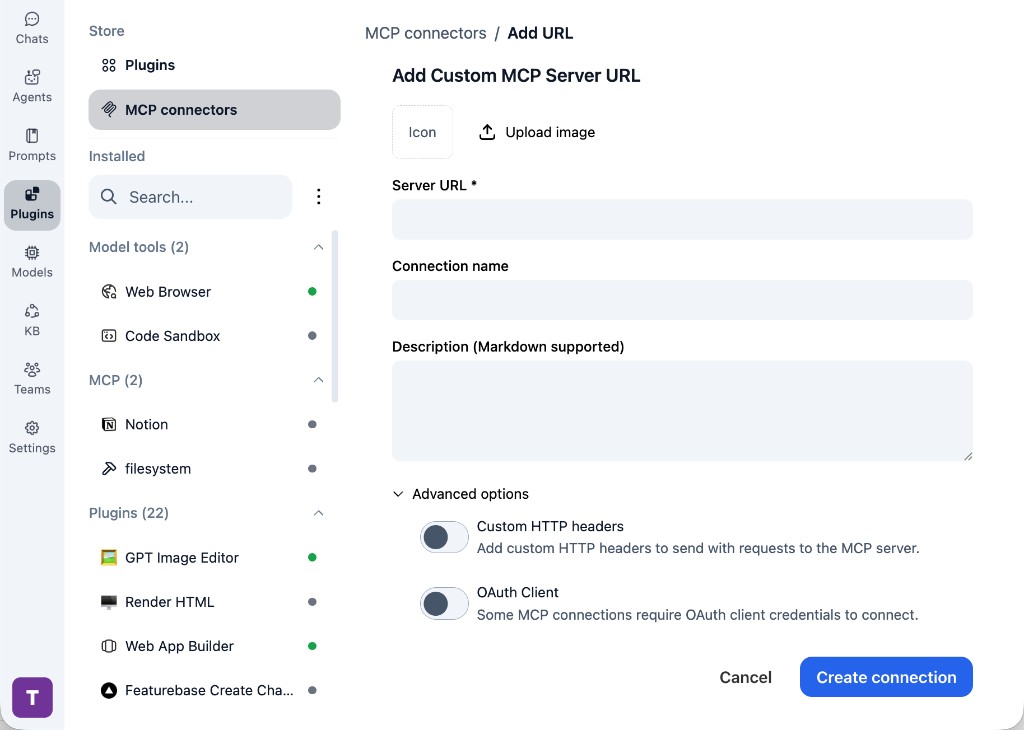
In TypingMind, go to Plugins, open MCP connectors, then choose Add URL.

  1. Open TypingMind in your browser.
  2. Go to Plugins.
  3. Open MCP connectors.
  4. Click Add URL.
TypingMind Add Custom MCP Server URL form
2

Paste the server URL

Enter your server URL in the Server URL field. Add a connection name, description, icon, custom HTTP headers, or OAuth client settings if the server requires them.

  1. Paste your server URL into the Server URL field.
  2. Enter a connection name for Sequential Thinking.
  3. Add a description and icon if you want it to be easier to identify.
  4. Add custom HTTP headers or OAuth client details if the server requires authentication.
3

Create the connection

Click Create connection, then return to the Plugins list and confirm the new MCP connection is active.

  1. Click Create connection.
  2. Return to the MCP connectors list.
  3. Confirm the Sequential Thinking connection appears as active.
  4. Refresh the plugin list if the connection does not appear immediately.
4

Switch models without reconnecting

Start a chat with your preferred model, enable the Sequential Thinking tools from Plugins, and switch to another model whenever needed. The MCP connection stays available to the TypingMind workspace.

  1. Start a new chat in TypingMind.
  2. Select the AI model you want to use.
  3. Enable the Sequential Thinking tools from Plugins.
  4. Ask the model to use the tool when needed.
  5. Switch to another AI model and reuse the same MCP connection.
TypingMind chat using enabled MCP tools with a selected AI model
Can you use Sequential Thinking to help me with this task?
Sequential Thinking
Sure. I read it.
Here is what I found using Sequential Thinking.

Frequently asked questions

What is the Sequential Thinking MCP server used for?

Sequential Thinking is an MCP server that lets compatible AI clients connect to external tools and context. In TypingMind, you can add this MCP server once and make its tools available in your AI workspace.

Can I use Sequential Thinking MCP with multiple AI models in TypingMind?

Yes. TypingMind connects MCP tools at the workspace level, so you can use Sequential Thinking with different AI models such as Claude, ChatGPT, Gemini, or other models you have configured in TypingMind without setting up the MCP server separately for each model.

Why use Sequential Thinking MCP with TypingMind?

TypingMind is one of the best frontends for LLM chat because it brings multiple AI models, prompts, plugins, AI agents, API keys, and MCP tools into one workspace. With Sequential Thinking connected, you can use its MCP tools across your preferred models while keeping your chat workflow organized in TypingMind.

How do I connect Sequential Thinking MCP to TypingMind?

Sequential Thinking can be connected in TypingMind with the local MCP connector or by adding a remote MCP server URL. Use the local connector when the server needs access to files, apps, or private resources on your device, and use a server URL when the MCP server is hosted remotely.

What tools does Sequential Thinking MCP provide in TypingMind?

Sequential Thinking exposes 1 MCP tools that can be enabled from the TypingMind Plugins page and used in chat or assigned to AI agents.

Do I need to share my API keys with TypingMind to use Sequential Thinking MCP?

No. TypingMind is local-first and lets you keep your model providers, API keys, prompts, and MCP configuration under your control. If Sequential Thinking requires authentication, add the required headers, OAuth settings, or local configuration for that MCP server when you create the connection.

Related MCP Servers

View all

Set up your own AI workspace now

Get notified about new features and future giveaways by subscribing to our newsletter 👇