Svelte logo

Svelte

Organization
sveltejs

The official svelte MCP for all your agentic needs.

Publishersveltejs
Repositorymcp
LanguageTypeScript
Forks
31
Stars
250
Available tools
4
Transport typestreamable-http
Categories
LicenseMIT
Links
  • Connect tools to AI workflows

    Svelte exposes MCP capabilities that can be used by compatible AI clients and agents.

  • 4 available tools

    Browse the callable actions below, including names and descriptions when provided by the server.

  • Ready-to-copy setup

    Use the installation snippets to configure this server in your preferred MCP client.

  • Open source signals

    250 stars and 31 forks from the linked repository.

@sveltejs/mcp

Repo for the official Svelte MCP server.

Dev setup instructions

pnpm i
cp apps/mcp-remote/.env.example apps/mcp-remote/.env
pnpm dev
  1. Set the VOYAGE_API_KEY for embeddings support

[!NOTE] Currently to prevent having a bunch of Timeout logs on vercel we shut down the SSE channel immediately. This means that we can't use server.log and we are not sending list-changed notifications. We can use elicitation and sampling since those are sent on the same stream of the POST request

Local dev tools

MCP inspector

pnpm run inspect

Then visit http://localhost:6274/

Database inspector

pnpm run db:studio

https://local.drizzle.studio/

Installation

TypingMind
{
  "mcpServers": {
    "svelte": {
      "url": "https://mcp.svelte.dev/mcp",
      "env": null
    }
  }
}

Available Tools

  • get-documentation

    Retrieves full documentation content for Svelte 5 or SvelteKit sections. Supports flexible search by title (e.g., "$state", "routing") or file path (e.g., "cli/overview"). Can accept a single section name or an array of sections. Before running this, make sure to analyze the users query, as well as the output from list-sections (which should be called first). Then ask for ALL relevant sections the user might require. For example, if the user asks to build anything interactive, you will need to fetch all relevant runes, and so on. Before calling this tool, try to implement Svelte components using your own knowledge and the svelte-autofixer tool, since calling this tool is token intensive.

  • list-sections

    $2e

  • playground-link

    Generates a Playground link given a Svelte code snippet. Once you have the final version of the code you want to send to the user, ALWAYS ask the user if it wants a playground link to allow it to quickly check the code in the playground before calling this tool. NEVER use this tool if you have written the component to a file in the user project. The playground accept multiple files so if are importing from other files just include them all at the root level.

  • svelte-autofixer

    Given a svelte component or module returns a list of suggestions to fix any issues it has. This tool MUST be used whenever the user is asking to write svelte code before sending the code back to the user

Use Svelte MCP with multiple AI models

TypingMind connects MCP tools at the workspace level, so once Svelte is connected, you can use it with different AI models in TypingMind instead of setting it up separately for each model. This MCP connects through a hosted MCP server URL in TypingMind.

Add an MCP server URL

Use this when Svelte is already hosted remotely or your team wants one shared connector that multiple users can access.

1

Open MCP connectors

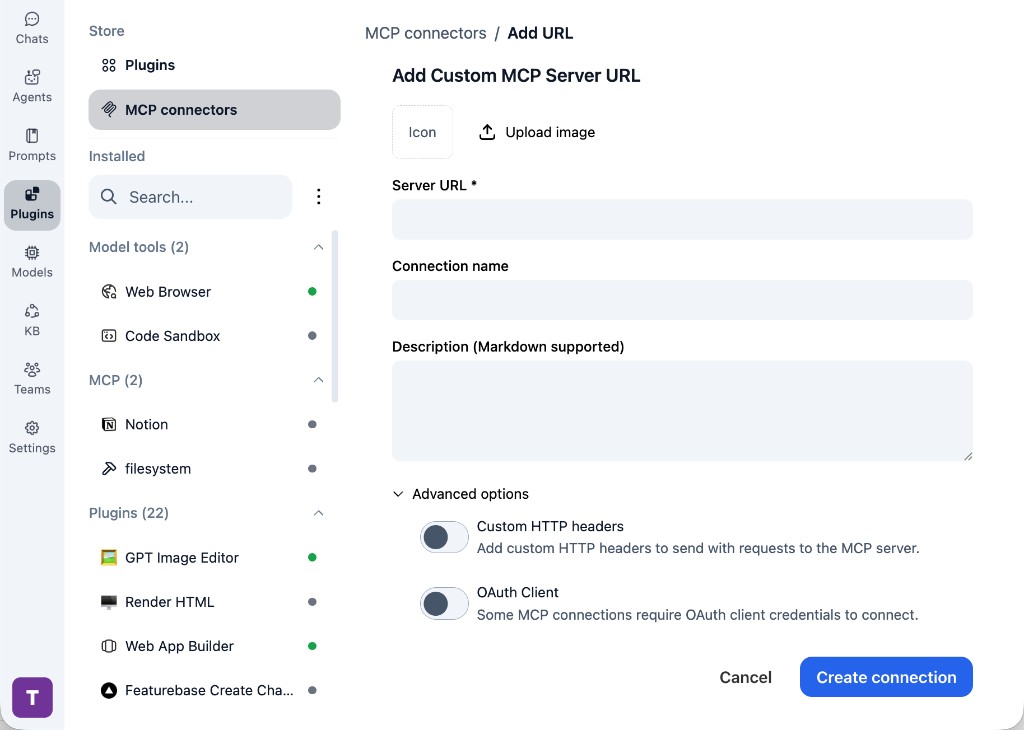
In TypingMind, go to Plugins, open MCP connectors, then choose Add URL.

  1. Open TypingMind in your browser.
  2. Go to Plugins.
  3. Open MCP connectors.
  4. Click Add URL.
TypingMind Add Custom MCP Server URL form
2

Paste the server URL

Enter https://mcp.svelte.dev/mcp in the Server URL field. Add a connection name, description, icon, custom HTTP headers, or OAuth client settings if the server requires them.

  1. Paste https://mcp.svelte.dev/mcp into the Server URL field.
  2. Enter a connection name for Svelte.
  3. Add a description and icon if you want it to be easier to identify.
  4. Add custom HTTP headers or OAuth client details if the server requires authentication.
3

Create the connection

Click Create connection, then return to the Plugins list and confirm the new MCP connection is active.

  1. Click Create connection.
  2. Return to the MCP connectors list.
  3. Confirm the Svelte connection appears as active.
  4. Refresh the plugin list if the connection does not appear immediately.
4

Switch models without reconnecting

Start a chat with your preferred model, enable the Svelte tools from Plugins, and switch to another model whenever needed. The MCP connection stays available to the TypingMind workspace.

  1. Start a new chat in TypingMind.
  2. Select the AI model you want to use.
  3. Enable the Svelte tools from Plugins.
  4. Ask the model to use the tool when needed.
  5. Switch to another AI model and reuse the same MCP connection.
TypingMind chat using enabled MCP tools with a selected AI model
Can you use Svelte to help me with this task?
Svelte
Sure. I read it.
Here is what I found using Svelte.

Frequently asked questions

What is the Svelte MCP server used for?

Svelte is an MCP server that lets compatible AI clients connect to external tools and context. In TypingMind, you can add this MCP server once and make its tools available in your AI workspace.

Can I use Svelte MCP with multiple AI models in TypingMind?

Yes. TypingMind connects MCP tools at the workspace level, so you can use Svelte with different AI models such as Claude, ChatGPT, Gemini, or other models you have configured in TypingMind without setting up the MCP server separately for each model.

Why use Svelte MCP with TypingMind?

TypingMind is one of the best frontends for LLM chat because it brings multiple AI models, prompts, plugins, AI agents, API keys, and MCP tools into one workspace. With Svelte connected, you can use its MCP tools across your preferred models while keeping your chat workflow organized in TypingMind.

How do I connect Svelte MCP to TypingMind?

Svelte can be connected in TypingMind by adding its hosted MCP server URL. This is useful when you want a remote MCP connection that is available from your TypingMind workspace.

What tools does Svelte MCP provide in TypingMind?

Svelte exposes 4 MCP tools that can be enabled from the TypingMind Plugins page and used in chat or assigned to AI agents.

Do I need to share my API keys with TypingMind to use Svelte MCP?

No. TypingMind is local-first and lets you keep your model providers, API keys, prompts, and MCP configuration under your control. If Svelte requires authentication, add the required headers, OAuth settings, or local configuration for that MCP server when you create the connection.

Related MCP Servers

View all

Set up your own AI workspace now

Get notified about new features and future giveaways by subscribing to our newsletter 👇