CloudBase AI Toolkit
AI writes the code. CloudBase runs the backend.
The CloudBase integration layer for AI coding tools: Plugin installs the stack, Skills steer how code is written, MCP operates databases, functions, storage, and deploys from chat.
English · 简体中文 · Docs · Changelog · Issues



Recent updates
v2.34.x (2026-09)
- i18n / IDE: full tool-copy localization with an instance-level
lang, plusauthsite/regionparams so international-site login and region routing resolve correctly - Cloud API:
callCloudApiservice allowlist widened to 57 with built-in version mapping (multi-version services such astke/mongodb/vodrequire an explicitversion) - Deploy / Env: new
appBuildtool with hosting build neutralization;queryEnvreports the region actually applied anddomainshonors a passed envId - Skills / Docs: skill fallback reads now point at the official distribution repo with a references address list; SDK-first database decision gate for cloudrun; site doc links moved to the current Markdown addresses; post-deployment share offered after delivery in the expert packs and the deploy skills (opt-in, redacted, at most once)
- Deploy / Apps: the cloud upload channel now completes end to end (
deployAppaccepts the timestampgetUploadUrlreturns,getBuildLogaccepts the build ID a deploy returns), and gateway route creation verifies the upstream exists before writing - Skills / Context: new PostgreSQL access-pattern best-practices skill (batching, indexes, RLS role gating, launch capacity);
searchKnowledgeBase's inline skill / OpenAPI catalogs now load on demand, cutting the 43-tool surface by 9.1% on everytools/list - Runtime / Hosting: CloudRun Function mode must not bind
PORT(the function framework does) and gets a credential decision gate namingCLOUDBASE_APIKEY; hosting paths and prefixes are normalized so a leading slash can no longer read as an empty directory - Connectors: the international-site WorkBuddy connector (
cloudbase-intl) is built from the sameconfig/source/**corpus as the domestic one — remotestreamableHttpwith standard MCP OAuth instead of local stdio, with China-site hosts rewritten to their international equivalents
v2.33.x (2026-09)
- Functions / Apps: custom container-image deploy for cloud functions with async status query; cloud upload channel (
getUploadUrl+deployAppcosTimestamp) - Env binding:
cloudbaserc.jsonas field-level fallback for envId / region / site (literal +{{env.KEY}}) - Errors / Skills: centralized error guidance by structured
Code; virtual-pay reference; CodeBuddy IDE MCP upgrade skill; WorkBuddy experts - Cloud API / Deploy:
callCloudApiopens monitor & postgres services; declarative deploy withdeployPlan/deployApply;cloud-api-operationsskill
Releases · Star · Watch → Releases
What it is
AI IDEs (Cursor, Claude Code, Codex, CodeBuddy, and others) are strong at generating code. What usually blocks you is the backend: schemas, permissions, functions, storage, environments, and release.
CloudBase is Tencent Cloud’s AI-native all-in-one backend (database, storage, auth, cloud functions, Cloud Run, and more). This repo is the Toolkit that connects that backend to AI tools:
| Piece | Role |
|---|---|
| Plugin | Installs MCP Server, Agent Skills, and Hooks together—less per-IDE wiring |
| Agent Skills | Scenario skills (Web / Mini Program / database / auth / functions, etc.) toward workable CloudBase practice |
| MCP | Login, query and change data, manage functions and hosting, read logs—from the conversation |
This repository ships the npm package @cloudbase/cloudbase-mcp, Skills, and AI plugins.
You still need your own CloudBase environment, and you should confirm sensitive actions the AI proposes. The Toolkit provides capability and path—not judgment.
Related repositories
Publishing and sync repos live under TencentCloudBase. Directly related to this Toolkit:
| Repository | Contents | Typical entry |
|---|---|---|
| CloudBase-AI-Toolkit (this repo) | MCP Server source; marketplace source for Claude Code / Codex | npx @cloudbase/cloudbase-mcp@latest |
| dsh-plugin | DeepSeek Harness plugin (@cloudbase/dsh-plugin): MCP bridge + DB/Storage/Auth panel | dsh plugin add @cloudbase/dsh-plugin |
| cloudbase-plugin | Open Plugin Spec publish repo (CI-synced): MCP + Skills + Hooks | npx plugins add TencentCloudBase/cloudbase-plugin · CNB fallback: npx plugins add https://cnb.cool/tencent/cloud/cloudbase/cloudbase-plugin.git |
| cloudbase-sites-plugin | Sites plugin: Vite Web create & deploy | npx plugins add TencentCloudBase/cloudbase-sites-plugin · CNB: https://cnb.cool/tencent/cloud/cloudbase/cloudbase-sites-plugin.git |
| cloudbase-skills | Agent Skills collection | npx skills add TencentCloudBase/cloudbase-skills · CNB: https://cnb.cool/tencent/cloud/cloudbase/cloudbase-skills.git |
| skills | Per-skill install catalog (also on skills.sh) | npx skills add tencentcloudbase/skills --skill <name> |
| awesome-cloudbase-examples | CloudBase examples and case studies | Browse / clone examples |
| OpenVibeCoding | Vibecoding template on CloudBase | Use as a project starter |
Prefer Plugin for the full stack; Skills alone when you only need knowledge constraints. For marketplace IDEs use this repo—do not also run npx plugins add on the same tool.
Quick start
Fastest way to get started
Copy this AI prompt into your AI IDE. The agent reads skill.md and completes the setup:
Set up CloudBase for me: 1. Open https://docs.cloudbase.net/skill.md and complete the setup following its instructions. 2. Tell me when you're done, and suggest the most relevant next step.
| Your tool | Suggested path |
|---|---|
| Claude Code / Codex (native marketplace) | Add this repo as marketplace, then install the cloudbase plugin (plugin docs) |
| Open Plugin Spec tools | npx plugins add TencentCloudBase/cloudbase-plugin |
| Prefer one CLI for many tools | CloudBase AI CLI: npm i -g @cloudbase/cli && tcb ai |
| CodeBuddy / WorkBuddy / ZCode / Kimi (built-in) | Use the IDE's built-in CloudBase plugin or connector; for CodeBuddy you can also install via plugin marketplace |
| Other MCP-capable IDEs | MCP config only (below) |
Plugin
bashnpx plugins add TencentCloudBase/cloudbase-plugin
Details and IDE differences: AI plugin docs.
MCP only
json{ "mcpServers": { "cloudbase": { "command": "npx", "args": ["@cloudbase/cloudbase-mcp@latest"] } } }
Remote HTTP, self-hosted Cloud Mode, and plugin scoping: Install & connect.
First prompts
Login to CloudBase
Use CloudBase Skills to build a todo app with login, database and permissions, then deploy
Skills shape structure and practice; MCP handles environment and resources. You should be able to verify data and APIs in your own environment—not only get local source files.
Supported AI IDEs
| Tool | Platform | Guide |
|---|---|---|
| CloudBase AI CLI | CLI | Guide |
| OpenClaw | CLI | Guide |
| WorkBuddy | Standalone IDE | Guide |
| ZCode | Standalone IDE (≥ 3.4.1 built-in) | Guide |
| Kimi Code | CLI (plugin marketplace) | Guide |
| Kimi Work | Desktop app (plugin panel) | Guide |
| Codex App | App | Guide |
| Cursor | Standalone IDE | Guide |
| WindSurf | IDE / plugins | Guide |
| CodeBuddy | Standalone IDE (built-in) | Guide |
| CLINE | VS Code plugin | Guide |
| GitHub Copilot | VS Code plugin | Guide |
| Trae | Standalone IDE | Guide |
| Tongyi Lingma | IDE / plugins | Guide |
| RooCode | VS Code plugin | Guide |
| Baidu Comate | Plugins | Guide |
| Augment Code | Plugins | Guide |
| Claude Code | CLI | Guide |
| Gemini CLI | CLI | Guide |
| Codex CLI | CLI | Guide |
| OpenCode | CLI | Guide |
| Qwen Code | CLI | Guide |
Full setup: IDE guides.
Capabilities
After setup, the AI can do typical backend work in your environment (confirm critical steps):
- Database: PostgreSQL and document DB, data models, CRUD, permissions and security rules
- Compute: author, deploy, invoke, and debug cloud functions / Cloud Run
- Auth & storage: login methods, object storage, permission linkage with data
- Release & ops: static hosting / Mini Program publish; inspect logs and redeploy
Fits Web, WeChat Mini Programs, and backend services. Platform overview: CloudBase docs.
Evaluation
Under controlled conditions, the same Todo application brief and frontend scaffold were used to compare two backend paths: a traditional cloud VM (self-managed runtime, process, and network exposure) and CloudBase (managed database, anonymous auth, and related backend services). An AI agent performed end-to-end development and verification. Given the model and task setup, the CloudBase path was more favorable in completion latency, token usage, and tool-call count. These outcomes are conditioned on the model, agent framework, and task definition, and should not be generalized beyond that scope.
Methods, data, and limits: Same-task evaluation: cloud VM vs CloudBase
Install & connect
Prerequisites
- Node.js v18.15.0+
- A CloudBase environment
- An AI tool that supports Plugin / Skills / MCP
Setup options
- Plugin (when the tool supports it)
npx plugins add TencentCloudBase/cloudbase-plugin - CloudBase AI CLI
npm i -g @cloudbase/cli && tcb ai - Manual MCP (write the IDE config file)
json{ "mcpServers": { "cloudbase": { "command": "npx", "args": ["@cloudbase/cloudbase-mcp@latest"] } } }
json{ "mcpServers": { "cloudbase": { "command": "npx", "args": ["@cloudbase/cloudbase-mcp@latest"] } } }
CloudBase is built in (MCP / Skills); manual config is usually unnecessary.
You can also install via the plugin marketplace: see the CodeBuddy setup guide.
Others: IDE setup guide.
MCP connection modes
Remote (recommended): your IDE connects over HTTP to Tencent Cloud MCP. No local Node, and interactive clients finish authorization in the browser.
| Site | MCP endpoint |
|---|---|
| China (domestic) | https://tcb-api.cloud.tencent.com/mcp/v1 |
| International | https://tcb-api.tencentcloud.com/mcp/v1 |
Pick the endpoint matching the site your environment lives in—the two sites use separate accounts, consoles, and credentials.
Local: runs npx @cloudbase/cloudbase-mcp@latest on your machine—full features, including local filesystem upload and template download.
json{ "mcpServers": { "cloudbase": { "type": "http", "url": "https://tcb-api.cloud.tencent.com/mcp/v1?env_id=<env_id>", "headers": { "X-TencentCloud-SecretId": "<Tencent Cloud Secret ID>", "X-TencentCloud-SecretKey": "<Tencent Cloud Secret Key>" } } } }
Remote auth takes one of two paths:
- OAuth (interactive, recommended): add the URL only. Your IDE opens the browser for login and consent—no keys in config files.
- Static credentials (CI/CD): add
env_idwith theX-TencentCloud-*headers above.
Remote trade-off: local-filesystem features (upload, template download) are unavailable, and the international site does not yet expose NoSQL tools.
Remote URLs also accept site (domestic / intl, only needed for a China-site environment in ap-singapore, where the region is ambiguous), plus enable_plugins / disable_plugins to trim tools. Canonical names live in mcp/src/server.ts.
Remote MCP E2E (official SDK client): npm run test:hosted-mcp:e2e — see tests/hosted-mcp-e2e/README.md for apikey/OAuth modes, TLS-insecure staging, and env vars. Missing credentials skip (exit 0).
Self-hosted Cloud Mode: set CLOUDBASE_MCP_CLOUD_MODE=true (or MCP_CLOUD_MODE=true) so local file and process tools are disabled for remote callers.
| Scenario | Suggestion |
|---|---|
| Personal / fastest start | Remote URL (OAuth) |
| Need local file features | Local npx |
| CI / automation | Remote + static credentials |
| Self-hosted MCP | Cloud Mode required |
Example
Online Gomoku: describe the need; get Web + cloud database / realtime and deploy.
Demo: Gomoku · More: tutorials
Docs
FAQ
Those focus on shipping frontends or containers. CloudBase provides backend building blocks (database, auth, functions). The Toolkit lets AI tools use them in chat. Deploy is only part of the path.
Yes. Any tool that can configure an MCP Server or install the matching Plugin / Skills works—including Claude Code, Gemini CLI, OpenCode. Support list
Deploy targets your own CloudBase environment. In local mode MCP runs on your machine; code need not leave until you deploy. Cloud traffic uses HTTPS.
Local npx is equivalent to running tools yourself. For remote hosts, set CLOUDBASE_MCP_CLOUD_MODE=true to disable local file/process tools. Tencent Cloud remote HTTP includes this protection.
The Toolkit (including MCP) is open source under MIT. CloudBase has free quotas; usage beyond that is billed—see billing.
Confirm an environment exists and is healthy in the console, then login again and pick the right one.
Both the domestic site (cloud.tencent.com) and the international site (tencentcloud.com) offer the ap-singapore region, so region alone is ambiguous. Without an explicit site, MCP defaults to intl for ap-singapore (backward compatible). Domestic-site Singapore users must set TCB_SITE=domestic (together with TCB_REGION=ap-singapore) in the MCP env, or add a .cloudbase/project.json at the project root:
json{ "site": "domestic", "region": "ap-singapore", "envId": "your-env-id" }
Credentials are stored per site (credential.domestic / credential.intl) so domestic and international logins can coexist; legacy single-slot auth.json is read as domestic and migrated on first write.
Remote mode: nothing extra to pass — the endpoint host decides the site (tcb-api.cloud.tencent.com = China site, tcb-api.tencentcloud.com = international site), and there is no site query parameter. This also covers a China-site environment located in ap-singapore: keep using the China-site endpoint.
Community
| Docs | docs.cloudbase.net |
| Issues | GitHub Issues |
| Releases | Changelog |
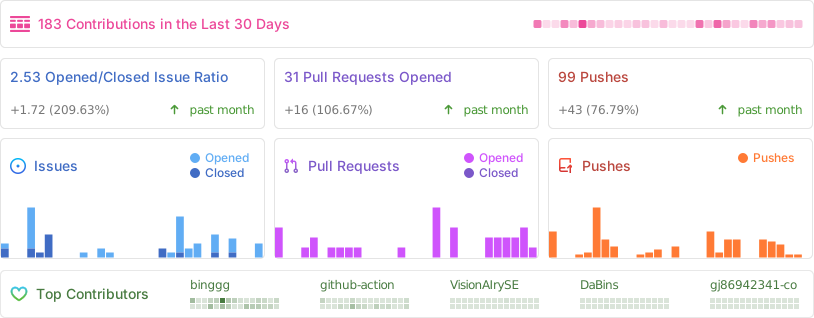
Activity