
 TypingMind×
 Hugging Face
 Ann Ng
Use GLM-4.7 on Hugging Face with your own API key on TypingMind
Hugging Face Inference is a managed service that gives you access to thousands of open-source AI models — including Meta Llama, Mistral, Qwen, DeepSeek, and more — through a single OpenAI-compatible API.
Here is how to use GLM-4.7 (zai-org/GLM-4.7) on Hugging Face with TypingMind.
GLM-4.7 Overview
| Model Name | GLM-4.7 |
| Provider | Hugging Face |
| Model ID | zai-org/GLM-4.7 |
| Release Date | Dec 22, 2025 |
| Last Updated | Dec 22, 2025 |
| Knowledge Cutoff | 2025-04 |
| Context Window | 204,800 tokens |
| Max Output | 131,072 tokens |
| Pricing /1M tokens | $0.6 input $2.2 output $0.11 cache read |
| Input Modalities | text |
| Output Modalities | text |
| Capabilities | Open WeightsReasoningTool CallingTemperature Control |
Complete Setup Guide
Create a Hugging Face Account
Go to huggingface.co and create a free account if you don't have one. Hugging Face provides access to thousands of open-source AI models through their Inference API — no complex setup required.
Generate an Access Token
Go to your Hugging Face Access Tokens settings and click "+ Create new token".
Select Fine-grained as the token type and give it a name (e.g. "typingmind"). Under the Inference section, enable the following permissions:
- ✅ Make calls to Inference Providers — required to use Hugging Face hosted models
- ☑️ Make calls to your Inference Endpoints — optional, for dedicated endpoints
- ☑️ Manage your Inference Endpoints — optional, for endpoint management
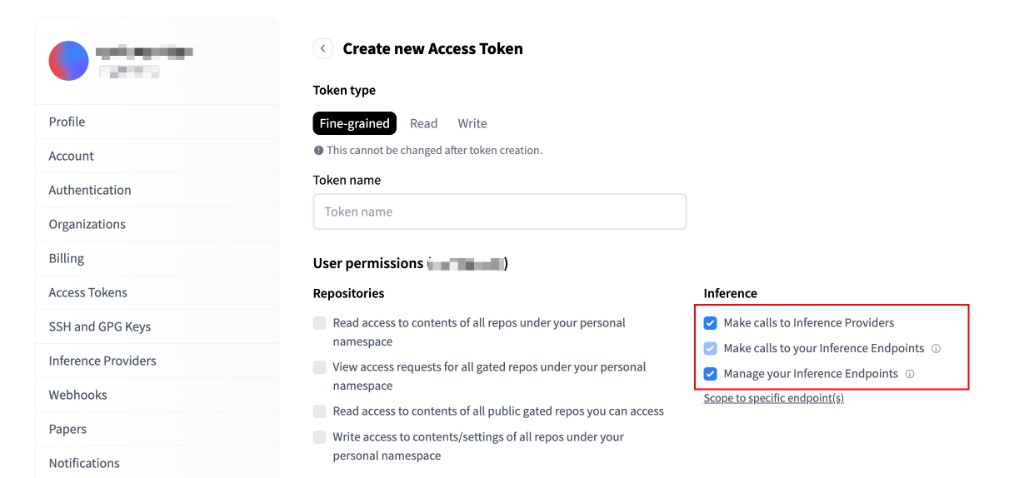
Click "Create token" and copy the generated token — you'll need it in the next step.
⚠️ Important: Keep your access token secure and never share it publicly. Store it safely as you'll need it to connect with TypingMind.
Add a Custom Model to TypingMind
Go to typingmind.com, click the Models tab on the left workspace bar, then click "Add Custom Model" in the top right corner.
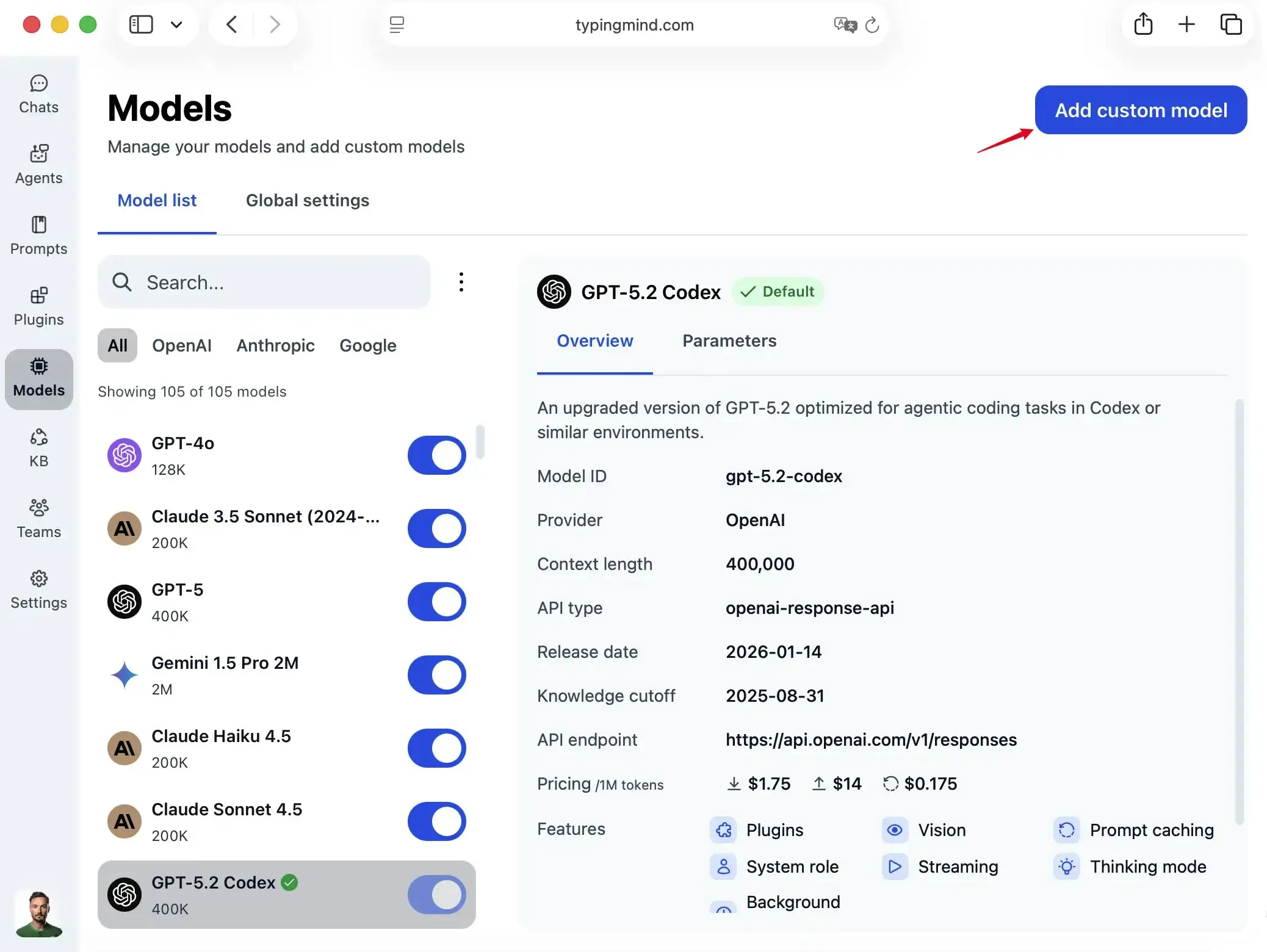
Select "Create Manually" as the creation method.
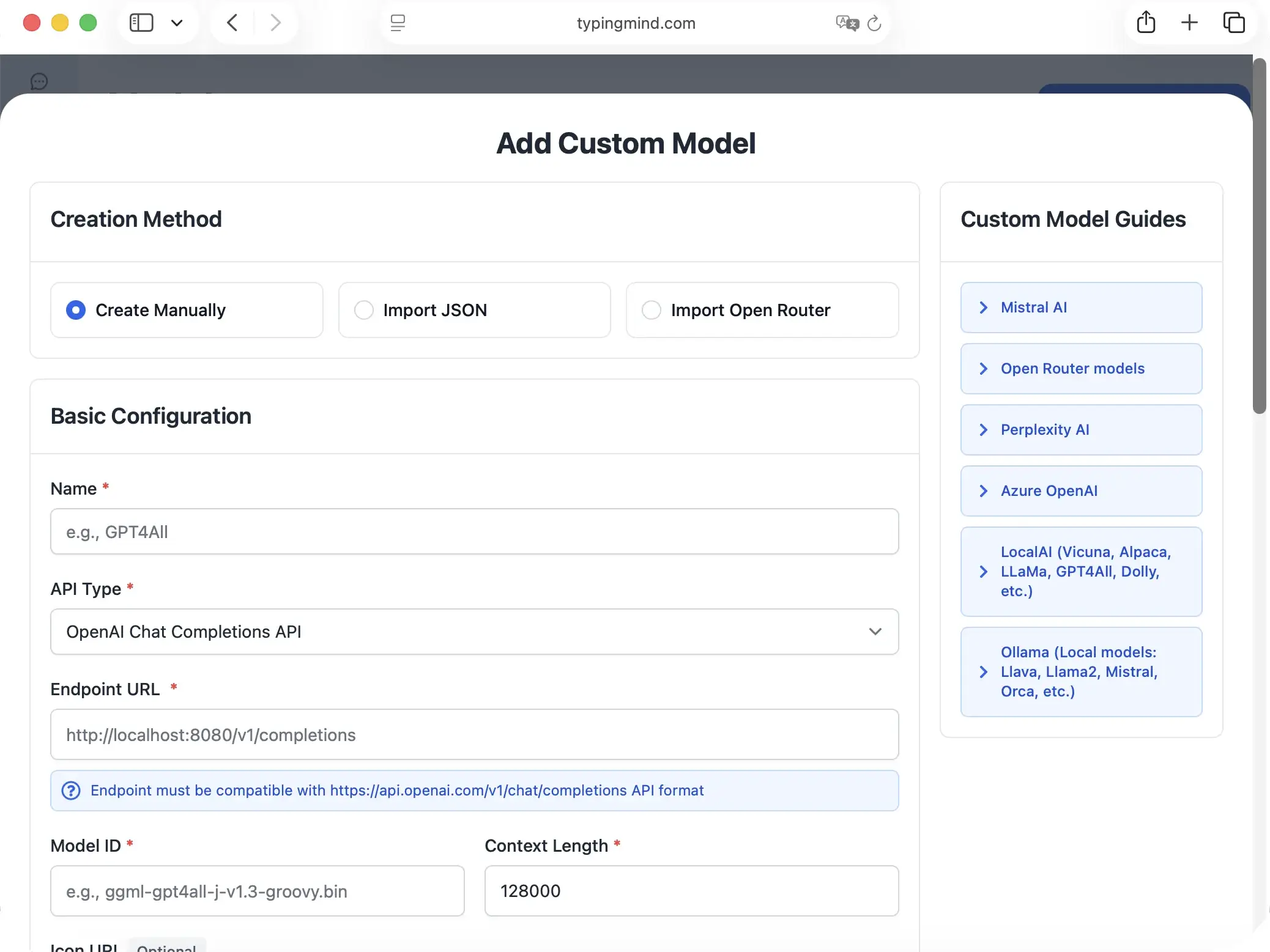
Fill in the following fields:
| Field | Value |
|---|---|
| Name | HuggingFace GLM-4.7(or any name you prefer) |
| API Type | OpenAI Chat Completions API |
| Endpoint URL | https://router.huggingface.co/v1/chat/completions |
| Model ID | zai-org/GLM-4.7 |
| Context Length | 204,800for GLM-4.7 |
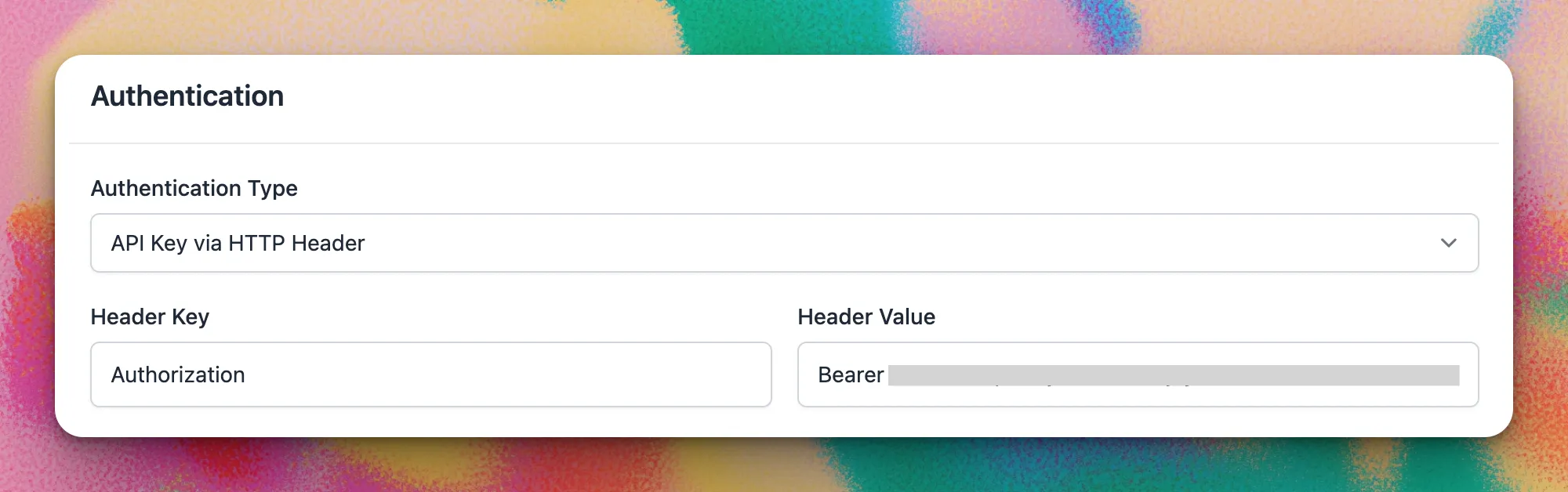
Scroll down to the Authentication section and set:
| Field | Value |
|---|---|
| Authentication Type | API Key via HTTP Header |
| Header Key | Authorization |
| Header Value | Bearer {{API key}} |
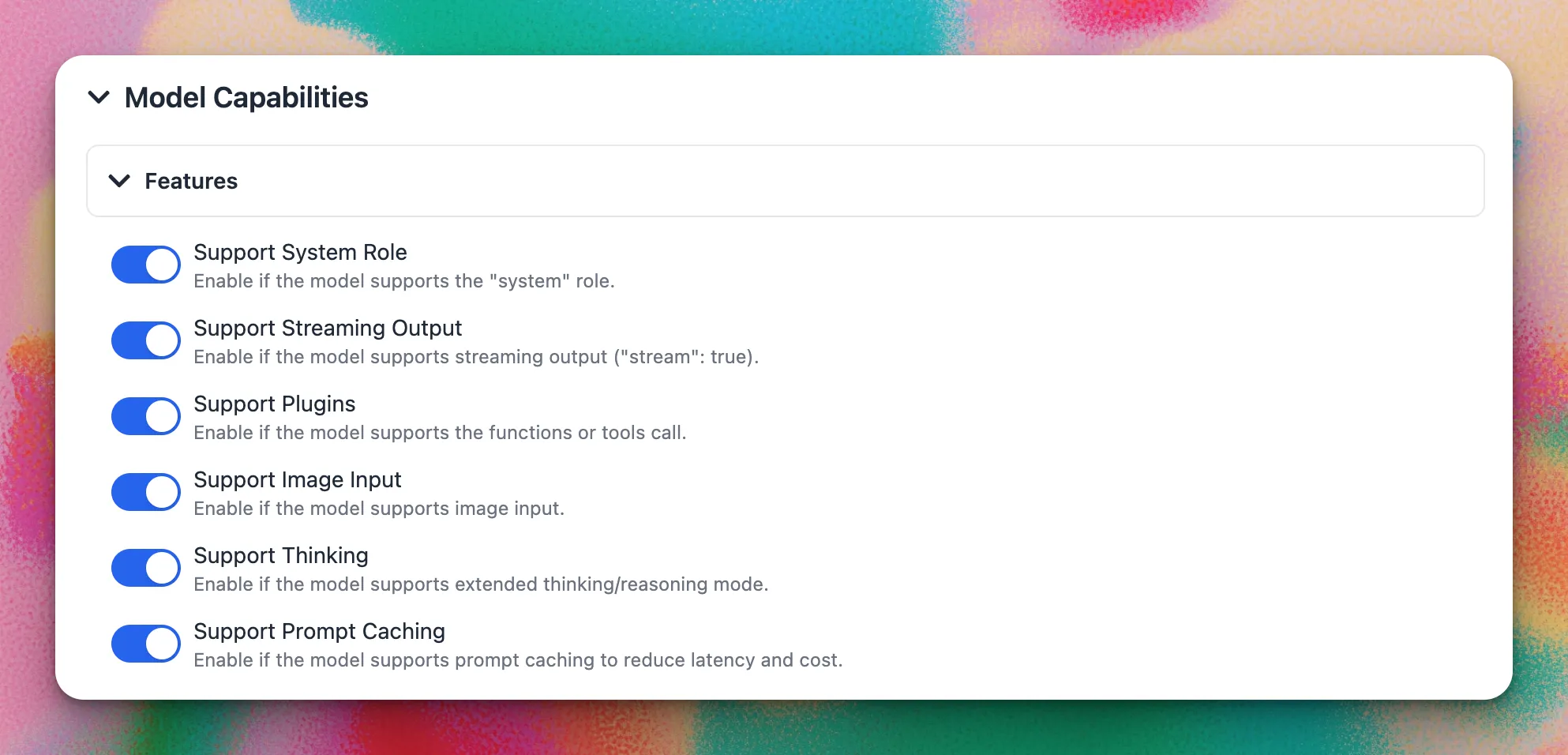
Under Model Capabilities, enable the features supported by your chosen model:
- ✅ Support System Role — recommended for most models
- ✅ Support Streaming Output — recommended for all models
- ☑️ Support Plugins — enable if the model supports function/tool calling
- ☑️ Support Image Input — enable for vision-capable models
- ☑️ Support Thinking — enable for reasoning/thinking models
After filling in all fields, click "Test". If everything is set up correctly, you will see the message "Nice, the endpoint is working!"
Click "+ Add Model" to finish.
Use the Model
Now you can select your newly added Hugging Face model from the model picker and start chatting!
- Select GLM-4.7 from the model dropdown menu
- Start typing your message in the chat input
- Enjoy faster responses and better features than the official interface
- Switch between different AI models as needed
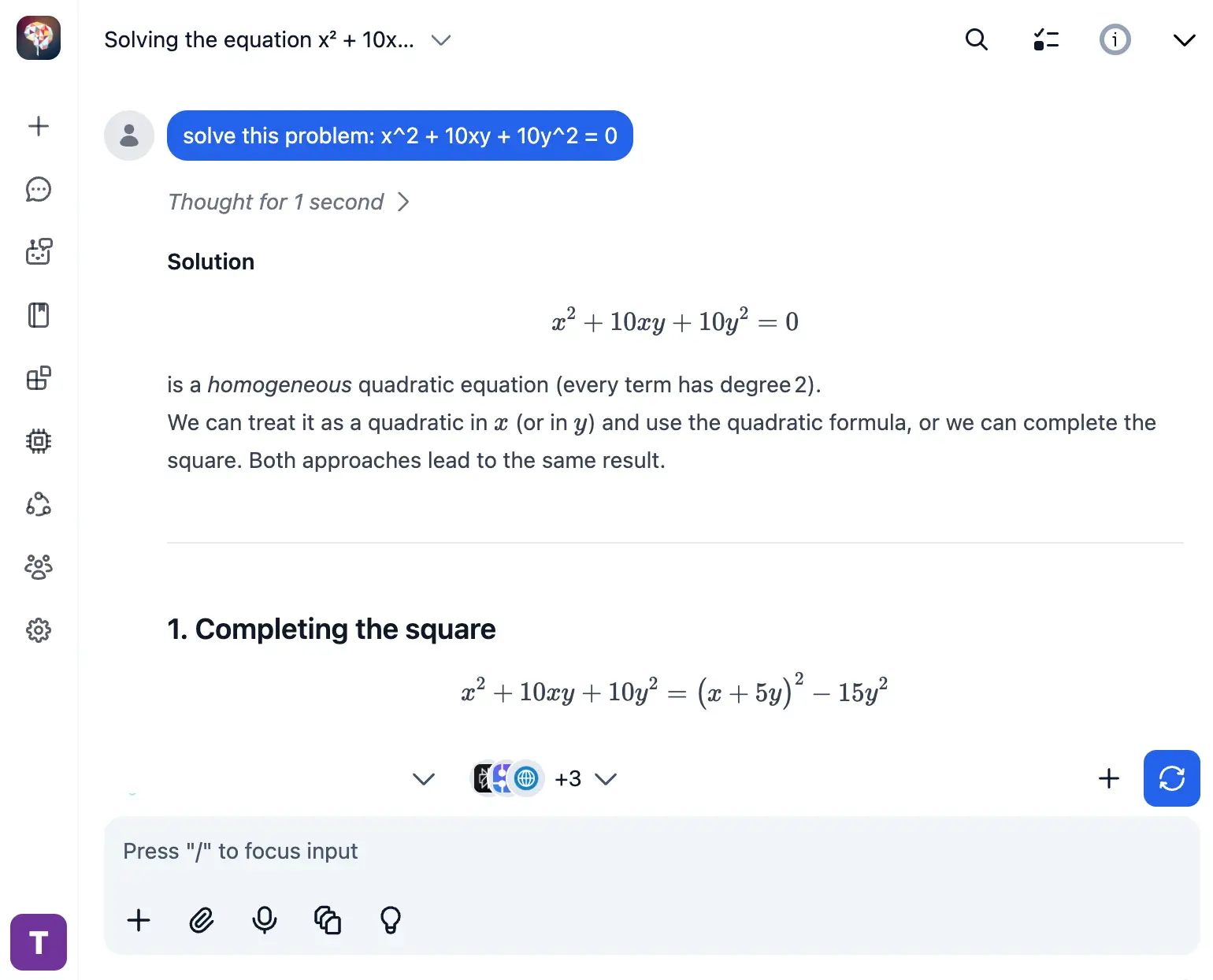 HuggingFace GLM-4.7
💡 Pro tips for better results:
- Use specific, detailed prompts for better responses (How to use Prompt Library)
- Create AI agents with custom instructions for repeated tasks (How to create AI Agents)
- Use plugins to extend GLM-4.7 capabilities (How to use plugins)
Hugging Face FAQ
Why use GLM-4.7 on Hugging Face with TypingMind instead of the official Hugging Face interface?
Hugging Face's web interface is built for model exploration and research — not for everyday AI chat. TypingMind gives you a polished, full-featured chat interface on top of Hugging Face Inference: conversation history, prompt library, AI agents, plugin support, file uploads, and more. You bring your own HF access token and pay only for what you use, with no TypingMind subscription required.
Do I need a Hugging Face subscription to use GLM-4.7?
No subscription required for many models. Hugging Face offers a free tier with rate limits, and a PRO plan ($9/month) for higher usage. Many open-weight models are completely free to use. You only pay for inference on paid models. TypingMind is also a one-time purchase, not a subscription.
How much does it cost to use GLM-4.7 via Hugging Face?
GLM-4.7 on Hugging Face costs $0.6/1M input tokens and $2.2/1M output tokens (cache read: $0.11/1M tokens). Many open-weight models are free to use. You can monitor usage in your Hugging Face billing dashboard.
What is Hugging Face Inference and how does it work with TypingMind?
Hugging Face Inference is a managed service that lets you run thousands of open-source AI models via a simple OpenAI-compatible API. TypingMind lets you connect to Hugging Face using your own access token, so you can chat with models like GLM-4.7 directly — without any intermediary subscription.
Can I use other Hugging Face models besides GLM-4.7 in TypingMind?
Yes! Hugging Face gives you access to thousands of open-source models from Meta, Mistral, Qwen, DeepSeek, and more. You can add multiple models as custom models in TypingMind and switch between them instantly in any conversation.
Is my data private when using Hugging Face with TypingMind?
Yes. TypingMind stores your conversations locally — in your browser (web) or on your device (desktop app). Hugging Face processes inference requests through their secure infrastructure. Your data never passes through TypingMind servers.
What token permissions do I need for the Hugging Face access token?
You need a Fine-grained token with "Make calls to Inference Providers" permission enabled under the Inference section. Optionally, you can also enable "Make calls to your Inference Endpoints" if you use dedicated endpoints.
Can I use GLM-4.7 on Hugging Face for commercial projects?
It depends on the model's license. GLM-4.7 is an open-weight model — check its specific license on Hugging Face for commercial use terms. TypingMind supports commercial use.

Use GLM-4.7-Flash from huggingface with API Key
GLM-4.7-Flash from Hugging Face - Context: 200000 tokens

Use GLM-5 from huggingface with API Key
GLM-5 from Hugging Face - Context: 202752 tokens

Use MiMo-V2-Flash from huggingface with API Key
MiMo-V2-Flash from Hugging Face - Context: 262144 tokens

Use MiniMax-M2.5 from huggingface with API Key
MiniMax-M2.5 from Hugging Face - Context: 204800 tokens

Use MiniMax-M2.1 from huggingface with API Key
MiniMax-M2.1 from Hugging Face - Context: 204800 tokens

Use DeepSeek-R1-0528 from huggingface with API Key
DeepSeek-R1-0528 from Hugging Face - Context: 163840 tokens

Use DeepSeek-V3.2 from huggingface with API Key
DeepSeek-V3.2 from Hugging Face - Context: 163840 tokens

Use Kimi-K2-Instruct from huggingface with API Key
Kimi-K2-Instruct from Hugging Face - Context: 131072 tokens

Use Kimi-K2-Instruct-0905 from huggingface with API Key
Kimi-K2-Instruct-0905 from Hugging Face - Context: 262144 tokens

Use Kimi-K2.5 from huggingface with API Key
Kimi-K2.5 from Hugging Face - Context: 262144 tokens

Use Kimi-K2-Thinking from huggingface with API Key
Kimi-K2-Thinking from Hugging Face - Context: 262144 tokens

Use Qwen3-Next-80B-A3B-Instruct from huggingface with API Key
Qwen3-Next-80B-A3B-Instruct from Hugging Face - Context: 262144 tokens
