Reddit MCP Server logo

Reddit MCP Server

Community
eliasbiondo

šŸ”— A zero-config Model Context Protocol (MCP) server for Reddit — search posts, browse subreddits, scrape user activity, and get structured data via any MCP-compatible AI client. No API keys or authentication needed.

Publishereliasbiondo
Repositoryreddit-mcp-server
LanguagePython
Forks
17
Stars
163
Available tools
0
Transport typestdio, streamable-http
Categories
LicenseMIT
Links
  • Connect tools to AI workflows

    Reddit MCP Server exposes MCP capabilities that can be used by compatible AI clients and agents.

  • 0 available tools

    Browse the callable actions below, including names and descriptions when provided by the server.

  • Ready-to-copy setup

    Use the installation snippets to configure this server in your preferred MCP client.

  • Open source signals

    163 stars and 17 forks from the linked repository.

Reddit MCP Server

PyPI License: MIT

A Model Context Protocol (MCP) server that provides AI assistants with access to Reddit data. Built on top of redd. It works without API keys where Reddit allows anonymous access, and can use optional Reddit OAuth credentials where it doesn't.

https://github.com/user-attachments/assets/af8ae52c-f9f3-4d04-80d5-4be0dfa61b0f


Table of Contents

  1. Features
  2. Quick Start
  3. Available Tools
  4. Configuration
  5. Architecture
  6. Contributing
  7. License

1. Features

  • šŸ” Search — Search all of Reddit or within a specific subreddit
  • šŸ“° Subreddit Posts — Browse hot, top, new, or rising posts from any subreddit
  • šŸ“– Post Details — Get full post content with nested comment trees
  • šŸ‘¤ User Activity — View a user's recent posts and comments
  • šŸ“ User Posts — Get a user's submitted posts

No browser required, and API keys are optional. Reddit now blocks unauthenticated requests from many networks (you'll see HTTP 403 ... blocked by network security). If that happens to you, add Reddit API credentials.


2. Quick Start

2.1. Using uvx (recommended)

The fastest way to run the server — no clone needed:

bash
# stdio transport (default, for Claude Desktop / Cursor / etc.)
uvx reddit-no-auth-mcp-server

# HTTP transport
uvx reddit-no-auth-mcp-server \
  --transport streamable-http \
  --port 8000

2.2. From source

bash
git clone https://github.com/eliasbiondo/reddit-mcp-server.git
cd reddit-mcp-server
uv sync

Run the server:

bash
# stdio transport (default)
uv run reddit-no-auth-mcp-server

# HTTP transport
uv run reddit-no-auth-mcp-server \
  --transport streamable-http \
  --port 8000

2.3. MCP Client Configuration

Claude Desktop

Add to your claude_desktop_config.json:

json
{
  "mcpServers": {
    "reddit": {
      "command": "uvx",
      "args": ["reddit-no-auth-mcp-server"]
    }
  }
}

Cursor

Add to your .cursor/mcp.json:

json
{
  "mcpServers": {
    "reddit": {
      "command": "uvx",
      "args": ["reddit-no-auth-mcp-server"]
    }
  }
}

From source (any MCP client)

json
{
  "mcpServers": {
    "reddit": {
      "command": "uv",
      "args": [
        "--directory", "/path/to/reddit-mcp-server",
        "run", "reddit-no-auth-mcp-server"
      ]
    }
  }
}

3. Available Tools

ToolDescriptionKey ArgumentsReturns
searchSearch Reddit for postsquery, limit, sort{"results": [...]}
search_subredditSearch within a subredditsubreddit, query, limit, sort{"results": [...]}
get_postGet post details + comment treepermalinkpost object
get_subreddit_postsGet subreddit listingsubreddit, limit, category, time_filter{"posts": [...]}
get_userGet user's activity feedusername, limit{"items": [...]}
get_user_postsGet user's submitted postsusername, limit, category, time_filter{"posts": [...]}

Every tool returns a JSON object (never a bare array) that matches its advertised outputSchema, so MCP-to-OpenAPI bridges such as mcpo / Open WebUI can validate the response.

Tool Details

search

Search all of Reddit for posts matching a query.

query: "python async programming"
limit: 10
sort: "relevance"  # relevance, hot, top, new, comments

search_subreddit

Search within a specific subreddit.

subreddit: "Python"
query: "web scraping"
limit: 10
sort: "top"

get_post

Get full details of a Reddit post including its comment tree.

permalink: "/r/Python/comments/abc123/my_post/"

get_subreddit_posts

Get posts from a subreddit listing.

subreddit: "MachineLearning"
limit: 25
category: "hot"       # hot, top, new, rising
time_filter: "week"   # hour, day, week, month, year, all

get_user

Get a user's recent public activity (posts and comments).

username: "spez"
limit: 10

get_user_posts

Get a user's submitted posts.

username: "spez"
limit: 10
category: "top"       # hot, top, new
time_filter: "all"    # hour, day, week, month, year, all

4. Configuration

All settings can be configured via environment variables:

VariableDefaultDescription
REDDIT_TRANSPORTstdioMCP transport (stdio, streamable-http)
REDDIT_HOST127.0.0.1Host for HTTP transport
REDDIT_PORT8000Port for HTTP transport
REDDIT_PATH/mcpPath for HTTP transport
REDDIT_LOG_LEVELWARNINGLog level (DEBUG, INFO, WARNING, ERROR)
REDDIT_PROXY—HTTP/HTTPS proxy URL
REDDIT_TIMEOUT10.0Request timeout in seconds
REDDIT_THROTTLE_MIN1.0Min delay between paginated requests (seconds)
REDDIT_THROTTLE_MAX2.0Max delay between paginated requests (seconds)
REDDIT_CLIENT_ID—Reddit app client ID; enables the OAuth API (see 4.1)
REDDIT_CLIENT_SECRET—Reddit app client secret (required together with REDDIT_CLIENT_ID)
REDDIT_USER_AGENTpython:reddit-no-auth-mcp-server:v<version> (...)User-Agent for OAuth API requests

CLI arguments take precedence over environment variables:

bash
uv run reddit-no-auth-mcp-server \
  --transport streamable-http \
  --port 9000 \
  --log-level DEBUG

4.1. Reddit API credentials (optional)

By default the server makes anonymous requests to www.reddit.com, the same JSON endpoints a browser uses. Reddit blocks those from many networks: every tool then fails with HTTP 403: You've been blocked by network security. In that case, use Reddit's official OAuth API with app-only ("userless") credentials. No Reddit account login is involved; the server only reads public data.

  1. Sign in to Reddit and open https://www.reddit.com/prefs/apps.
  2. Click create another app..., choose script, give it a name, and enter any redirect URI (for example http://localhost:8080; it is not used).
  3. Copy the client ID (the string under the app name) and the secret.
  4. Pass them to the server as environment variables:
json
{
  "mcpServers": {
    "reddit": {
      "command": "uvx",
      "args": ["reddit-no-auth-mcp-server"],
      "env": {
        "REDDIT_CLIENT_ID": "your-client-id",
        "REDDIT_CLIENT_SECRET": "your-client-secret"
      }
    }
  }
}

With both variables set, the server gets an access token using the client_credentials grant, refreshes it automatically, and sends all requests to https://oauth.reddit.com. Leave both unset to keep anonymous access. Setting only one of them is an error.

Notes:

  • Reddit's API rules apply, including its OAuth rate limits (about 100 requests per minute per client). Depending on Reddit's current policy, a new app may need approval before its credentials work.
  • Reddit asks API clients to send a descriptive User-Agent. Set REDDIT_USER_AGENT to identify yourself, e.g. python:my-reddit-mcp:v1.0 (by /u/your_username).
  • An HTTP 401 error or "OAuth authentication failed" means the client ID or secret is wrong.

4.2. stdio and the FastMCP banner

With the default stdio transport, the server turns off FastMCP's startup banner, so the only output is JSON-RPC on stdout and logs on stderr. Some MCP clients (notably on Windows) misbehave when the banner's box-drawing art shows up on stderr. For the HTTP transport the banner is still shown; set FASTMCP_SHOW_SERVER_BANNER=false to hide it there too.


5. Architecture

This project follows hexagonal architecture (ports & adapters):

src/reddit_mcp_server/
ā”œā”€ā”€ domain/                # Pure business logic, no framework imports
│   ā”œā”€ā”€ exceptions.py      # Domain exception hierarchy
│   └── value_objects.py   # Immutable config objects
ā”œā”€ā”€ ports/                 # Abstract interfaces (contracts)
│   ā”œā”€ā”€ config.py          # ConfigPort
│   └── reddit.py          # RedditPort
ā”œā”€ā”€ application/           # Use cases (orchestration)
│   ā”œā”€ā”€ search.py
│   ā”œā”€ā”€ search_subreddit.py
│   ā”œā”€ā”€ get_post.py
│   ā”œā”€ā”€ get_user.py
│   ā”œā”€ā”€ get_subreddit_posts.py
│   └── get_user_posts.py
ā”œā”€ā”€ adapters/
│   ā”œā”€ā”€ inbound/           # Presentation layer
│   │   ā”œā”€ā”€ cli.py         # CLI entry point
│   │   ā”œā”€ā”€ mcp_server.py
│   │   ā”œā”€ā”€ error_mapping.py
│   │   ā”œā”€ā”€ serialization.py
│   │   └── mcp_tools/     # MCP tool definitions
│   └── outbound/          # Infrastructure layer
│       ā”œā”€ā”€ env_config.py  # ConfigPort implementation
│       └── redd_client.py # RedditPort implementation (wraps redd)
└── container.py           # DI composition root

6. Contributing

Contributions are welcome. Please read CONTRIBUTING.md for guidelines on setting up the project, running tests, and submitting changes.
7. License

MIT

Installation

TypingMind
{
  "mcpServers": {
    "eliasbiondo-reddit-mcp-server": {
      "command": "reddit-mcp-server",
      "args": []
    }
  }
}

Use Reddit MCP Server MCP with multiple AI models

TypingMind connects MCP tools at the workspace level, so once Reddit MCP Server is connected, you can use it with different AI models in TypingMind instead of setting it up separately for each model. You can run MCP locally on your device or connect to a remote MCP server URL.

Option 1: Use the local connector

Use this when the MCP server needs access to local files, apps, or private resources on your computer.

1

Open the MCP settings

In TypingMind, go to Settings, Advanced Settings, then Model Context Protocol and choose Setup Connector.

  1. Open TypingMind in your browser.
  2. Click the Settings icon.
  3. Go to Advanced Settings.
  4. Open the Model Context Protocol section.
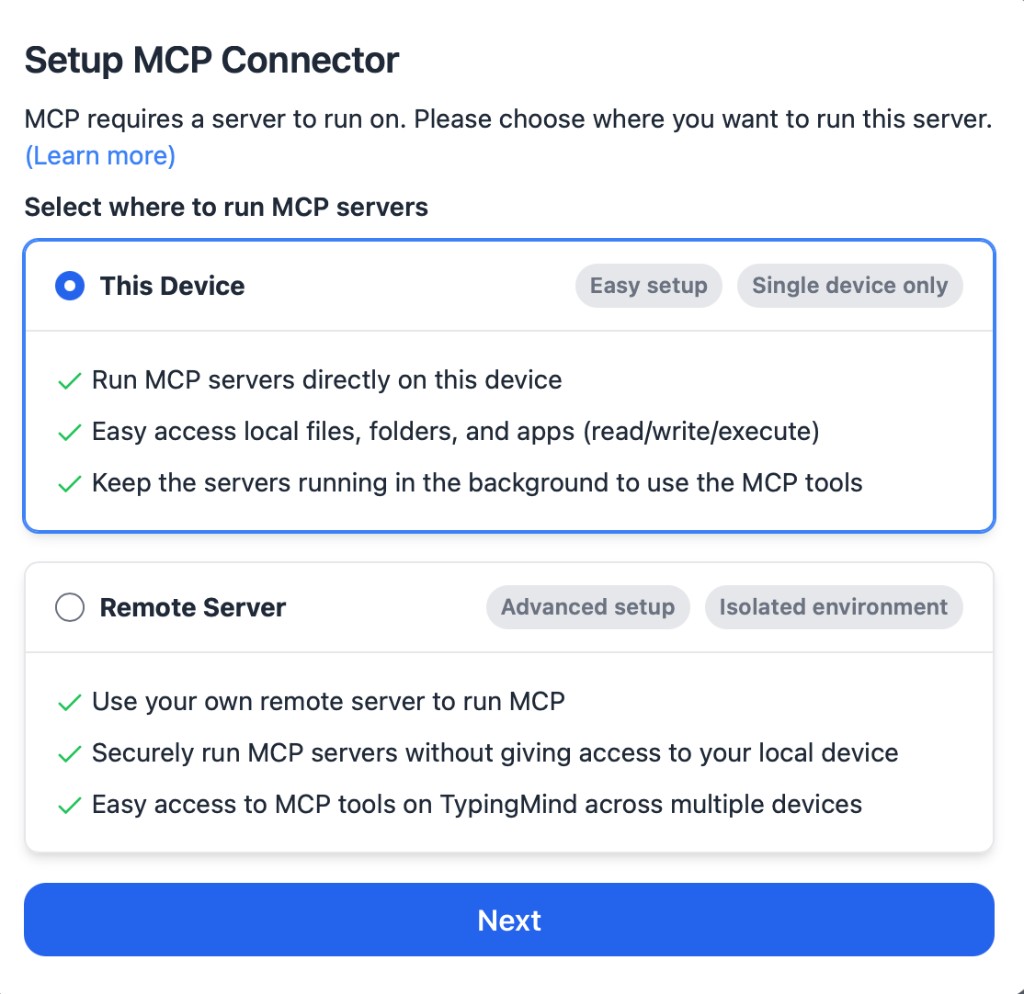
  5. Click Setup Connector and choose This Device.
TypingMind MCP connector setup screen with This Device selected
2

Run the connector command

Choose This Device, copy the command from TypingMind, and run it in Terminal. Keep the process running while you use MCP.

  1. Copy the setup command shown by TypingMind.
  2. Open Terminal on macOS or Windows Terminal on Windows.
  3. Paste and run the command.
  4. Approve the package install if Terminal asks you to proceed.
  5. Keep the Terminal window running while using MCP tools.
3

Add Reddit MCP Server as a server

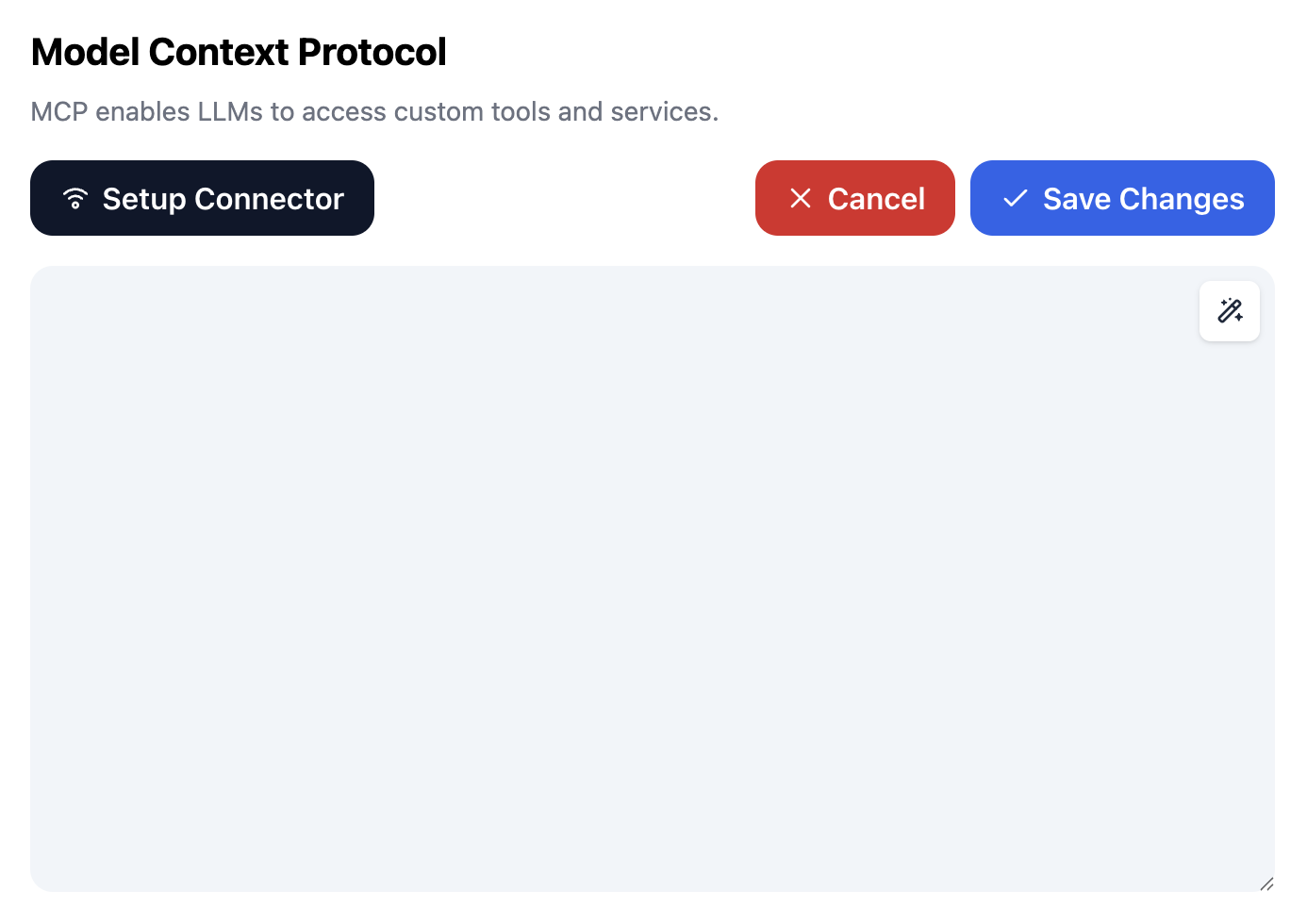
When the connector status is Ready, click Edit Servers and paste the MCP server configuration.

  1. Wait until the connector status shows Ready.
  2. Click Edit Servers.
  3. Paste the Reddit MCP Server MCP server configuration.
  4. Save the server list.
  5. Refresh if you want to confirm the connector is still ready.
TypingMind MCP settings showing active server and Edit Servers button
{
  "mcpServers": {
    "eliasbiondo-reddit-mcp-server": {
      "command": "npx",
      "args": [
        "-y",
        "<mcp-server-package>"
      ]
    }
  }
}
4

Use it across models

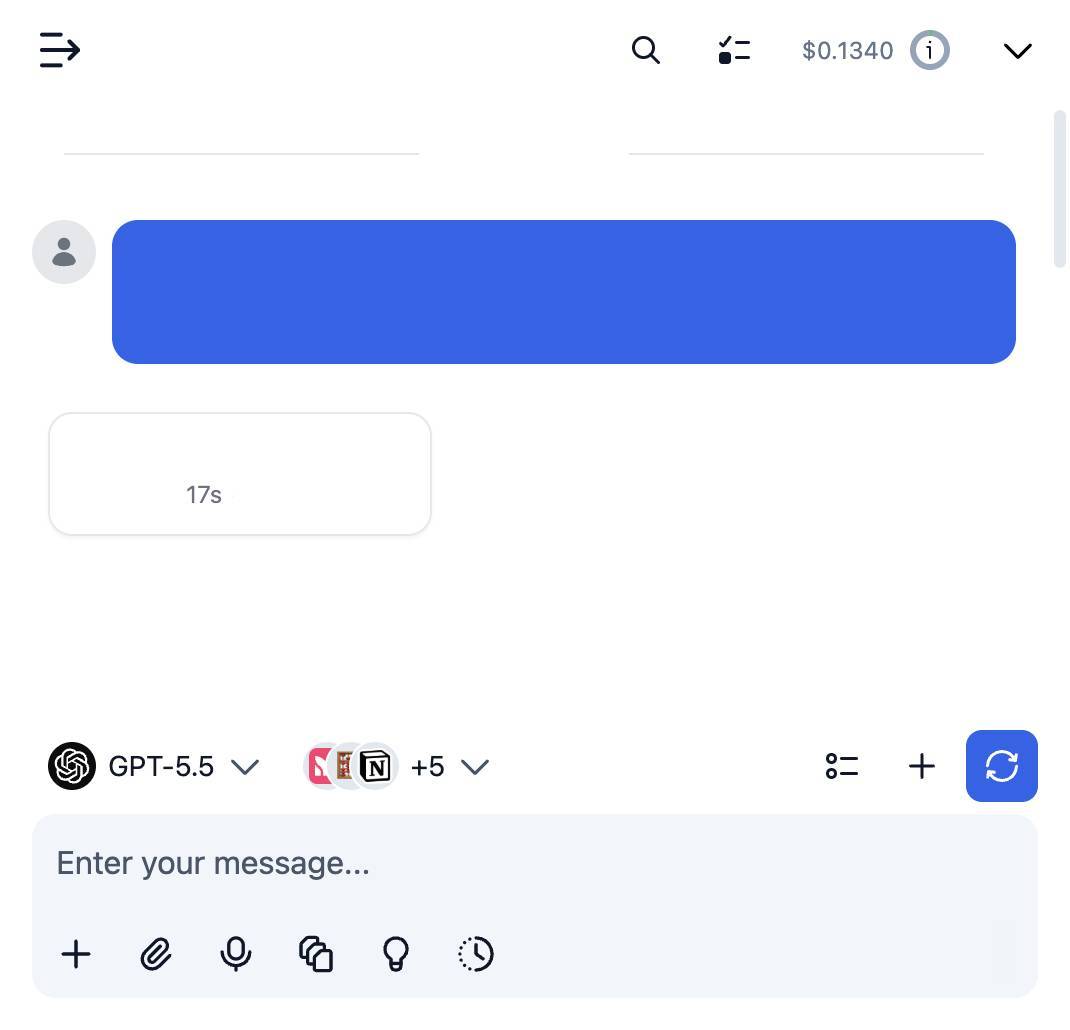
Save the server list, open Plugins, enable the Reddit MCP Server MCP tools, then select any supported AI model in TypingMind and use the tools in chat or assign them to an AI agent.

  1. Open the Plugins page in TypingMind.
  2. Enable the Reddit MCP Server MCP tools.
  3. Start a chat and choose the AI model you want to use.
  4. Use the MCP tools in chat or assign them to an AI agent.
  5. Switch to another AI model whenever needed without reconnecting MCP.
TypingMind chat using enabled MCP tools with a selected AI model
Can you use Reddit MCP Server to help me with this task?
Reddit MCP Server
Sure. I read it.
Here is what I found using Reddit MCP Server.

Option 2: Add an MCP server URL

Use this when Reddit MCP Server is already hosted remotely or your team wants one shared connector that multiple users can access.

1

Open MCP connectors

In TypingMind, go to Plugins, open MCP connectors, then choose Add URL.

  1. Open TypingMind in your browser.
  2. Go to Plugins.
  3. Open MCP connectors.
  4. Click Add URL.
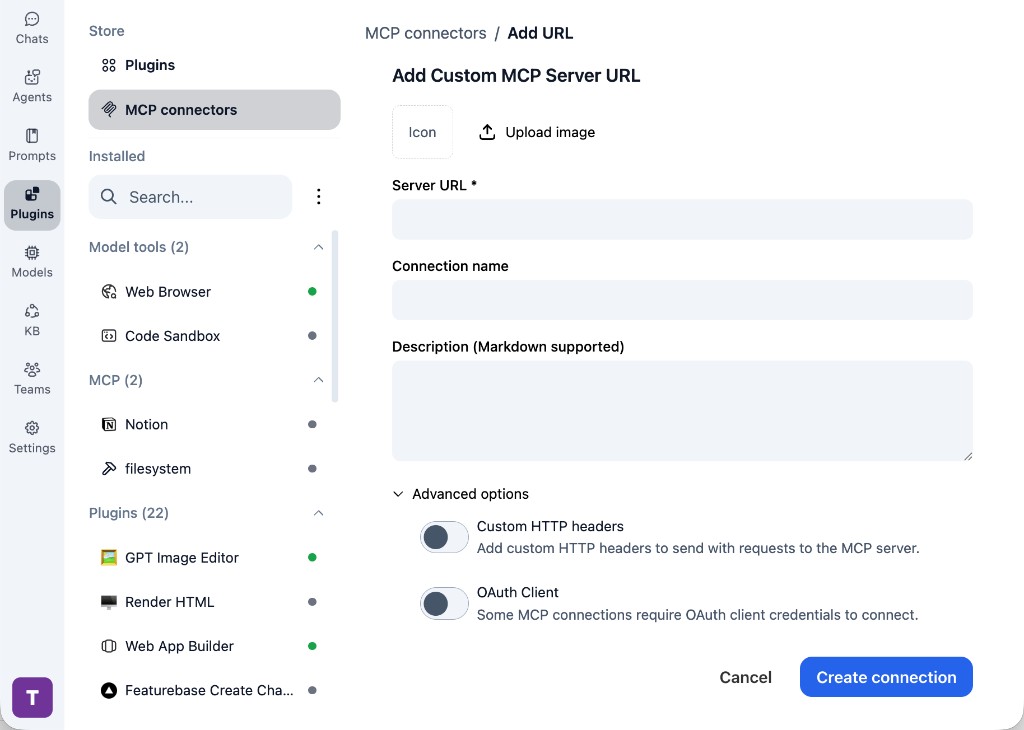
TypingMind Add Custom MCP Server URL form
2

Paste the server URL

Enter the MCP server URL from the provider in the Server URL field. Add a connection name, description, icon, custom HTTP headers, or OAuth client settings if the server requires them.

  1. Paste the MCP server URL from the provider into the Server URL field.
  2. Enter a connection name for Reddit MCP Server.
  3. Add a description and icon if you want it to be easier to identify.
  4. Add custom HTTP headers or OAuth client details if the server requires authentication.
3

Create the connection

Click Create connection, then return to the Plugins list and confirm the new MCP connection is active.

  1. Click Create connection.
  2. Return to the MCP connectors list.
  3. Confirm the Reddit MCP Server connection appears as active.
  4. Refresh the plugin list if the connection does not appear immediately.
4

Switch models without reconnecting

Start a chat with your preferred model, enable the Reddit MCP Server tools from Plugins, and switch to another model whenever needed. The MCP connection stays available to the TypingMind workspace.

  1. Start a new chat in TypingMind.
  2. Select the AI model you want to use.
  3. Enable the Reddit MCP Server tools from Plugins.
  4. Ask the model to use the tool when needed.
  5. Switch to another AI model and reuse the same MCP connection.
TypingMind chat using enabled MCP tools with a selected AI model
Can you use Reddit MCP Server to help me with this task?
Reddit MCP Server
Sure. I read it.
Here is what I found using Reddit MCP Server.

Frequently asked questions

What is the Reddit MCP Server MCP server used for?

Reddit MCP Server is an MCP server that lets compatible AI clients connect to external tools and context. In TypingMind, you can add this MCP server once and make its tools available in your AI workspace.

Can I use Reddit MCP Server MCP with multiple AI models in TypingMind?

Yes. TypingMind connects MCP tools at the workspace level, so you can use Reddit MCP Server with different AI models such as Claude, ChatGPT, Gemini, or other models you have configured in TypingMind without setting up the MCP server separately for each model.

Why use Reddit MCP Server MCP with TypingMind?

TypingMind is one of the best frontends for LLM chat because it brings multiple AI models, prompts, plugins, AI agents, API keys, and MCP tools into one workspace. With Reddit MCP Server connected, you can use its MCP tools across your preferred models while keeping your chat workflow organized in TypingMind.

How do I connect Reddit MCP Server MCP to TypingMind?

Reddit MCP Server can be connected in TypingMind with the local MCP connector or by adding a remote MCP server URL. Use the local connector when the server needs access to files, apps, or private resources on your device, and use a server URL when the MCP server is hosted remotely.

What tools does Reddit MCP Server MCP provide in TypingMind?

Reddit MCP Server exposes MCP capabilities that can be enabled from the TypingMind Plugins page and used in chat or assigned to AI agents.

Do I need to share my API keys with TypingMind to use Reddit MCP Server MCP?

No. TypingMind is local-first and lets you keep your model providers, API keys, prompts, and MCP configuration under your control. If Reddit MCP Server requires authentication, add the required headers, OAuth settings, or local configuration for that MCP server when you create the connection.

Related MCP Servers

View all

Set up your own AI workspace now

Get notified about new features and future giveaways by subscribing to our newsletter šŸ‘‡