Prisma Postgres
CommunityPrisma's provides two MCP servers: a local and a remote one. See below for specific information on each. If you're a developer working on a local machine and want your AI agent to help with your database workflows, use the local MCP server. If you're building an "AI platform" and want to give the ability to manage database to your users, use the remote MCP server.
| Publisher | null |
| Repository | null |
| Language | TypeScript |
| Forks | 0 |
| Stars | 519 |
| Available tools | 0 |
| Transport type | streamable-http |
| Categories | |
| License | MIT |
- Connect tools to AI workflows
Prisma Postgres exposes MCP capabilities that can be used by compatible AI clients and agents.
- 0 available tools
Browse the callable actions below, including names and descriptions when provided by the server.
- Ready-to-copy setup
Use the installation snippets to configure this server in your preferred MCP client.
- Open source signals
519 stars and 0 forks from the linked repository.
Installation
{
  "mcpServers": {
    "prisma-postgres": {
      "url": "https://mcp.prisma.io/mcp"
    }
  }
}
Use Prisma Postgres MCP with multiple AI models
TypingMind connects MCP tools at the workspace level, so once Prisma Postgres is connected, you can use it with different AI models in TypingMind instead of setting it up separately for each model. This MCP connects through a hosted MCP server URL in TypingMind.
Add an MCP server URL
Use this when Prisma Postgres is already hosted remotely or your team wants one shared connector that multiple users can access.
Open MCP connectors
In TypingMind, go to Plugins, open MCP connectors, then choose Add URL.
- Open TypingMind in your browser.
- Go to Plugins.
- Open MCP connectors.
- Click Add URL.
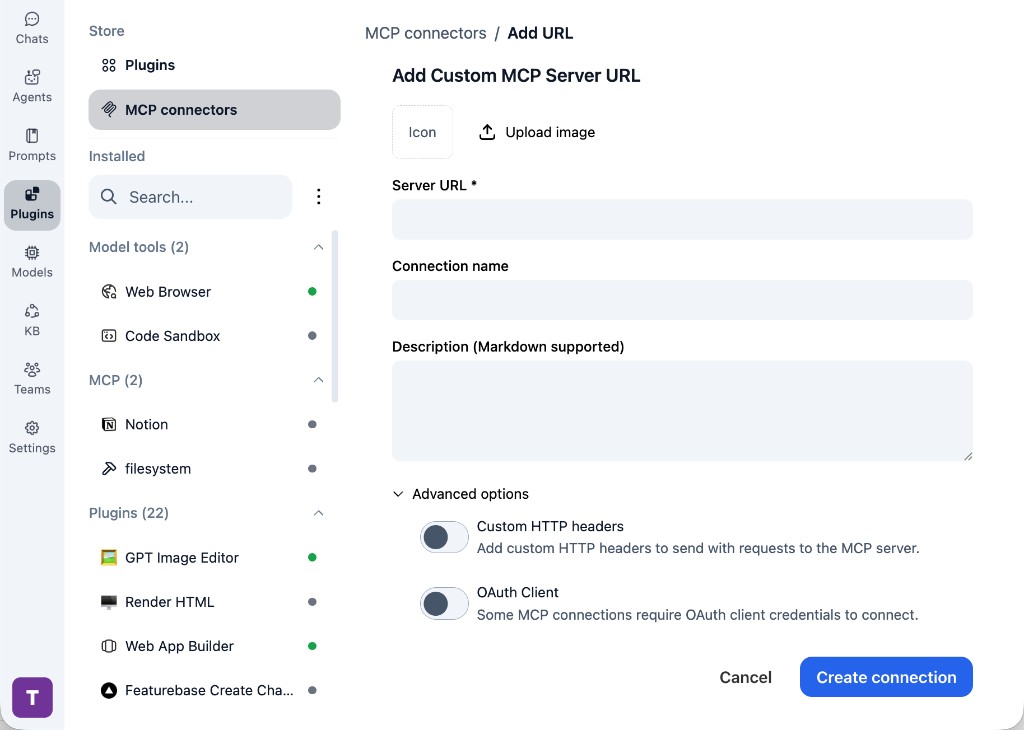
Paste the server URL
Enter https://mcp.prisma.io/mcp in the Server URL field. Add a connection name, description, icon, custom HTTP headers, or OAuth client settings if the server requires them.
- Paste https://mcp.prisma.io/mcp into the Server URL field.
- Enter a connection name for Prisma Postgres.
- Add a description and icon if you want it to be easier to identify.
- Add custom HTTP headers or OAuth client details if the server requires authentication.
Create the connection
Click Create connection, then return to the Plugins list and confirm the new MCP connection is active.
- Click Create connection.
- Return to the MCP connectors list.
- Confirm the Prisma Postgres connection appears as active.
- Refresh the plugin list if the connection does not appear immediately.
Switch models without reconnecting
Start a chat with your preferred model, enable the Prisma Postgres tools from Plugins, and switch to another model whenever needed. The MCP connection stays available to the TypingMind workspace.
- Start a new chat in TypingMind.
- Select the AI model you want to use.
- Enable the Prisma Postgres tools from Plugins.
- Ask the model to use the tool when needed.
- Switch to another AI model and reuse the same MCP connection.

Here is what I found using Prisma Postgres.
Frequently asked questions
What is the Prisma Postgres MCP server used for?
Prisma Postgres is an MCP server that lets compatible AI clients connect to external tools and context. In TypingMind, you can add this MCP server once and make its tools available in your AI workspace.
Can I use Prisma Postgres MCP with multiple AI models in TypingMind?
Yes. TypingMind connects MCP tools at the workspace level, so you can use Prisma Postgres with different AI models such as Claude, ChatGPT, Gemini, or other models you have configured in TypingMind without setting up the MCP server separately for each model.
Why use Prisma Postgres MCP with TypingMind?
TypingMind is one of the best frontends for LLM chat because it brings multiple AI models, prompts, plugins, AI agents, API keys, and MCP tools into one workspace. With Prisma Postgres connected, you can use its MCP tools across your preferred models while keeping your chat workflow organized in TypingMind.
How do I connect Prisma Postgres MCP to TypingMind?
Prisma Postgres can be connected in TypingMind by adding its hosted MCP server URL. This is useful when you want a remote MCP connection that is available from your TypingMind workspace.
What tools does Prisma Postgres MCP provide in TypingMind?
Prisma Postgres exposes MCP capabilities that can be enabled from the TypingMind Plugins page and used in chat or assigned to AI agents.
Do I need to share my API keys with TypingMind to use Prisma Postgres MCP?
No. TypingMind is local-first and lets you keep your model providers, API keys, prompts, and MCP configuration under your control. If Prisma Postgres requires authentication, add the required headers, OAuth settings, or local configuration for that MCP server when you create the connection.
Related MCP Servers
View all
Google GenAI Toolbox
MCP Toolbox for Databases is an open source MCP server for databases.

DBHub (Universal Database Gateway)
Zero-dependency, token-efficient database MCP server for Postgres, MySQL, SQL Server, MariaDB, SQLite.

Postgres MCP Pro
Postgres MCP Pro provides configurable read/write access and performance analysis for you and your AI agents.

Supabase MCP Server
Connect Supabase to your AI assistants
